I’m working on a project which involves an i2c communication between a master and some slaves. The master device is using an LPC2148 microcontroller running at 60 MHz and the slave ones have a low-cost PIC microcontroller. Each slave device runs a different task and some of them are more CPU-intensive than others.

The nature of this i2c communication is essentially some kind of Query-Response protocol in which the master requests some processing from the slaves and they send back the results to the master. The processing time varies from one slave to another and sometimes it will be higher than the master ‘clock’ time.

This leaded me to find a way to stop the master until the slave is done with its processing: clock stretching. The slave will pull the clock line down, causing the master to stop until it’s done with its task and then releases the SCL line (going high due to the required pull-ups of the i2c signals).

As I was writing the slave C code using PICC compiler, there was no way to implement this technique directly from the supplied i2c functions therefore I’d got to implement it by myself:


#byte PIC_SSPCON=0x14
#bit CKP = PIC_SSPCON.4 // 1 = Release Clock, 0 = Holds Clock Low (clock stretch)
#define SCL_STRECTHING_ON bit_clear(PIC_SSPCON, 4); // CLK STRETCHING
#define SCL_STRETCHING_OFF bit_set(PIC_SSPCON, 4); // release clock to master


ISR:

if(state >= 0x80) //Master is requesting data
{
SCL_STRECTHING_ON
delay_us(400); // Simulate processing delay
i2c_write(buffer[cnt++]);
SCL_STRETCHING_OFF
}

Please, note that the values defined for SSPCON register / bits are for PIC16F677 microcontroller and it might differ from the one you’re using.

Below you can see an screenshot of the Logic Analyzer output I used for testing purposes. You can see the 400 us delay between two consecutive readings from the master while the SCL line remains low.

I2C Protocol - Clock Stretching

All in all, it’s a well known technique described in the protocol specification but as far as I’m concerned by googling a little bit, its usage is not very extended and there are not so much source code out there addressing this issue.

Warm regards,

Daniel

Finally we wrote some tiny documentation about RL-AMC-50NP04 along with a reference C source code to interface it from the LPC2138-01 board.

RL-AMC-50NP04 Quick Reference Guide

RL-AMC-50NP04 Reference Source Code

Enjoy it,

Daniel

When I had to write some formulas in the blog I used to render them from LaTeX to images using some websites such as Online LaTeX Equation Editor. It has the disadvantage that you’ve got to write the equation, render it, save it to your harddisk and then upload to the WordPress file manager. Now, thanks to an interesting plugin written by Steve Mayer you can embed its usage into WordPress just by typing the LaTeX commands between special tags.

\sum_{n=0}^{\infty}\frac{(-\phi^2)^n}{(2n)!}

It uses MimeTeX  which is an standalone program that directly renders LaTeX expressions into images without using the entire TeX package or its fonts. Thus, it’s a simple, lightweight and elegant solution ready to be used in your websites or blogs.

D.

Golden Cup


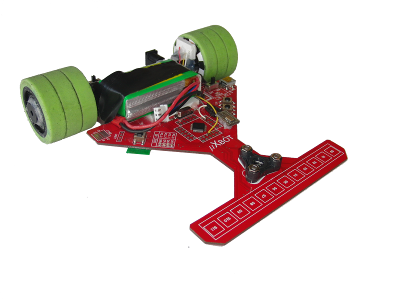
Last week, we attended to Campus Party in Valencia. At CampusBot area, some robots competitions took place along the week and we had our line followers ready to fight. The results were pretty good: In the qualifying session on Tuesday we got the fastest two times with our two robots and in the finals on Saturday (being held at Ciudad de Las Artes y Las Ciencias) we managed to win the two first places in the podium !

 Here you can see some videos:


Slayer S8 during our first training rounds:

Slayer S8 from a speed view like if it was an F1 camera :-) running at more than 2,5m/s:

Slayer S8 at Semifinals Round against the later 4th classified:

It was a great week and the robots performed pretty well in such a speedy track. I might upload some more media when I finish collecting all the videos and pictures from the event.

My colleague Alberto Calvo and me are already thinking in our next robot which will have some kind of inertial control based on gyroscopes and accelerometers. I’ll keep the blog up to date.

Special thanks to our teammates and friends Luis-Ángel Gónzalez and Daniel de la Torre who drove more than 800 km by car just to watch the final rounds and support us (well and to have a nice Paella in front of the beach). Thanks guys!

More to come,
Daniel

RL-AMC-01

RL-AMC-50NP04 is an advanced Full H-Bridge board based on high performance MOSFETs capable of driving two high power DC motors. It has been designed to achieve a great efficiency and usage simplicity since just 3 pins are needed to control a motor. Based on the large experience working with Robotics we designed this board keeping in mind some important factors such as power dissipation, heating, simplicity and functionalities like braking, bi-directional control of the motors and a wide range of PWM frequencies from 3.3v or 5V microcontrollers.

Its small size makes this H-Bridge MOSFET board perfect to fit in your Robotics designs: 50 x 42 mm (1,97 x 1,65 inch) .

Main features:

  • 2 high power DC Motors control.
  • PWM frequencies up to 20 KHz for speed control.
  • Bi-directional control.
  • Braking function (coast and brake functions).
  • 3.3v / 5V logic capable.
  • Up to 8A continuous operation with very low internal resistance (0.038 ohms).
  • Up to 35A pulsed current.
  • Wide range of power supply voltage ranging from 3 to 40V.
  • Current sense (just 6mV per amp to minimize the total voltage drop when high currents are demanded).
  • Just 3 pins needed from your microcontroller to drive each motor.
  • Two LEDs per leg indicating the rotating direction of each motor.
  • Easy interface connections through an standard 10-pin male header.
  • Three two-pin terminal blocks for connecting the motors and their power supply.
  • Logic power supply ranging from 2V to 6V.

Here you can see the output of the board when driving one of its LEDs with a voltage supply of 8,4V. The voltage drop accross the LED is about 1 Volt and in this graphic you can appreciate that the rising and falling times are extremely small since it has been designed for operating in high-speed environments with the maximum efficiency. This minimizes the transition time of the MOSFETs (time when their internal Rds resistance is higher) and, thus, also minimizes the total power dissipation due to switching power losses.

RL-AMC Output 7.2KHz

If you are interested in this board or have any further questions / suggestions don’t hesitate  to contact me.

Documentation:

More to come,

Daniel

Today I’ve been trying to debug an application remotely with IDA Pro and I found the following error when launched the program:

Copying the debugger server to PocketPC ...
Could not invoke debugger server at PocketPC: Access denied.

Thus, surfing the web I found a workaround regarding the security polices of the handheld. Just by changing some values in the registry you will be able to copy/invoke the debugger remotely.

Key: 'HKLM\Security\Policies\Policies001001'  from  value DWORD:2 to value DWORD:1

Key: 'HKLM\Security\Policies\Policies00100b' change  to value DWORD:1

And now you’ll be able to debug your programs remotely :-)

Cheers,

Daniel

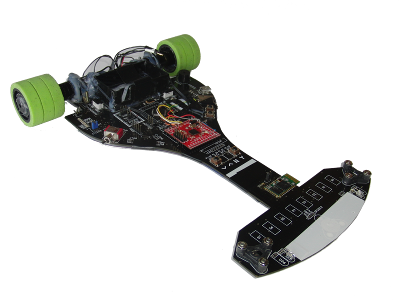
DIEZ_fDIEZ is a line following robot which has been designed for several national contests being held in Spain throughout the year.

The goal for this kind of robots is to follow a black line over a white floor as quick as possible. The track has also branches which should be taken properly by the robot. It should be able to read some little strips located at both sides of the track which shows the robot the right direction to take in the next branch. In almost all the competitions, taking the wrong side of the branch makes the robot to travel a longer distance and, sometimes involves a 10-15 seconds penalty over the total time achieved.

The tracks usually have many turns and 90 degrees corners so DIEZ has been designed to be lightweight and small in order to achieve these movements as fast as possible with the less moment of inertia.

Prior to the final assembly of the robot, a CAD design was performed when all the decisions about the design were made. Here you can see a GIF showing the first steps from CAD to assembly phases:

cad_to_assembly

Sensors, Control Board and Algorithm:

The main board is an LPC2138-01 based on a 32-bit LPC2138 microcontroller at 60 MIPS.

The sensor board’s got 10 tiny SMD reflective sensors which are read by the microcontroller with one of its A/D converters. Due to the different light conditions in the contests and sometimes, the camera flashes and the reflection ratios of the track surfaces, DIEZ performs an ambient light cancelation by reading the sensors with the IR led switched off. Besides, the IR led light is modulated to achieve an even more reliable reading from the sensors.

The control algorithm used by DIEZ is a PD controller. The input of the controller is the position of the center of the line, which is estimated using an interpolation function of the values read from the sensor board. A C# application’s Control Centerbeen developed to test and debug the algorithm before coding it into the microcontroller. Here you can see an screenshot of this program which allowed us to monitor in Real Time what the robot saw in every moment. Also, thanks to the SD socket of the LPC2138-01 board, the robot was recording all the data and parameters on it for a later study with this program. This was specially useful to detect some of the problems of the algorithm because we had all the telemetry. This recording was quite feasible using the Embedded File System Library since the robot just had to create a new telemetry file on a FAT32 filesystem which was perefctly readable from any computer.

Weight and Dimensions

The total weight of DIEZ is less than 400 gr (about 14 oz) with two Li-Po batteries (1450 mAh).

Its size is 15 x 15 x 7 cm (5.9 x 5.9 x 2.7 inches).

Video

Here you can see a video with DIEZ in action. Those ‘ugly’ pink thingies on its wheels are stripes of a water balloon which we had handy to increase the adherence and, thus, the maximum speed to reach a corner. Due to its light weight, these rubbers were necessary to avoid the skids.

That’s all :-)

Again, hope you liked the article.
Regards,
Daniel Alvarez

In this article I will explain how I solved lagalopex crackme from crackmes.de.You can download my keygen and its source code from here.

These are the rules and information:

Get a working keygen.
Allowed are only GPLed-tools.
Patching/Hijacking prohibited ;)

Difficulty: 3 - Getting harder
Platform: Unix/linux etc.
Language: C/C++

Ok, first let’s execute it to see what’s going on and if we are prompted for something:

daniel@gargamel:~/crackme/lagalopex$ ./cm3
Your name: daniel
Hello daniel, lets see what you've done so far...
daniel@gargamel:~/crackme/lagalopex$

Ok, we have done nothing so far so we cannot expect anything else. If we test the binary with the ‘file’ command we will see that it is not stripped so we might get some useful information from its ‘nm’ and ’strings’ output:

daniel@gargamel:~/crackme/lagalopex$ nm cm3
0804bf58 T gcd1
0804bf92 T gcd2
0804bfcc T gcd3
0804bea6 T gcd_
U getline@@GLIBC_2.0
U getppid@@GLIBC_2.0
U getpwuid@@GLIBC_2.0
U getsid@@GLIBC_2.0
U getuid@@GLIBC_2.0
0804c007 T gs
0804c0ee T main
U memcpy@@GLIBC_2.0
U open@@GLIBC_2.0
U printf@@GLIBC_2.0
U pthread_attr_destroy@@GLIBC_2.0
U pthread_attr_init@@GLIBC_2.1
U pthread_attr_setdetachstate@@GLIBC_2.0
U pthread_create@@GLIBC_2.1
U pthread_exit@@GLIBC_2.0
U pthread_join@@GLIBC_2.0
U puts@@GLIBC_2.0
0804c03d T rad
0804bf04 T rad_
0804c086 T calc
0804bc34 t rmd160_final
0804be4a T rmd160_hash_buffer
080488b4 t rmd160_init
080488fe t rmd160_trans
0804bb15 t rmd160_write

daniel@gargamel:~/crackme/lagalopex$ strings cm3
[...]
Get a name first...
Hello %s, lets see what you've done so far...
%s/.key_%s
%s/.key_%s_%i
Nice, you got it!

I didn’t list all of them but the interesting ones. We can see that there are threads involved which will probably make our reversing job harder. Also, we can see the presumably goodboy string: ‘Nice, you got it’ and some print format strings. I will not go much in detail with the reversing process and I will just show a flow diagram:

flowchart-2

As you can see in the flow diagram, it first computes a hash value of 20 bytes (RIPEMD-160) and then iterates over it through some calculations performed by 6 threads (hence, a total of 120 threads are created). I will describe briefly what these threads do:

  • gcd1
0804bf58 gcd1:
 804bf58:       55                      push   ebp
 804bf59:       89 e5                   mov    ebp,esp
 804bf5b:       83 ec 08                sub    esp,0×8
 804bf5e:       8b 45 08                mov    eax,DWORD PTR [ebp+8]
 804bf61:       8b 50 04                mov    edx,DWORD PTR [eax+4]
 804bf64:       8b 45 08                mov    eax,DWORD PTR [ebp+8]
 804bf67:       8b 00                   mov    eax,DWORD PTR [eax]
 804bf69:       89 54 24 04             mov    DWORD PTR [esp+4],edx
 804bf6d:       89 04 24                mov    DWORD PTR [esp],eax
 804bf70:       e8 31 ff ff ff          call   gcd_
 804bf75:       83 f8 01                cmp    eax,0×1
 804bf78:       75 0c                   jne    804bf86
 804bf7a:       c7 04 24 01 00 00 00    mov    DWORD PTR [esp],0×1
 804bf81:       e8 5e c7 ff ff          call   pthread_exit
 804bf86:       c7 04 24 00 00 00 00    mov    DWORD PTR [esp],0×0
 804bf8d:       e8 52 c7 ff ff          call   pthread_exit

In this code you can see a pointer to a vector holding Xi, Yi and (Xi+Yi). So, as you can see this thread is computing the greatest common divisor of Xi and Yi. If this value is 1 (ie, they are coprimes), then the thread will return 1. Otherwise, the returned value will be zero.

  • gcd2
0804bf92 gcd2:
 804bf92:       55                      push   ebp
 804bf93:       89 e5                   mov    ebp,esp
 804bf95:       83 ec 08                sub    esp,0×8
 804bf98:       8b 45 08                mov    eax,DWORD PTR [ebp+8]
 804bf9b:       8b 50 08                mov    edx,DWORD PTR [eax+8]
 804bf9e:       8b 45 08                mov    eax,DWORD PTR [ebp+8]
 804bfa1:       8b 00                   mov    eax,DWORD PTR [eax]
 804bfa3:       89 54 24 04             mov    DWORD PTR [esp+4],edx
 804bfa7:       89 04 24                mov    DWORD PTR [esp],eax
 804bfaa:       e8 f7 fe ff ff          call   gcd_
 804bfaf:       83 f8 01                cmp    eax,0×1
 804bfb2:       75 0c                   jne    804bfc0
 804bfb4:       c7 04 24 01 00 00 00    mov    DWORD PTR [esp],0×1
 804bfbb:       e8 24 c7 ff ff          call   pthread_exit
 804bfc0:       c7 04 24 00 00 00 00    mov    DWORD PTR [esp],0×0
 804bfc7:       e8 18 c7 ff ff          call   pthread_exit

This thread will compute gcd(Xi,Xi+Yi), ie, the first and the third elements of our vector. If again they are coprimes, the thread will return 1; zero otherwise.

  • gcd3
0804bfcc gcd3:
 804bfcc:       55                      push   ebp
 804bfcd:       89 e5                   mov    ebp,esp
 804bfcf:       83 ec 08                sub    esp,0×8
 804bfd2:       8b 45 08                mov    eax,DWORD PTR [ebp+8]
 804bfd5:       8b 50 08                mov    edx,DWORD PTR [eax+8]
 804bfd8:       8b 45 08                mov    eax,DWORD PTR [ebp+8]
 804bfdb:       8b 40 04                mov    eax,DWORD PTR [eax+4]
 804bfde:       89 54 24 04             mov    DWORD PTR [esp+4],edx
 804bfe2:       89 04 24                mov    DWORD PTR [esp],eax
 804bfe5:       e8 bc fe ff ff          call   gcd_
 804bfea:       83 f8 01                cmp    eax,0×1
 804bfed:       75 0c                   jne    804bffb
 804bfef:       c7 04 24 01 00 00 00    mov    DWORD PTR [esp],0×1
 804bff6:       e8 e9 c6 ff ff          call   pthread_exit
 804bffb:       c7 04 24 00 00 00 00    mov    DWORD PTR [esp],0×0
 804c002:       e8 dd c6 ff ff          call   pthread_exit

This thread will compute gcd(Yi,Xi+Yi), ie, the second and the third elements of our vector. If again they are coprimes, the thread will return 1; zero otherwise.

  • gs
0804c007 gs:
 804c007:       55                      push   ebp
 804c008:       89 e5                   mov    ebp,esp
 804c00a:       83 ec 08                sub    esp,0×8
 804c00d:       8b 45 08                mov    eax,DWORD PTR [ebp+8]
 804c010:       8b 00                   mov    eax,DWORD PTR [eax]
 804c012:       85 c0                   test   eax,eax
 804c014:       7e 1b                   jle    804c031
 804c016:       8b 45 08                mov    eax,DWORD PTR [ebp+8]
 804c019:       8b 50 04                mov    edx,DWORD PTR [eax+4]
 804c01c:       8b 45 08                mov    eax,DWORD PTR [ebp+8]
 804c01f:       8b 00                   mov    eax,DWORD PTR [eax]
 804c021:       39 c2                   cmp    edx,eax
 804c023:       7e 0c                   jle    804c031
 804c025:       c7 04 24 01 00 00 00    mov    DWORD PTR [esp],0×1
 804c02c:       e8 b3 c6 ff ff          call   pthread_exit
 804c031:       c7 04 24 00 00 00 00    mov    DWORD PTR [esp],0×0
 804c038:       e8 a7 c6 ff ff          call   pthread_exit

This thread will return 1 when Xi > Yi and zero otherwise.

  • rad
0804c03d rad:
 804c03d:       55                      push   ebp
 804c03e:       89 e5                   mov    ebp,esp
 804c040:       83 ec 08                sub    esp,0×8
 804c043:       8b 45 08                mov    eax,DWORD PTR [ebp+8]
 804c046:       8b 10                   mov    edx,DWORD PTR [eax]
 804c048:       8b 45 08                mov    eax,DWORD PTR [ebp+8]
 804c04b:       8b 40 04                mov    eax,DWORD PTR [eax+4]
 804c04e:       0f af d0                imul   edx,eax
 804c051:       8b 45 08                mov    eax,DWORD PTR [ebp+8]
 804c054:       8b 40 08                mov    eax,DWORD PTR [eax+8]
 804c057:       0f af c2                imul   eax,edx
 804c05a:       89 04 24                mov    DWORD PTR [esp],eax
 804c05d:       e8 a2 fe ff ff          call   rad_
 804c062:       89 c2                   mov    edx,eax
 804c064:       8b 45 08                mov    eax,DWORD PTR [ebp+8]
 804c067:       8b 40 08                mov    eax,DWORD PTR [eax+8]
 804c06a:       39 c2                   cmp    edx,eax
 804c06c:       7d 0c                   jge    804c07a
 804c06e:       c7 04 24 01 00 00 00    mov    DWORD PTR [esp],0×1
 804c075:       e8 6a c6 ff ff          call   pthread_exit
 804c07a:       c7 04 24 00 00 00 00    mov    DWORD PTR [esp],0×0
 804c081:       e8 5e c6 ff ff          call   pthread_exit

This thread will calculate the radical of (Xi*Yi*(Xi+Yi)) and if it’s less than (Xi+Yi) it will return 1.

  • calc
0804c086 calc:
 804c086:       push   ebp
 804c087:       mov    ebp,esp
 804c089:       push   ebx
 804c08a:       sub    esp,0×14
 804c08d:       mov    eax,DWORD PTR [ebp+8]
 804c090:       mov    ecx,DWORD PTR [eax]
 804c092:       mov    DWORD PTR [ebp-8],0×6bca1af3
 804c099:       mov    eax,DWORD PTR [ebp-8]
 804c09c:       imul   ecx
 804c09e:       sar    edx,0×3
 804c0a1:       mov    eax,ecx
 804c0a3:       sar    eax,0×1f
 804c0a6:       mov    ebx,edx
 804c0a8:       sub    ebx,eax
 804c0aa:       mov    eax,DWORD PTR [ebp+8]
 804c0ad:       mov    ecx,DWORD PTR [eax+4]
 804c0b0:       mov    DWORD PTR [ebp-8],0xae4c415d
 804c0b7:       mov    eax,DWORD PTR [ebp-8]
 804c0ba:       imul   ecx
 804c0bc:       lea    eax,[edx+ecx]
 804c0bf:       mov    edx,eax
 804c0c1:       sar    edx,0×6
 804c0c4:       mov    eax,ecx
 804c0c6:       sar    eax,0×1f
 804c0c9:       mov    ecx,edx
 804c0cb:       sub    ecx,eax
 804c0cd:       mov    eax,ecx
 804c0cf:       lea    edx,[ebx+eax]
 804c0d2:       mov    eax,edx
 804c0d4:       sar    eax,0×1f
 804c0d7:       mov    ecx,eax
 804c0d9:       shr    ecx,0×18
 804c0dc:       lea    eax,[edx+ecx]
 804c0df:       and    eax,0xff
 804c0e4:       sub    eax,ecx
 804c0e6:       mov    DWORD PTR [esp],eax
 804c0e9:       call   pthread_exit

Now we have to find out what this function does since, at first glance, it’s not as simple as the other ones.
It makes some operations with the first and second values of our vector, ie, Xi and Yi. And right before the call to pthread_exit instruction we can see that the returned value is AND’ed with 0xFF so the output of this function will be between 0×00 and 0xFF. I will not dig too much into all the shifts and the multiplications details; instead I will print its equivalent C source.

int calc(int *v)
{
        int x, y;
        x=v[0];
        y=v[1];

        return (   ((int)(x/19) + (int)(y/94)) % 256  );
}

Now let’s have a look at the way the binary is collecting all this data and how it is processed:

 804c677:       call   80486c4
 804c67c:       test   eax,eax
 804c67e:       je     804c68f
 804c680:       mov    DWORD PTR [ebp-0×2510],0×3
 804c687:
 804c68a:       jmp    804c869
 804c68f:       mov    eax,DWORD PTR [ebp-0×360]
 804c695:       add    DWORD PTR [ebp-20],eax

This is the code which actually collects the data returned by the ‘gcd1 threads’. Essentially it does the same than the ‘gcd2′, ‘gcd3′, ‘gs’, and ‘rad’ threads so I will just comment this one.

After the call to pthread_join, the returned value is at [ebp-0×360] address. If it is not zero (ie, if it is 1), the value is added to the value at [ebp-0×360] which is the counter shown in the flow chart.

Let’s now analyze the ‘pthread_join’ to the ‘calc’ threads:

 804c7f8:       call   pthread_join
 804c7fd:       test   eax,eax
 804c7ff:       je     804c80d
 804c801:       mov    DWORD PTR [ebp-0×2510],0×3
 804c808:
 804c80b:       jmp    804c869
 804c80d:       mov    eax,DWORD PTR [ebp-24]
 804c810:       movzx  eax,BYTE PTR [ebp+eax-0×24fc]
 804c817:
 804c818:       movsx  eax,al
 804c81b:       movzx  edx,al
 804c81e:       mov    eax,DWORD PTR [ebp-0×360]
 804c824:       cmp    edx,eax
 804c826:       je     804c834
 804c828:       mov    DWORD PTR [ebp-0×2510],0×5
 804c82f:
 804c832:       jmp    804c869
 804c869:       mov    eax,DWORD PTR [ebp-0×2510]
 804c86f:       add    esp,0×252c
 804c875:       pop    ecx
 804c876:       pop    ebx
 804c877:       pop    edi
 804c878:       leave
 804c879:       lea    esp,[ecx-4]
 804c87c:       ret

This code gets the value returned from the ‘calc’ thread and compares it to the H[i] which holds the i-th hash value. If they don’t match, the program will exit with code 5. Otherwise, it will continue picking up the values returned by the threads. So for the sake of writing the keygen we now know that the (Xi,Yi) values read from the file must satisfy this constraint. If not, the program will just exit without printing out the goodboy message.

After all the exit values are collected and processed we will find the following code:

 804c841:       8b 5d ec                mov    ebx,DWORD PTR [ebp-20]
 804c844:       83 eb 64                sub    ebx,0×64
 804c847:       e8 78 bf ff ff          call   rand
 804c84c:       0f af c3                imul   eax,ebx
 804c84f:       85 c0                   test   eax,eax
 804c851:       75 0c                   jne    804c85f
 804c853:       c7 04 24 b4 c9 04 08    mov    DWORD PTR [esp],0×804c9b4
 804c85a:       e8 55 bf ff ff          call   puts

The ‘result’ value is loaded into ebx, then 0×64 is substracted from it and multiplied by a random value.
If the multiplication returns zero, the goodboy string is moved onto the stack and printed out through puts function:

if( (counter-0×64) * rand()  ==  0)
   puts("Nice, you got it!");

The way to go is making ‘counter’ to be 0×64. In every iteration, counter is incremented by 5 if the conditions are satisfied; as there are 20 iterations, counter will be 100 (0×64) if (Xi,Yi) pairs are correctly chosen. And this is what our keygen should do.

Putting it all together:

eq-forall

eq-calc

eq-rad

eq-constraints

To get a working keygen, we must implement a sort of intelligent brute-force keeping in mind all the constraints listed above.

  • ABC Conjecture

This conjecture was first put forward in 1980 by Joseph Oesterle of the University of Paris and David Masser of the Mathematics Institute of the University of Basel in Switzerland, which is now considered one of the most important unsolved problems in number theory. This conjecture deals with numbers that have no common factors. For example, if A=3 and B=7 then we’ll have C=10. These 3 numbers are relative primes but rad(A*B*C) > C. Occasionally this is not always true; for instance, if A=1 and B=8, then C=9, rad(A*B*C)=1*2*3=6 < 9.

From here we can read:

If rad(a*b*c) can be less than c, just how much less? Can we find an example where rad(abc) is so much smaller that the square of rad(abc) is also less than c? No one knows of such a triple, but there are some examples where [rad(abc)]α < c for some exponent α greater than 1 though less than 2. Take the triple {2, 6436341, 6436343}. Here b is equal to 310 × 109 and c is equal to 235, and so rad(abc) = 2 × 3 × 23 × 109 = 15042. And 15042α < 6436343 for any α < 1.6299.

In 1985 Joseph Oesterlé of the University of Paris and David W. Masser of the University of Basel conjectured that there are only finitely many such exceptional triples. Given a positive number ε that can be made arbitrarily small, [rad(abc)]1 + ε can be less than c only in a finite number of cases (which will depend on ε). That’s the abc conjecture.

First of all we should try only the (Xi,Yi) pairs so that calc(Xi,Yi) = H(i); to achieve this we need a way to solve that equation:

int solve_calc(int x, int k)
{
        int d = k - (int)(x/19);
        return  d*94;
}

We will get the Yi candidates by solving the equation with some Xi and the H[i] value for each iteration. The ’solve_calc’ function will return a valid Yi but it’s not the only one which will satisfy the ‘calc’ condition. Valids Yi will range from the returned value to the returned value+93 and we can add them n*256 (for any positive n) since the calc function performs a modulo 256 operation.

As well, for each Xi value multiple of 19, we will get the same ‘calc’ value for the next 18 ones due to the integer division.

With these in mind we now have to bruteforce the obtained pairs to find the ones who satisfy the co-primality and radical restrictions. The way I will deal with the co-primality restrictions is by computing the GCD with the Extended Euclidean Algorithm. However, the hardest part is computing the radical of the numbers since a factorization is needed.

To speed the factorization process up I will use the Sieve of Eratosthenes to compute a table with all the primes up to a limit.

Please, have a look at the source code of the keygen for a further understanding of the process I have described. In a Pentium 4 3.0 GHz a valid license is generated in less than 1 second but it also depends on the hash value.


daniel@gargamel:~/crackme/lagalopex$ time ./keygen
Username: daniel
Sieve of Eratosthenes Prime Generation...OK
100% completed
Writing license info into /home/daniel/.key_daniel

real 0m1.079s
user 0m0.420s
sys 0m0.030s

As you can see it took about 0.45 seconds to generate the numbers and write the license file. The rest of the time is how much it took me to write my username :-).


daniel@gargamel:~/crackme/lagalopex$ time ./cm3
Your name: daniel
Hello daniel, lets see what you've done so far...
Nice, you got it!

real 0m1.711s
user 0m1.020s
sys 0m0.030s

Voila ! We got a working keygen and it takes less than half the time in the bruteforcing process than the crackme itself in verifying our license.

Notes:

Regarding the string to be hashed I’d like to point out that the final part of it is a number of value: getppid()-getsid(). This number should be zero since the parent PID and the session ID are the same if the program is running from a shell. However if you are debugging the crackme (gdb, strace, ltrace, …) the parent process ID will be the PID of the debugger and this assumption is not true anymore. To debug the program with the data generated by my KeyGen I made a little trick based on LD_PRELOAD so that getppid and getsid always return 0:

int getppid() { return 0; }
int getsid(int pid) { return 0; }

gcc -shared -o fakeids.so fakeids.c
export LD_PRELOAD=$PWD/fakeids.so

daniel@gargamel:~/crackme/lagalopex$ ./testuids
ppid()=0
getsid()=0

This way, the debugging process becomes easier.

Hope you found this article interesting.

Regards,

Daniel

robot-arm-xpic

X-PIC-3The X-PIC Development System was designed by my colleague and friend Alberto Calvo and me during our studies at University. It is composed of two main boards: X-PIC and X-BOT which I will describe briefly. Our goal was to design a microcontroller based system powerful enough for our Robotics projects. However, we realized that it could be a good idea to design a more generic system which could be used as a small development platform without the need to have a big amount of LED’s, buttons, LCD, switches, jumpers, etc. as most boards use to have. So it is suitable for any projects which require a microcontroller.

  • X-PIC

X-PIC-1 This is the main board. It has got a PIC16F877A microcontroller at a clock frequency of 20MHz. There’s also an EEPROM serial memory which can be interfaced both externally and through the microcontroller. All the GPIO pins can be easily accessed through the 10-Pin connectors, all of them including VCC and GND signals.
For testing purposes, the board’s got a general purpose button and one LED. It can be programmed through its ICSP connector or through its RS232 interface if a bootloader is previously loaded into its internal Flash memory.

  • X-BOT

X-BOT-1

This board was designed specifically for Robotics applications and can be easily connected to the X-PIC board and mounted together. It’s got eight connectors which allow the microcontroller to read their value through selectable digital or analog IO pins. Also it includes two DC Motor drivers to drive up to 4 motors (1A per channel) which make this board suitable for a huge number of Robotics and Electronics applications.

X-TRK-1As an extension to this system we designed the X-TRK sensor board specially aimed to Sniffer Robots. It can drive up to 8 IR sensors with just 4 IO pins thanks to its 3 to 8 line decoder. In the picture you can see a 3D version of the board, which has not been yet manufactured (just two home-made protoypes).

You can download all the documentation and schematics in Spanish (sorry for the inconvenience):

X-PIC User Guide

X-BOT User Guide

X-PIC Schematics

X-BOT Schematics

Regards,

Daniel

This KeyGenMe is pretty nice since it’s got some public key cryptography inside it.

You can download the original exe file, my KeyGen source file and the tools used from here.

The goal is to break an RSA protection to build a valid KeyGen. Let’s start by opening the executable file with PeID and its Krypto Analyzer Plugin:

PEiD-pallas

As you can see there is some calls to Miracl library functions and it could identify an SHA hash function inside the binary. Let’s keep this in mind while analyzing further with IDA. I recommend you to download some Miracl signatures for IDA so that it can identify the library functions for us.

Open the KeyGenMe with IDA and locate the GetDlgItemTextA call which will retrieve our typed Serial. Analyze the code around it to see what’s going on:

.text:004027B2                 push    [ebp+var_488]
.text:004027B8                 push    [ebp+var_490]
.text:004027BE                 push    [ebp+var_494]
.text:004027C4                 push    [ebp+var_498]
.text:004027CA                 call      miracl_powmod

Powmod function prototype:

void    powmod (big x, big y, big n, big w);

The powmod function computes w = x^y (mod n). It actually looks like RSA algorithm where x is the serial we typed in the TextBox. Now I will rename the vars for the sake of clarity:

.text:004027B2 push    [ebp+result]
.text:004027B8 push    [ebp+modulus]
.text:004027BE push    [ebp+public_key]
.text:004027C4 push    [ebp+INPUT_SERIAL]
.text:004027CA call      miracl_powmod

All these variables pushed onto the stack are mirvars and since we know its structure we can have a look at them to figure out their size:

debug025:00914F58 dword_914F58 dd 20h
debug025:00914F5C dd offset unk_914F64
debug025:00914F60 db    0
debug025:00914F61 db    0
debug025:00914F62 db    0
debug025:00914F63 db    0
debug025:00914F64 unk_914F64 db  49h ;

The first dword of a mirvar represents its length in 32bit words. So 20h means that the modulus is 1024 bits long.

From the pointer above (0×00914F64) we can take out the modulus value:

N=6601E15E4F6C572B0B38EDF792D426BBA6DEDB98D600C5763C5F2123A361F
49C0CAEA628887077DE01D1DE826D2496DF38802024BC00A64940C8EAB4F1D8
60443C8DE0CEB6B7611888F660B022AA32C3450BC2B6E035D6354654E8EF4666
31F0D180E978DB6960EB4061EAB52D0B281C580B8DA8FE76AB54D5AD85223DB
E1449

Repeating this process we will extract the public exponent: E in RSA scheme.

E=2B7893403C69D8FEB1C4A36D219298438722F2CEB82792230A0B9B8F2DD680
4DB9E64381AEDC6B070AF501522781368C6D76A176223F98FADBFF5F26B5FBAD
814C62143C2A430667CEDDD19C91F20E8EDCAA2A1773F71A18DA3CFAD34B75A6
23724349417E963347C9971E0EFB6E613691F2715523A53AA7CEC4E970584135F3

These two values were hardcoded into the original file each byte XOR’ed with 0×01.

If we scroll up in the disassembly we will see some interesting code:

.text:0040263D call    ds:GetVolumeInformationA
.text:00402643 push    [ebp+VolumeSerialNumber]
.text:00402649 push    offset asc_40D0FC ; "%x"
.text:0040264E lea     eax, [ebp+strVolumeSerialNumber]
.text:00402654 push    eax             ; char *
.text:00402655 call    _sprintf

Interesting, the above code is retrieving our HDD serial number and printing it as an hex ascii string into a local variable.
Then some modifications to this string will be applied:

With the help of Krypto Analyzer we could locate the SHA routine starting at 0×00401030 address which will be soon called
after retrieving the HDD serial number. Having a further look into xrefs to the identified SHA functions we may recognize
a typical hash stucture:

SHA_Init        @       0×00401000
SHA_Process     @       0×004023A4
SHA_Result      @       0×00402435

Ok, the HDD serial number is retrieved, printed to an ASCII hex string and then hashed. I checked the hash with a standard SHA-1 implementation and it differed from the 20-byte hash calculated by the keygenme. So I checked also SHA-0 which just differs from SHA-1 in a rotation but it didn’t match either. I didn’t want to waste so much time in identifying the used hash function so I decided to rip out the code from the binary itself (see sha.asm file in my sources) and build an object which will be linked against my KeyGen to produce exactly the same hash value.

After the hash of our HDD serial string was computed, the KeygenMe creates some miracl variables and a bignum which I’ll call ‘A’

A = 920CC8F0512FB63B8C2F89397A129BAA3D663BD1890C8EE23AAC836A316E231B
C = hash(strHDD_Serial) ^ 7 (mod A)

Now, the serial we typed in the TextBox will be the object of the RSA computation:

INPUT_SERIAL ^ E (mod N)

and compared with the previously calculated value C. If both match, then we have entered the right Serial.

So we have to find a serial which satisfies: C = INPUT_SERIAL ^ E (mod N) given C, E and N. This is clearly an RSA scheme:

RSA Encryption
rsa-encryption

RSA Decryption
rsa-decryption1

rsa-decryption2

Thus:

INPUT_SERIAL = C ^ D (MOD N)

We can see that to find a valid Serial we must know D (private exponent) and therefore we’ve got to compute it somehow.

N = P*Q, where P and Q are two large primes
E*D = 1 (MOD P-1)
E*D = 1 (MOD Q-1)
So, given P,Q and E we could easily obtain D. The problem is that factorizing N (1024-bit number) into P*Q is not feasible since it would take a nice amount of years.

There are some vulnerabilities in RSA algorithm regarding the size of the chosen exponents. One of them is exploited by the Wiener Attack which is able to find in polynomial time the secret exponent (D) if two conditions are given:

  • Q < P and P < 2*Q
  • D < 1/3*N^1/4

Sometimes low private exponents are chosen to speed up the decryption process. However if it falls inside these bounds we can compute it very fast. I will use the RAT (RSA Attacking Tool) by bLaCk-eye which is a very powerful tool to attack RSA in several ways. Besides he distributes this application with its source code and I recommend you to have a look at it.

If we give N and E to RAT it will immediately say the value of the private exponent which happens to be:

pallas-rat

D = B33F

Thus, we just have to code the following actions in our KeyGen:

  • Retrieve the HDD serial number
  • Compute C=hash(strHDD_Serial) ^ 7 (mod A)
  • Serial = C^D (mod N)

Please note that only the first 8 bytes of the hash output are used for the above calculation.

pallaskeygen

And paste this number into Pallas KeyGenMe:

pallas-ok
For a further understanding of the process have a look at the source code included.

« Previous PageNext Page »