Electronics


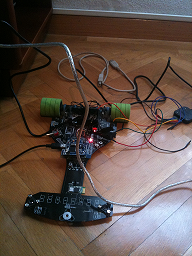
I want to introduce you the brand-new uXbot (micro xBot) robot. It has been designed for educational purposes and with the main goal of serving as a base for the Robotics Workshop at Campus-Party España 2010.

 uXbot front view uXbot rear view

Features:

  • ARM Cortex-M3 32 bit Microcontroller (LPC1343)
  • Motor driver up to 3.5A
  • 12 Infrared sensors
  • Integrated battery charger
  • Battery Voltage monitoring
  • Firmware Programming via USB
  • 4 General Purpose LEDs
  • 800mAh Li-Po battery
  • Metal Gearbox motors
  • Bluetooth module

In order to make the development process easier, some libraries have been written  for the end user with the following layout:

uXbot library layout

  • HALLib (Hardware Abstraction Layer Library): Provides an interface to uXbot hardware and the microcontroller peripherals such as sensor reading, pushbutton, voltage monitor, motors, timing functions.
  • VCOMLib: Provides a USB Virtual COM Port driver (ACM profile under Linux OS) so that the user can communicate to a PC.
  • uXbotLib: This is a high-level library which will be mainly used by users who do not have/need to have any knowledge about the underlying electronics of the uXbot. It provides an interface to move the robot in any direction, an open-loop PID controller for line following, sensor reading and filtering, etc.

All the tools used to develop applications for the uXbot are free and available for both Windows and Linux OS (32 and 64-bit).

In order to control the uXbot through the USB VCom port or Bluetooth, a C# application has been written. Anyone will be able to use it from Windows or Linux (using Mono). Here you can see an screenshot:

uXbot Manager Software

I want to show you two videos. In the first one you can see the uXbot being controlled from a Windows Mobile device using a simply C# application which sends commands to the motors depending upon the PDA acclerometer sensor readings. It’s pretty funny and addicting :) In the second one, the uXbot is following a black line at an average speed of 1.65 meters per second.

I would like to publish all the source and diagrams soon, so stay tunned :)

Daniel

PS. You can find more information at www.uxbot.es (Wiki & Forum in Spanish).

I’ve started to build some sort of two-wheel Balancing Robot and before getting the party started I’m having to deal with mixing up the data gathered from my inertal sensors.

My homebrew IMU (Inertial Measurement Unit) is composed by one 3-axis accelerometer and 1-axis gyroscope. The gyro sensor’s got an analog output (.67mV per degree/s) and the accelerometer’s got an i2c interface. I would love to share its part number with you but, since I liked this unit to be as cheap as possible, the sensors were ripped out (and reverse-engineered with a logic analyzer) from a cheap PS3 gamepad bought on eBay ;).

Since the output of the gyro sensor is ‘too low’ for my ADC, I built a simple non-inverter amplifier and a low pass filter with a cutoff frequency of 1KHz. Also I placed a high pass filter (cutoff frequency at .3Hz) in order to compensate the temperature drift. The data from the accelerometer’s digitally filtered on the microcontroller with a simple 1st order Butterworth filter.

Inverted Pendulum

The main idea of this kind of robots (inverted pendulum) is to measure the tilt angle in order to drive the wheels just below the mass. The higher the center of gravity, the easier balancing will be. Why do we need both an accelerometer and a gyro?

- The acclerometer senses not only the gravity (tilt) but the acceleration forces on its axis. So it would be useful if it was static (no acceleration due to movement).

- The gyro outputs angular velocity (degrees per second) and it’s not sensitive to acceleration. In order to get the angular position we have to integrate this signal. However this will drift over the time and the estimated tilt angle wouldn’t be accurate after some seconds.

The ‘trick’ is to take out the best of each sensor: the long-term information from the accelerometer and the short-term response from the gyro sensor. One way to do this is using a ‘black-box’ known as Kalman Filter (if you are brave enough, have a look at the theory; I’m not :)) which mixes up both signals predicting the actual tilt angle.

I got some source code of this filter from rotomotion (http://scratchpad.wikia.com/wiki/RotomotionCode) and pushed it directly onto my microcontroller. The sensors are sampled at 50Hz and fed to the KF at the same rate. In the next plot you can see the raw tilt angle (atan2(raw_accy, raw_accx)), the integral of the gyro sensor (using the trapezoidal rule) and the output of the Kalman Filter.

Kalman Filter

As you can see, the raw tilt angle is a little bit noisy while the gyro integration is very clean. Also, there’s a lot of drift in this signal but magically the KF manages to estimate the angle very accuratelly and free of noise.

Now it’s time to try the filter with stronger movements and vibrations before feeding its output to the PID which will - hopefully - make the robot balance :)

I ‘ll post more on this soon!

Daniel

I’m working on a project which involves an i2c communication between a master and some slaves. The master device is using an LPC2148 microcontroller running at 60 MHz and the slave ones have a low-cost PIC microcontroller. Each slave device runs a different task and some of them are more CPU-intensive than others.

The nature of this i2c communication is essentially some kind of Query-Response protocol in which the master requests some processing from the slaves and they send back the results to the master. The processing time varies from one slave to another and sometimes it will be higher than the master ‘clock’ time.

This leaded me to find a way to stop the master until the slave is done with its processing: clock stretching. The slave will pull the clock line down, causing the master to stop until it’s done with its task and then releases the SCL line (going high due to the required pull-ups of the i2c signals).

As I was writing the slave C code using PICC compiler, there was no way to implement this technique directly from the supplied i2c functions therefore I’d got to implement it by myself:


#byte PIC_SSPCON=0x14
#bit CKP = PIC_SSPCON.4 // 1 = Release Clock, 0 = Holds Clock Low (clock stretch)
#define SCL_STRECTHING_ON bit_clear(PIC_SSPCON, 4); // CLK STRETCHING
#define SCL_STRETCHING_OFF bit_set(PIC_SSPCON, 4); // release clock to master


ISR:

if(state >= 0x80) //Master is requesting data
{
SCL_STRECTHING_ON
delay_us(400); // Simulate processing delay
i2c_write(buffer[cnt++]);
SCL_STRETCHING_OFF
}

Please, note that the values defined for SSPCON register / bits are for PIC16F677 microcontroller and it might differ from the one you’re using.

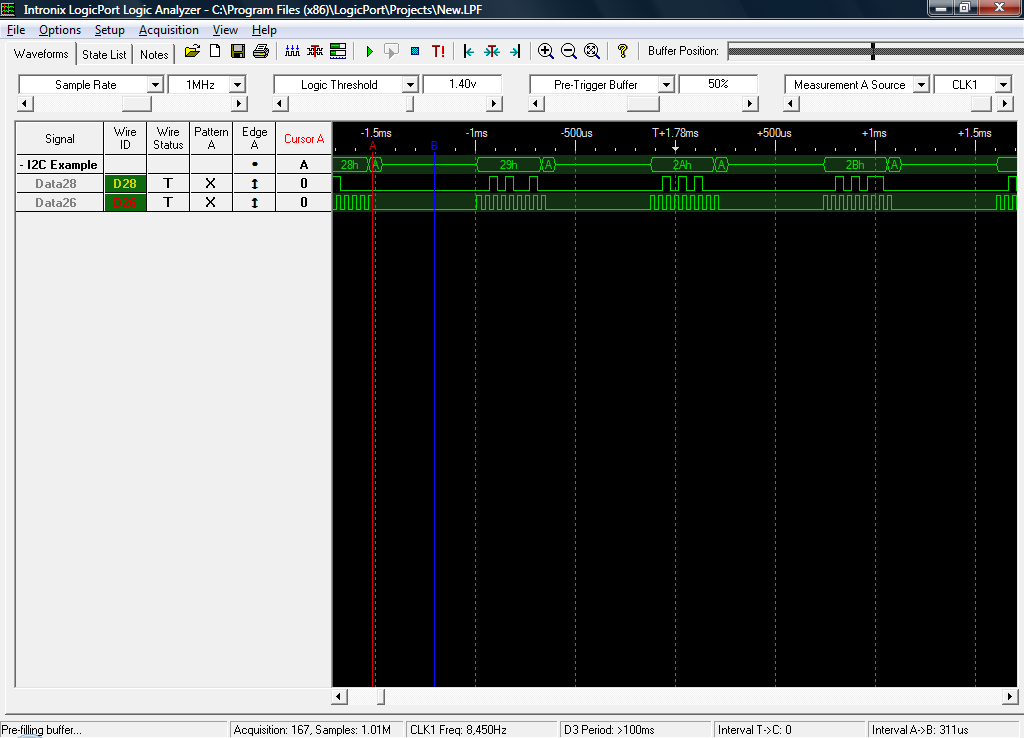
Below you can see an screenshot of the Logic Analyzer output I used for testing purposes. You can see the 400 us delay between two consecutive readings from the master while the SCL line remains low.

I2C Protocol - Clock Stretching

All in all, it’s a well known technique described in the protocol specification but as far as I’m concerned by googling a little bit, its usage is not very extended and there are not so much source code out there addressing this issue.

Warm regards,

Daniel

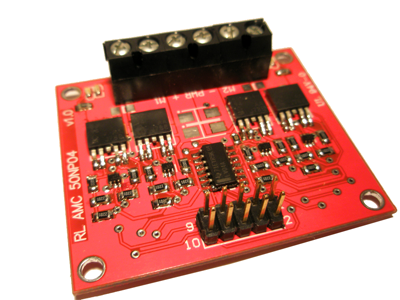
Finally we wrote some tiny documentation about RL-AMC-50NP04 along with a reference C source code to interface it from the LPC2138-01 board.

RL-AMC-50NP04 Quick Reference Guide

RL-AMC-50NP04 Reference Source Code

Enjoy it,

Daniel

RL-AMC-01

RL-AMC-50NP04 is an advanced Full H-Bridge board based on high performance MOSFETs capable of driving two high power DC motors. It has been designed to achieve a great efficiency and usage simplicity since just 3 pins are needed to control a motor. Based on the large experience working with Robotics we designed this board keeping in mind some important factors such as power dissipation, heating, simplicity and functionalities like braking, bi-directional control of the motors and a wide range of PWM frequencies from 3.3v or 5V microcontrollers.

Its small size makes this H-Bridge MOSFET board perfect to fit in your Robotics designs: 50 x 42 mm (1,97 x 1,65 inch) .

Main features:

  • 2 high power DC Motors control.
  • PWM frequencies up to 20 KHz for speed control.
  • Bi-directional control.
  • Braking function (coast and brake functions).
  • 3.3v / 5V logic capable.
  • Up to 8A continuous operation with very low internal resistance (0.038 ohms).
  • Up to 35A pulsed current.
  • Wide range of power supply voltage ranging from 3 to 40V.
  • Current sense (just 6mV per amp to minimize the total voltage drop when high currents are demanded).
  • Just 3 pins needed from your microcontroller to drive each motor.
  • Two LEDs per leg indicating the rotating direction of each motor.
  • Easy interface connections through an standard 10-pin male header.
  • Three two-pin terminal blocks for connecting the motors and their power supply.
  • Logic power supply ranging from 2V to 6V.

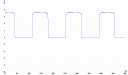
Here you can see the output of the board when driving one of its LEDs with a voltage supply of 8,4V. The voltage drop accross the LED is about 1 Volt and in this graphic you can appreciate that the rising and falling times are extremely small since it has been designed for operating in high-speed environments with the maximum efficiency. This minimizes the transition time of the MOSFETs (time when their internal Rds resistance is higher) and, thus, also minimizes the total power dissipation due to switching power losses.

RL-AMC Output 7.2KHz

If you are interested in this board or have any further questions / suggestions don’t hesitate  to contact me.

Documentation:

More to come,

Daniel

robot-arm-xpic

X-PIC-3The X-PIC Development System was designed by my colleague and friend Alberto Calvo and me during our studies at University. It is composed of two main boards: X-PIC and X-BOT which I will describe briefly. Our goal was to design a microcontroller based system powerful enough for our Robotics projects. However, we realized that it could be a good idea to design a more generic system which could be used as a small development platform without the need to have a big amount of LED’s, buttons, LCD, switches, jumpers, etc. as most boards use to have. So it is suitable for any projects which require a microcontroller.

  • X-PIC

X-PIC-1 This is the main board. It has got a PIC16F877A microcontroller at a clock frequency of 20MHz. There’s also an EEPROM serial memory which can be interfaced both externally and through the microcontroller. All the GPIO pins can be easily accessed through the 10-Pin connectors, all of them including VCC and GND signals.
For testing purposes, the board’s got a general purpose button and one LED. It can be programmed through its ICSP connector or through its RS232 interface if a bootloader is previously loaded into its internal Flash memory.

  • X-BOT

X-BOT-1

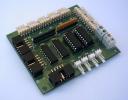
This board was designed specifically for Robotics applications and can be easily connected to the X-PIC board and mounted together. It’s got eight connectors which allow the microcontroller to read their value through selectable digital or analog IO pins. Also it includes two DC Motor drivers to drive up to 4 motors (1A per channel) which make this board suitable for a huge number of Robotics and Electronics applications.

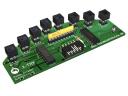
X-TRK-1As an extension to this system we designed the X-TRK sensor board specially aimed to Sniffer Robots. It can drive up to 8 IR sensors with just 4 IO pins thanks to its 3 to 8 line decoder. In the picture you can see a 3D version of the board, which has not been yet manufactured (just two home-made protoypes).

You can download all the documentation and schematics in Spanish (sorry for the inconvenience):

X-PIC User Guide

X-BOT User Guide

X-PIC Schematics

X-BOT Schematics

Regards,

Daniel

LPC2138-01

I have designed a new development board which is supposed to be used in many of the projects I am/will be involved in. It’s been built around an NXP LPC2138 microcontroller which has the following main features:

  • 16/32 bit ARM7TDMI-S microcontroller (LQFP64 package)
  • 32 KB of internal SRAM and 512 KB of on-chip flash program memory. 128-bit wide interface/accelerator enables high-speed 60 Mhz operation.
  • In-System Programming/In-Application Programming (ISP/IAP) via on-chip bootloader software. Single flash sector or full chip erase in 400 ms and programming of 256 B in 1 ms.
  • Two 8-channel 10-bit ADCs with conversion times as low as 2.44 us per channel.
  • Two 32-bit timers/external event counters (with four capture and four compare channels each), PWM unit (six outputs) and watchdog.
  • Multiple serial interfaces including two UARTs (16C550), two Fast I2C-bus (400 kbit/s), SPI and SSP with buffering and variable data length capabilities.
  • Vectored interrupt controller with configurable priorities and vector addresses.
  • Up to forty-seven 5 V tolerant general purpose I/O pins in tiny LQFP64 package.
  • Up to nine edge or level sensitive external interrupt pins available.
  • 60 MHz maximum CPU clock available from programmable on-chip PLL with settling time of 100 us.
  • On-chip integrated oscillator operates with external crystal in range of 1 MHz to 30 MHz and with external oscillator up to 50 MHz.
  • Power saving modes include Idle and Power-down.
  • Individual enable/disable of peripheral functions as well as peripheral clock scaling down for additional power optimization.
  • Processor wake-up from Power-down mode via external interrupt or BOD.
  • Single power supply chip with POR and BOD circuits:
    • CPU operating voltage range of 3.0 V to 3.6 V (3.3 V +- 10 pct) with 5 V tolerant I/O pads.

This microcontroller is suitable for most of my projects due to its high processing power (up to 60 MIPS) and its large amount of memory. Also, the board itself has some kind of features that I couldn’t find in any other development board:

  • Audio playing support with earphones connector. Connected to the DAC output of the microcontroller through an audio amplifier circuit. It is possible to use the DAC output for another purposes.
  • Audio recording support with microphone connector. Connected to one of the ADCs channels of the microcontroller through an audio amplifier and signal conditioning circuit. It is possible to use the ADC input for another purposes.
  • Selectable power supply input: directly from USB or from external battery for standalone applications (Vin ranging from 3.3V to 20V).
  • RS232 interface through DB9 connector.
  • USB communication through USB Type-B connector (on-board USB-Serial converter). RX and TX leds.
  • 8 General Purpose LED’s connected to the microcontroller through an output buffer which can be disabled through a jumper in case that these GPIO pins are needed.
  • Reset Button
  • General purpose button connected to one of the external interrupts of the microcontroller.
  • In Circuit Programming interface up to 115200 bps.
  • 12 MHz crystal for operation up to 60 MHz.
  • MMC/SD memory card interface connected to the SPI bus of the microcontroller.
  • Integrated Li-Ion / Li-Po Battery charger. It can charge batteries from USB or external power supply with LED charge indicators.
  • All the GPIO pins are available in the board. Including JTAG interface for programming / debugging in circuit.
  • Battery level monitoring. The input voltage is connected to one of the ADC inputs of the microcontroller through a voltage divisor so that it can be measured by software.

Software:

As the ARM architecture is being more and more popular there are lots of development tools available for all the platforms.

On Windows machines you can use WinARM which is a collection of tools to develop software for the ARM-family of controllers/processors including GNU C/C++ compiler (gcc / g++), GNU Binutils, GDB server, …

Most of these tools are part of GNU arm-elf toolchain distributions so you can easily develop /program the LPC2138 microcontroller under GNU/Linux.

Also, you can find some good commercial software for ARM microcontrollers/microprocessors like the ARM RealView Development Suite.

In some applications an RTOS (Real Time Operating System) is needed and there are some of them available for this microcontroller. I would stand out the following ones: FreeRTOS (free for non-commercial purposes) and RealView RL-ARM.

Daniel.