Category: OVN

Learning OVN and BGP with Claude AI

Recently, OVN has introduced BGP support and I did not have the time to follow the development so I decided to use the help of AI (Claude Code CLI) to learn about the new feature. The path I chose here is:

  1. Run one of the existing BGP tests  (ovn multinode bgp unnumbered)
  2. Use AI (claude-sonnet-4.5 model) to help me understand what the test does
  3. Identify the parts of the codebase that implement some of the bits in the test
  4. Do a small modification to the test to do something new

1. Run the BGP test from the OVN sources

To run this test, I need first to deploy an ovn-fake-multinode setup with 4 chassis and 4 gateways. I did it just by following the instructions in the README.md file.

$ sudo -E CHASSIS_COUNT=4 GW_COUNT=4 ./ovn_cluster.sh start

After deploying the cluster, you’ll have multiple containers running but only the ovn-central-az1, ovn-gw-1, and ovn-gw-2 are relevant to this test. This cluster will have some OVN resources but the test cleans them up upon start.

I did not want to investigate much how these containers are wired so I asked Claude to read the sources and produce a diagram for me. It also helped me to render it into a PNG file using ImageMagick :p
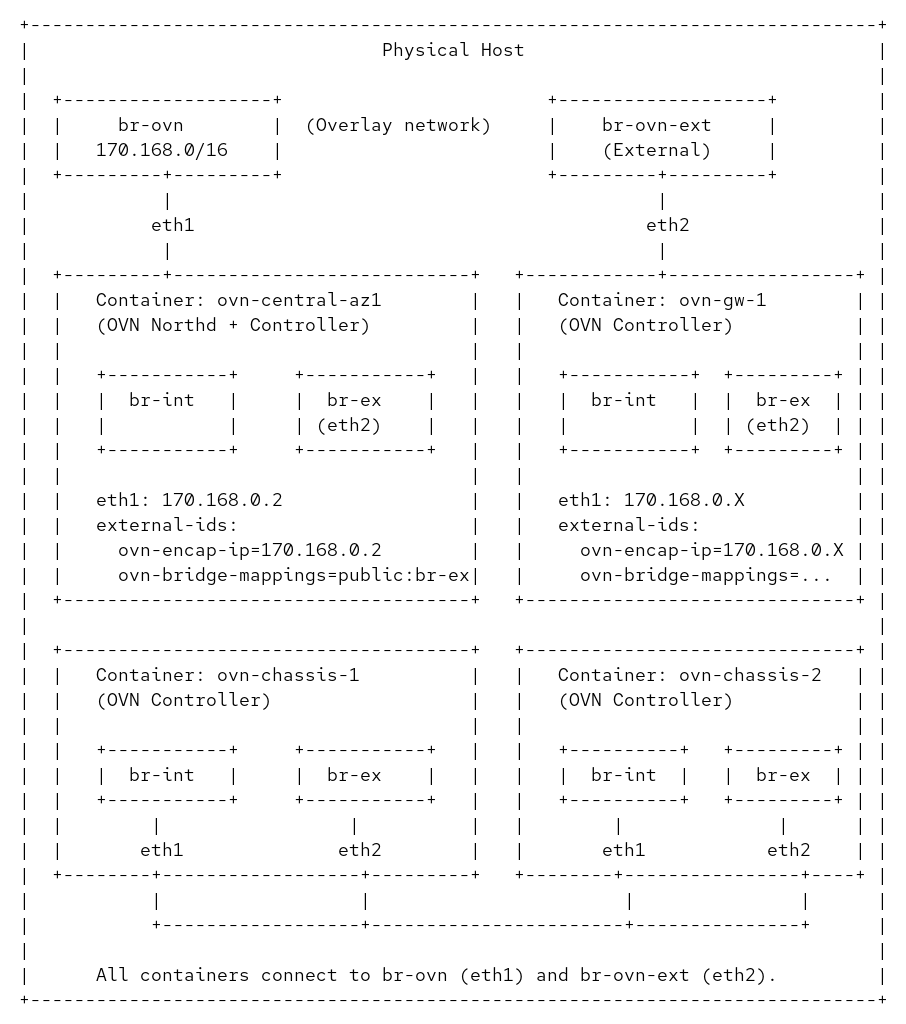
Essentially, it will create two OVS bridges in my host to connect eth1 on each container for the underlay and eth2 for the dataplane. The eth0 interface is connected to the podman network for management.

Now we run the test and stop it before the clean up. This you can do by adding a check false right before the cleanup, and then executing the test like this:

OVS_PAUSE_TEST=1 make check-multinode TESTSUITEFLAGS="-k 'ovn multinode bgp unnumbered' -v"

Once the test stops, you can see that it’s completed successfully and it was able to ping some IP address, and the containers are running with the configuration and resources created by the test.

multinode.at:2959: waiting until m_as ovn-gw-1 ip netns exec frr-ns ping -W 1 -c 1 172.16.10.2...
PING 172.16.10.2 (172.16.10.2) 56(84) bytes of data.
64 bytes from 172.16.10.2: icmp_seq=1 ttl=62 time=2.32 ms

--- 172.16.10.2 ping statistics ---
1 packets transmitted, 1 received, 0% packet loss, time 0ms
rtt min/avg/max/mdev = 2.322/2.322/2.322/0.000 ms
multinode.at:2959: wait succeeded immediately
multinode.at:2960: waiting until m_as ovn-gw-2 ip netns exec frr-ns ip route | grep -q 'ext1'...
multinode.at:2960: wait succeeded immediately
multinode.at:2961: waiting until m_as ovn-gw-2 ip netns exec frr-ns ping -W 1 -c 1 172.16.10.2...
PING 172.16.10.2 (172.16.10.2) 56(84) bytes of data.
64 bytes from 172.16.10.2: icmp_seq=1 ttl=62 time=1.77 ms

--- 172.16.10.2 ping statistics ---
1 packets transmitted, 1 received, 0% packet loss, time 0ms
rtt min/avg/max/mdev = 1.773/1.773/1.773/0.000 ms
multinode.at:2961: wait succeeded immediately
false
./ovn-macros.at:856: "$@"
./ovn-macros.at:856: exit code was 1, expected 0
=====================================================
Set following environment variable to use various ovs utilities
export OVS_RUNDIR=/root/ovn/tests/multinode-testsuite.dir/17
Press ENTER to continue:


$ podman exec ovn-central-az1 ovn-nbctl show | grep -E '^(router|switch)'
switch 05e453e9-f5b2-47b9-9eb6-10ef6ea8a08c (ls-ovn-gw-2-ext0)
switch 8a12c075-6367-46b0-ac5a-88346450fc60 (ls-ovn-gw-1-ext0)
switch 3cc96979-1aab-4cd3-a84b-6f5f36bd4a42 (ls-guest-ovn-gw-1)
switch e24ad9c9-ef80-4686-96eb-88ef47d9bc01 (ls-guest-ovn-gw-2)
switch 9a279d1b-0929-4386-a704-fb9faaf6dfa6 (ls-join)
router e0a37965-c854-4c17-a4bb-4401d61c48a6 (lr-guest)
router 1f81175b-1168-4956-b7a8-64c85c07af4f (lr-ovn-gw-1-ext0)
router ce2161ff-ea11-4fb0-954b-75f0cf26f3d7 (lr-ovn-gw-2-ext0)

2. Use Claude AI to understand what the test does

At this point I read the test and I can see that there’s a fake VM with a Floating IP (172.16.10.2) that’s reachable through the simulated ToR switches. The ToRs learn the route via BGP, but I’m struggling to understand the exact topology and configuration because the test uses several layers of macros that call other macros.

Claude to the rescue!

I used Claude to help me:

  • Trace through the macro definitions to understand what topology gets created
  • Identify which components run where (containers, namespaces, VRFs)
  • Map out the BGP peering relationships and AS numbers
  • Understand how FRR is configured on both the ToRs and OVN gateways
  • Figure out why there are two separate FRR instances running on the same container The key insight Claude helped me understand was that the test simulates both the ToR switches and the OVN gateways within the same container nodes, using:
  • Network namespaces (frr-ns) to isolate the ToR’s network stack
  • Two separate FRR instances – one for the ToR (in frr-ns) and one for the OVN gateway (in default namespace, using VRFs)
  • BGP unnumbered peering using IPv6 link-local addresses between them

As a bonus, I asked Claude to draw a couple of diagrams for me to better understand the topology that this test creates:
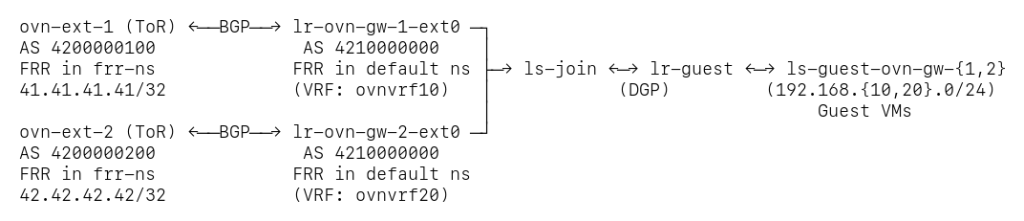
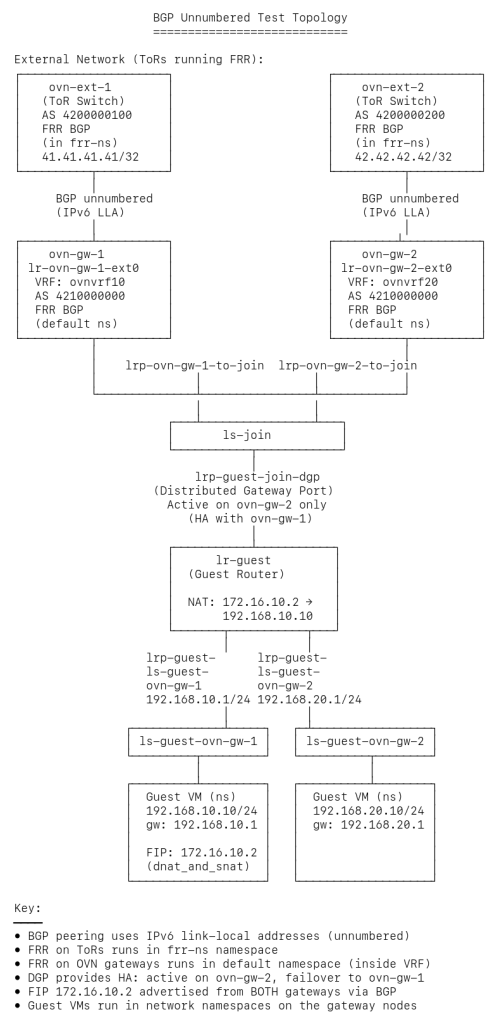
 

Since I stopped the test before the cleanup, I told Claude how to access the remote lab and asked to inspect the live environment via SSH commands.

NOTE: Before I got the answer below I had been asking Claude things about the macros that the test uses and it’s been unpacking and reading a lot of the OVN code that I checked out locally. I re-ran this on a fresh session and it failed to figure out things like who creates the VRFs where the blackhole routes are installed, so it required a few more follow-up questions until I was able to find the right answers.

> I would like you to inspect the live deployment and show how the routes get advertised (eg. listing the different OVN tables, FRR configuration, etcetera). You can access the live environment by running 'ssh ovnlab' directly and using 'sudo'.


⏺ Perfect! Let me trace through exactly how the Floating IP (172.16.10.2) gets advertised from OVN through to the external ToR switches via BGP.

  ---  Step 1: NAT Configuration in OVN Northbound

  First, the NAT rule is configured on the guest router:

  $ podman exec ovn-central-az1 ovn-nbctl list NAT
  _uuid               : 4305c6db-b431-400d-b3e8-248d920394fc
  external_ip         : "172.16.10.2"
  logical_ip          : "192.168.10.10"
  type                : dnat_and_snat
  gateway_port        : lrp-guest-join-dgp
  options             : {add_route="true", ...}

  Key points:
  - external_ip: 172.16.10.2 (the Floating IP)
  - logical_ip: 192.168.10.10 (the internal VM IP)
  - gateway_port: Associated with the Distributed Gateway Port (DGP)
  - add_route=true: Tells OVN to create a route for this NAT entry

  Step 2: Dynamic Routing and VRF Configuration

  The gateway routers are configured with dynamic routing and VRF settings:

  $ podman exec ovn-central-az1 ovn-nbctl get logical_router lr-ovn-gw-1-ext0 options
  {chassis=ovn-gw-1, dynamic-routing="true", dynamic-routing-vrf-id="10"}

  $ podman exec ovn-central-az1 ovn-nbctl get logical_router_port lrp-ovn-gw-1-ext0 options
  {dynamic-routing-maintain-vrf="true", dynamic-routing-redistribute=nat,
   routing-protocol-redirect=lsp-ovn-gw-1-ext0-bgp, routing-protocols="BGP,BFD"}

  This configuration tells OVN:
  - Enable dynamic routing on lr-ovn-gw-1-ext0
  - Use VRF ID 10 (will create VRF named ovnvrf10)
  - dynamic-routing-maintain-vrf=true on the router port - This is the key setting that tells ovn-controller to create and maintain the VRF in the kernel
  - Redistribute NAT routes via the router port
  - Redirect BGP protocol traffic to the lsp-ovn-gw-1-ext0-bgp port

  When ovn-controller on the ovn-gw-1 chassis sees the dynamic-routing-maintain-vrf=true option, it automatically creates the VRF in the kernel:

  $ podman exec ovn-gw-1 ip link show type vrf
  11: ovnvrf10: <NOARP,MASTER,UP,LOWER_UP> mtu 65575 qdisc noqueue state UP mode DEFAULT group default qlen 1000
      link/ether 7a:7c:6f:2c:0d:22 brd ff:ff:ff:ff:ff:ff

  The VRF name is constructed as ovnvrf + dynamic-routing-vrf-id (10 in this case).

  Similarly, on ovn-gw-2, the VRF ID 20 creates ovnvrf20.

  Step 3: Advertised Routes in OVN Southbound

  OVN northd processes the NAT configuration and creates advertised route entries:

  $ podman exec ovn-central-az1 ovn-sbctl list Advertised_Route
  _uuid               : 360a360a-4ff4-4e87-888f-80e7c3b55e0a
  ip_prefix           : "172.16.10.2"
  logical_port        : lrp-ovn-gw-1-to-join
  ...

  _uuid               : d3a74c47-2ad9-471e-8b5e-e186ab774f21
  ip_prefix           : "172.16.10.2"
  logical_port        : lrp-ovn-gw-2-to-join
  ...

  Both gateway routers have advertised route entries for 172.16.10.2 because:
  - Each gateway router (lr-ovn-gw-1-ext0, lr-ovn-gw-2-ext0) has dynamic-routing-redistribute=nat configured on its port connecting to the join switch
  - The NAT entry from lr-guest gets redistributed to both gateway routers
  - Each gateway then advertises the FIP to its respective ToR (ovn-ext-1 and ovn-ext-2)
  - This provides connectivity from both external ASNs (ASN 4200000100 and ASN 4200000200) to reach the FIP

  The DGP location only matters for actual traffic forwarding, not for route advertisement. Both ToRs can advertise reachability to 172.16.10.2, and when traffic arrives at either gateway, OVN's overlay handles forwarding it to whichever chassis actually hosts the DGP.

  Step 4: Blackhole Routes in the Kernel

  OVN-controller on each gateway node installs blackhole routes in the VRF:

  $ podman exec ovn-gw-1 ip route show vrf ovnvrf10
  blackhole 172.16.10.2 proto 84 metric 1000

  $ podman exec ovn-gw-2 ip route show vrf ovnvrf20
  blackhole 172.16.10.2 proto 84 metric 1000

  These blackhole routes serve as markers for FRR to detect and advertise via BGP. They don't actually route traffic (that's handled by OVN flows), but FRR's redistribute kernel configuration picks them up.

  Step 5: FRR BGP Advertisement (OVN Gateway Side)

  FRR on the OVN gateway sees the kernel route and advertises it to its BGP neighbor:

  $ podman exec ovn-gw-1 vtysh --vty_socket /run/frr/ -c "show bgp vrf ovnvrf10 ipv4"
  BGP table version is 1, local router ID is 14.14.14.14, vrf id 11
  Default local pref 100, local AS 4210000000

       Network          Next Hop            Metric LocPrf Weight Path
   *>  172.16.10.2/32   0.0.0.0               1000         32768 ?

  The route shows:
  - Next Hop: 0.0.0.0 - locally originated (from kernel redistribution)
  - Weight: 32768 - default weight for local routes
  - Path: ? - incomplete origin (redistributed from kernel)

  Step 6: BGP Peering (Unnumbered)

  The OVN gateway and ToR are peered using BGP unnumbered (IPv6 link-local addresses):

  $ podman exec ovn-gw-1 vtysh --vty_socket /run/frr/ -c "show bgp vrf ovnvrf10 neighbors ext0-bgp"
  BGP neighbor on ext0-bgp: fe80::a8ed:baff:feb6:585e, remote AS 4200000100, local AS 4210000000
  BGP state = Established, up for 1d06h12m
  ...
  Prefix statistics:
    0 accepted, 1 sent prefixes

  Key details:
  - Neighbor: fe80::a8ed:baff:feb6:585e (IPv6 link-local - unnumbered)
  - Remote AS: 4200000100 (the ToR's ASN)
  - Local AS: 4210000000 (OVN gateway's ASN)
  - Sent prefixes: 1 (the 172.16.10.2/32 route)

  Step 7: FRR BGP Learning (ToR Side)

  The ToR's FRR instance receives and accepts the route:

  $ podman exec ovn-gw-1 vtysh --vty_socket /run/frr/frr-ns/ -c "show bgp ipv4"
  BGP table version is 1, local router ID is 41.41.41.41, vrf id 0
  Default local pref 100, local AS 4200000100

       Network          Next Hop            Metric LocPrf Weight Path
   *>  172.16.10.2/32   ext1                  1000             0 4210000000 ?

  The ToR now knows:
  - Network: 172.16.10.2/32
  - Next Hop: ext1 (the interface toward the OVN gateway)
  - Metric: 1000 (inherited from the advertised route)
  - ASN Path: 4210000000 (learned from the OVN gateway's ASN)

  Summary: Complete Advertisement Chain

  1. NAT Config (NB)
     ↓
  2. Dynamic Routing + VRF Config (NB)
     ↓
  3. VRF Creation (Kernel) ← ovn-controller sees dynamic-routing-maintain-vrf=true
     ↓
  4. Advertised Routes (SB) ← northd processing
     ↓
  5. Blackhole Routes (Kernel VRF) ← ovn-controller
     ↓
  6. BGP Table (FRR Gateway) ← redistribute kernel
     ↓
  7. BGP Peering (IPv6 LLA)
     ↓
  8. BGP Table (FRR ToR) ← received from peer

  This shows the complete journey of how a NAT entry in OVN becomes a BGP route advertised to external infrastructure, enabling seamless integration between OVN's virtual networking and physical network routing.

3. Identify the parts of the codebase that implement some of the bits in the test

At this point I believe I understand what the test does and how the BGP implementation works on the surface. In order for me to get a deeper understanding of certain parts of the code I want to understand how and when the VRF is created by ovn-controller. Since Claude has access to the OVN sources and my live environment, it should be able to give me good pointers to it 🙂

> I want to get some details (source code level) about how and when ovn-controller creates the VRF where it installs the blackhole routes.


⏺ Let me trace through the source code to show you exactly how and when ovn-controller creates the VRF and installs the blackhole routes.

⏺ Read(ovn/controller/route-exchange.c)
  ⎿  Read 100 lines

⏺ Search(pattern: "vrf.*create|create.*vrf", path: "ovn/controller", output_mode: "content")
  ⎿  Found 5 lines (ctrl+o to expand)

⏺ Read(ovn/controller/route-exchange.c)
  ⎿  Read 150 lines

⏺ Read(ovn/controller/route-exchange-netlink.c)
  ⎿  Read 80 lines

⏺ Now let me check where the advertise_datapath_entry gets populated with the maintain_vrf flag:

⏺ Search(pattern: "maintain_vrf.*=|->maintain_vrf", path: "ovn/controller", output_mode: "content")
  ⎿  Found 2 lines (ctrl+o to expand)

⏺ Read(ovn/controller/route.c)
  ⎿  Read 50 lines

⏺ Perfect! Now let me check how advertised routes get added:

⏺ Search(pattern: "Advertised_Route|advertised.*route", path: "ovn/controller/route.c", output_mode: "content")
  ⎿  Found 3 lines (ctrl+o to expand)

⏺ Read(ovn/controller/route.c)
  ⎿  Read 80 lines

⏺ Perfect! Now I have the complete picture. Let me create a detailed source code-level explanation:

  ---
  Source Code Deep Dive: VRF Creation and Blackhole Route Installation

  Overview

  The VRF creation and blackhole route installation happens in ovn-controller through a multi-step process coordinated between several source files. Let me trace through the exact code path.

  Step 1: Checking for dynamic-routing-maintain-vrf Option

  File: controller/route.c (lines 206-209)

  ad->maintain_vrf |=
      smap_get_bool(&repb->options,
                    "dynamic-routing-maintain-vrf",
                    false);

  What happens here:
  - ovn-controller iterates through all router port bindings (repb) that have dynamic routing enabled
  - For each port, it checks if the dynamic-routing-maintain-vrf option is set to true
  - If found, it sets the maintain_vrf flag in the advertise_datapath_entry structure
  - This flag tells ovn-controller that it is responsible for creating and managing the VRF

  Step 2: Determining VRF Name

  File: controller/route.c (lines 211-225)

  const char *vrf_name = smap_get(&repb->options,
                                  "dynamic-routing-vrf-name");
  if (vrf_name && strlen(vrf_name) >= IFNAMSIZ) {
      // Warn and ignore if name is too long
      vrf_name = NULL;
  }
  if (vrf_name) {
      memcpy(ad->vrf_name, vrf_name, strlen(vrf_name) + 1);
  } else {
      snprintf(ad->vrf_name, sizeof ad->vrf_name, "ovnvrf%"PRIu32,
               route_get_table_id(ad->db));
  }

  What happens here:
  - First checks if a custom VRF name is specified via dynamic-routing-vrf-name option
  - If no custom name is provided, constructs the default name as ovnvrf + VRF ID
  - For example, with dynamic-routing-vrf-id=10, it creates ovnvrf10

  Step 3: Creating the VRF

  File: controller/route-exchange.c (lines 265-277)

  if (ad->maintain_vrf) {
      if (!sset_contains(&old_maintained_vrfs, ad->vrf_name)) {
          error = re_nl_create_vrf(ad->vrf_name, table_id);
          if (error && error != EEXIST) {
              VLOG_WARN_RL(&rl,
                           "Unable to create VRF %s for datapath "
                           UUID_FMT": %s.", ad->vrf_name,
                           UUID_ARGS(&ad->db->header_.uuid),
                           ovs_strerror(error));
              SET_ROUTE_EXCHANGE_NL_STATUS(error);
              continue;
          }
      }
      sset_add(&_maintained_vrfs, ad->vrf_name);
  }

  What happens here:
  - During the route_exchange_run() function execution (called on every ovn-controller iteration)
  - Checks if the VRF was already created in a previous iteration (by checking old_maintained_vrfs)
  - If not, calls re_nl_create_vrf() to create it via netlink
  - Adds the VRF name to _maintained_vrfs set to track it
  - If VRF already exists (EEXIST error), silently continues (this is normal)

  Step 4: Netlink VRF Creation

  File: controller/route-exchange-netlink.c (lines 42-77)

  int
  re_nl_create_vrf(const char *ifname, uint32_t table_id)
  {
      if (!TABLE_ID_VALID(table_id)) {
          // ... error handling
          return EINVAL;
      }

      // Prepare netlink message
      struct ofpbuf request;
      uint8_t request_stub[NETNL_REQ_BUFFER_SIZE];
      ofpbuf_use_stub(&request, request_stub, sizeof(request_stub));

      // Create RTM_NEWLINK message with VRF attributes
      nl_msg_put_nlmsghdr(&request, 0, RTM_NEWLINK,
                          NLM_F_REQUEST | NLM_F_ACK | NLM_F_CREATE | NLM_F_EXCL);
      ifinfo = ofpbuf_put_zeros(&request, sizeof *ifinfo);
      nl_msg_put_string(&request, IFLA_IFNAME, ifname);  // VRF name

      ifinfo->ifi_change = ifinfo->ifi_flags = IFF_UP;   // Bring it UP
      linkinfo_off = nl_msg_start_nested(&request, IFLA_LINKINFO);
      nl_msg_put_string(&request, IFLA_INFO_KIND, "vrf");  // Type: VRF
      infodata_off = nl_msg_start_nested(&request, IFLA_INFO_DATA);
      nl_msg_put_u32(&request, IFLA_VRF_TABLE, table_id);  // VRF table ID
      nl_msg_end_nested(&request, infodata_off);
      nl_msg_end_nested(&request, linkinfo_off);

      // Send to kernel via netlink
      err = nl_transact(NETLINK_ROUTE, &request, NULL);

      ofpbuf_uninit(&request);
      return err;
  }

  What happens here:
  - Constructs a netlink RTM_NEWLINK message to create a new network interface
  - Sets the interface type to "vrf"
  - Associates it with the routing table ID (from dynamic-routing-vrf-id)
  - Sets the interface to UP state immediately
  - Sends the netlink message to the kernel's routing subsystem
  - The kernel creates the VRF device (e.g., ovnvrf10)

  Step 5: Reading Advertised Routes from Southbound DB

  File: controller/route.c (lines 267-295)

  const struct sbrec_advertised_route *route;
  SBREC_ADVERTISED_ROUTE_TABLE_FOR_EACH (route,
                                         r_ctx_in->advertised_route_table) {
      struct advertise_datapath_entry *ad =
          advertise_datapath_find(r_ctx_out->announce_routes,
                                  route->datapath);
      if (!ad) {
          continue;
      }

      struct in6_addr prefix;
      unsigned int plen;
      if (!ip46_parse_cidr(route->ip_prefix, &prefix, &plen)) {
          // ... error handling
          continue;
      }

      if (!lport_is_local(r_ctx_in->sbrec_port_binding_by_name,
                          r_ctx_in->chassis,
                          route->logical_port->logical_port)) {
          // Skip routes for ports not on this chassis
          continue;
      }

      // Add route to the advertise_datapath_entry
      struct advertise_route_entry *ar = xmalloc(sizeof(*ar));
      ar->addr = prefix;
      ar->plen = plen;
      ar->priority = priority;
      hmap_insert(&ad->routes, &ar->node,
                  advertise_route_hash(&prefix, plen));
  }

  What happens here:
  - Reads all Advertised_Route entries from the Southbound database
  - These are created by northd when it processes NAT rules with redistribution enabled
  - Filters to only routes whose logical port is bound to this chassis
  - Builds a hash map of routes to be installed in the kernel

  Step 6: Installing Blackhole Routes

  File: controller/route-exchange-netlink.c (lines 98-121)

  static int
  modify_route(uint32_t type, uint32_t flags_arg, uint32_t table_id,
               const struct in6_addr *dst, unsigned int plen,
               unsigned int priority)
  {
      uint32_t flags = NLM_F_REQUEST | NLM_F_ACK;
      bool is_ipv4 = IN6_IS_ADDR_V4MAPPED(dst);
      struct rtmsg *rt;

      flags |= flags_arg;

      struct ofpbuf request;
      // ... buffer initialization

      nl_msg_put_nlmsghdr(&request, 0, type, flags);
      rt = ofpbuf_put_zeros(&request, sizeof *rt);
      rt->rtm_family = is_ipv4 ? AF_INET : AF_INET6;
      rt->rtm_table = RT_TABLE_UNSPEC;
      rt->rtm_protocol = RTPROT_OVN;      // Mark as OVN-managed (proto 84)
      rt->rtm_type = RTN_BLACKHOLE;       // ← BLACKHOLE route type
      rt->rtm_scope = RT_SCOPE_UNIVERSE;

  What happens here:
  - For each advertised route, constructs a netlink RTM_NEWROUTE message
  - Sets route type to RTN_BLACKHOLE - this is the key!
  - Sets protocol to RTPROT_OVN (protocol 84) so they can be identified later
  - Sends to kernel, which installs the route in the specified VRF table

  Step 7: FRR Picks Up the Routes

  Once the blackhole routes are installed in the kernel VRF, FRR's redistribute kernel configuration (in the VRF BGP context) automatically detects them and advertises via BGP.

  Key Timing and Lifecycle

  1. When VRF is created: On first ovn-controller iteration after seeing dynamic-routing-maintain-vrf=true
  2. When routes are installed: Every time ovn-controller runs and processes Advertised_Route entries
  3. Route updates: Synchronized continuously - stale routes are removed, new ones added
  4. VRF cleanup: When dynamic-routing-maintain-vrf is removed or chassis loses binding, VRF is deleted

  Why Blackhole Routes?

  The routes are marked as RTN_BLACKHOLE because:
  - They are markers for FRR to advertise, not for actual packet forwarding
  - OVN handles the actual packet forwarding through OpenFlow rules
  - If a packet somehow reaches the kernel and matches one of these routes, it will be dropped (blackholed)
  - This prevents routing loops and ensures all traffic goes through OVN's datapath

Impressive, right?

Let’s now try to do something with the environment!

3. Modify the environment to advertise internal IPs via BGP

One potential modification to this test is to advertise the internal IP address of the guest VM (192.168.10.10) and ping it from the ToR. Instead of changing the code of the test I’ll modify the live environment to advertise the route to the VM and use Claude to handhold me.

First, verify that the VM is not reachable.

# podman exec ovn-gw-2 ip netns exec frr-ns ping -c 1 192.168.10.10
ping: connect: Network is unreachable

Now, since the ToRs are on different ASNs and are not connected,  we will only be able to access the VM from the ToR where the DGP  is bound. In our environment, the active gateway is on the gw-2 node. On a typical datacenter with a spine-and-leaf topology, the ToRs will be in the same AS and will be connected through the spine so we could reach the VM from anywhere in the network.

> I would like the lr-guest to advertise the route to 192.168.10.10, how can i enable that option?

⏺ To make lr-guest advertise its connected routes, you need to configure dynamic routing on lr-guest itself and on its router ports. Here's how:

  Step 1: Enable dynamic routing on lr-guest

  podman exec ovn-central-az1 ovn-nbctl set logical_router lr-guest \
      options:dynamic-routing=true \
      options:dynamic-routing-vrf-id=100

  Step 2: Configure the router ports to redistribute connected routes

  You need to set dynamic-routing-redistribute on the ports where you want to advertise routes from:

  # Advertise from the port connected to ls-guest-ovn-gw-1
  podman exec ovn-central-az1 ovn-nbctl set logical_router_port lrp-guest-ls-guest-ovn-gw-1 \
      options:dynamic-routing-redistribute=connected

  # Advertise from the port connected to ls-guest-ovn-gw-2
  podman exec ovn-central-az1 ovn-nbctl set logical_router_port lrp-guest-ls-guest-ovn-gw-2 \
      options:dynamic-routing-redistribute=connected

  However, there's a critical limitation here:

  - lr-guest is only instantiated on the chassis where the DGP is active (ovn-gw-2)
  - The VRF (ovnvrf100) will only be created on ovn-gw-2
  - Routes from lr-guest won't propagate to the gateway routers (lr-ovn-gw-1-ext0, lr-ovn-gw-2-ext0) automatically

  To actually make this work end-to-end, you would still need the static routes approach on the gateway routers, because OVN doesn't automatically propagate routes between different logical routers.

  The dynamic-routing-redistribute=connected on lr-guest would be useful if you had FRR running directly in the lr-guest VRF (ovnvrf100), but in this test topology, the BGP peering is happening in the gateway router VRFs (ovnvrf10, ovnvrf20), not in lr-guest's VRF.

  So the answer is: you can enable it, but it won't achieve what you want without also adding the static routes on the gateway routers.

This looks sane but still it does not seem that we’re telling OVN to create the VRF 100 and also FRR won’t be reading any routes from that VRF. Claude has missed that part, let’s talk about it 🙂

> if i understood you correctly earlier, we still need to add the maintain-vrf option to the LRP so that the vrf100 gets created

⏺ You're absolutely right! We need to add the maintain-vrf option to trigger vrf100 creation. Let me provide the complete configuration:

  # 1. Set maintain-vrf=true on the DGP to create vrf100
  # This is the critical step that triggers VRF creation in ovn-controller
  podman exec -it ovn-central-az1 \
    ovn-nbctl set logical_router_port lrp-guest-join-dgp \
    options:dynamic-routing-maintain-vrf=true

  # 2. Add static routes on gateway routers pointing to the DGP
  podman exec ovn-central-az1 ovn-nbctl lr-route-add lr-ovn-gw-2-ext0 \
      192.168.10.0/24 fe80::216:6ff:fe12:f00d lrp-ovn-gw-2-to-join


> FRR on ovn-gw-2 does not know anything about the vrf100. Can you help me adding the config to import this VRF?

⏺ You are right. Here's the configuration to add the import:

  podman exec -i ovn-gw-2 vtysh <<'EOF'
  configure
    router bgp 4210000000 vrf ovnvrf100
      bgp router-id 100.100.100.100
      no bgp ebgp-requires-policy
      address-family ipv4 unicast
        redistribute kernel
      exit-address-family
    exit
    router bgp 4210000000 vrf ovnvrf20
      address-family ipv4 unicast
        import vrf ovnvrf100
      exit-address-family
    exit
    write memory
  EOF

  This will:
  1. Create the BGP instance in ovnvrf100 that redistributes kernel routes (the blackhole route for 192.168.10.0/24)
  2. Add import vrf ovnvrf100 to the existing ovnvrf20 BGP configuration, so routes from vrf100 get leaked into vrf20 and advertised to the ToR


> Can you explain in detail what we have just done to reach 192.168.10.10 from the ToR?


⏺ Let me explain in detail how this works by tracing through the entire flow:

  1. OVN Configuration Creates the Foundation

  You've configured lr-guest with:
  - options:dynamic-routing=true
  - options:dynamic-routing-vrf-id=100
  - lrp-guest-join-dgp has options:dynamic-routing-maintain-vrf=true

  2. VRF Creation in Kernel

  On ovn-gw-2 (where the DGP is bound), ovn-controller sees the dynamic-routing-maintain-vrf=true option and calls re_nl_create_vrf() to create ovnvrf100 in the kernel with routing table ID 100.

  You can verify this:
  ssh ovnlab sudo podman exec ovn-gw-2 ip link show ovnvrf100
  ssh ovnlab sudo podman exec ovn-gw-2 ip route show vrf ovnvrf100

  3. Blackhole Route Installation

  When lr-guest has routes to advertise (like the connected network 192.168.10.0/24), ovn-controller queries the Advertised_Route table in the Southbound DB and installs blackhole routes in vrf100:

  ssh ovnlab sudo podman exec ovn-gw-2 ip route show vrf ovnvrf100 table 100
  # You should see something like:
  # blackhole 192.168.10.0/24 proto 84

  The route is marked as:
  - RTN_BLACKHOLE - doesn't actually route traffic, just a marker
  - RTPROT_OVN (protocol 84) - identifies it as an OVN-managed route

  This happens in route-exchange-netlink.c:98-121.

  4. FRR Sees the Kernel Route in vrf100

  When you configure:
  router bgp 4210000000 vrf ovnvrf100
    address-family ipv4 unicast
      redistribute kernel

  FRR monitors the kernel routing table for vrf100 (table 100) and sees the blackhole route for 192.168.10.0/24. Because of redistribute kernel, FRR adds this route to BGP's Routing Information Base (RIB) for vrf100.

  You can verify:
  ssh ovnlab "sudo podman exec ovn-gw-2 vtysh -c 'show ip bgp vrf ovnvrf100'"

  5. VRF Route Leaking (The Magic Part)

  When you configure in ovnvrf20:
  router bgp 4210000000 vrf ovnvrf20
    address-family ipv4 unicast
      import vrf ovnvrf100

  This tells FRR to import routes from vrf100's BGP RIB into vrf20's BGP RIB. This is called "VRF route leaking" or "route target import."

  Internally, FRR copies the 192.168.10.0/24 route from vrf100's BGP table into vrf20's BGP table.

  You can verify:
  ssh ovnlab "sudo podman exec ovn-gw-2 vtysh -c 'show ip bgp vrf ovnvrf20'"
  # Should now show 192.168.10.0/24 in addition to the NAT routes

  6. BGP Advertisement to ToR

  Once the route is in ovnvrf20's BGP RIB, the existing BGP session advertises it:
  router bgp 4210000000 vrf ovnvrf20
    neighbor ext0-bgp interface remote-as external
    address-family ipv4 unicast
      redistribute kernel
      neighbor ext0-bgp prefix-list no-default out

  The route gets advertised to the ToR peer via the ext0-bgp unnumbered BGP session.


  Key Points

  1. vrf100 has no external BGP peers - it's purely for internal route collection from lr-guest
  2. vrf20 has the actual ToR peering - it's where routes get advertised externally
  3. VRF import bridges the two - routes from vrf100 appear in vrf20's BGP table
  4. Blackhole routes are just markers - they don't route actual traffic, they just signal to FRR "advertise this prefix"
  5. This only works on ovn-gw-2 - because that's where the DGP (lrp-guest-join-dgp) is currently bound

And, of course, we can now ping the VM IP address from the ToR connected to ovn-gw-2:

$ podman exec -it ovn-central-az1 ovn-sbctl list advertised_route | grep 192.168.10 -C3
_uuid               : 1c417fc1-6af6-4945-9aaf-5443237a120a
datapath            : c1a7942f-bf59-4835-8c56-4df45a5c5855
external_ids        : {}
ip_prefix           : "192.168.10.0/24"
logical_port        : 782b2357-2c37-4e6f-bec6-ff204fcb4733
tracked_port        : []

$ podman exec ovn-gw-2 ip netns exec frr-ns ip route
172.16.10.2 nhid 6 via inet6 fe80::20fb:d6ff:fe66:992c dev ext1 proto bgp metric 20
192.168.10.0/24 nhid 6 via inet6 fe80::20fb:d6ff:fe66:992c dev ext1 proto bgp metric 20
192.168.20.0/24 nhid 6 via inet6 fe80::20fb:d6ff:fe66:992c dev ext1 proto bgp metric 20

$ podman exec ovn-gw-2 ip netns exec frr-ns ping -c 2 192.168.10.10
PING 192.168.10.10 (192.168.10.10) 56(84) bytes of data.
64 bytes from 192.168.10.10: icmp_seq=1 ttl=62 time=1.48 ms
64 bytes from 192.168.10.10: icmp_seq=2 ttl=62 time=0.575 ms

--- 192.168.10.10 ping statistics ---
2 packets transmitted, 2 received, 0% packet loss, time 1002ms
rtt min/avg/max/mdev = 0.575/1.027/1.479/0.452 ms


Conclusions

This combination of code analysis + live system inspection + domain knowledge made understanding the feature much faster than traditional code reading alone. Even for someone familiar with OVN, having AI as a “knowledgeable assistant” that can quickly locate and explain specific implementation details is awesome! It’s been very handy for:

  • Rapid ramp-up on the new BGP integration feature as a user
  • Tracing execution paths across multiple source files without manually grepping through thousands of lines
  • Understanding the “how” and “why” of implementation details like the VRF creation
  • Connecting the dots between configuration options and actual kernel-level operations

Claude is definitely getting a permanent route in my learning topology. Next hop: more complex features! 😉

Trunk ports in OVN

The purpose of this post is explaining the low level details of how trunking works in OVN. A typical use case of trunk ports could be the use of nested VMs or containers inside VMs; where all the traffic is directed to the vNIC of the virtual machine and then forwarded to the right container based on their VLAN ID. For more context around the feature and use cases, please check out the OpenStack documentation guide.

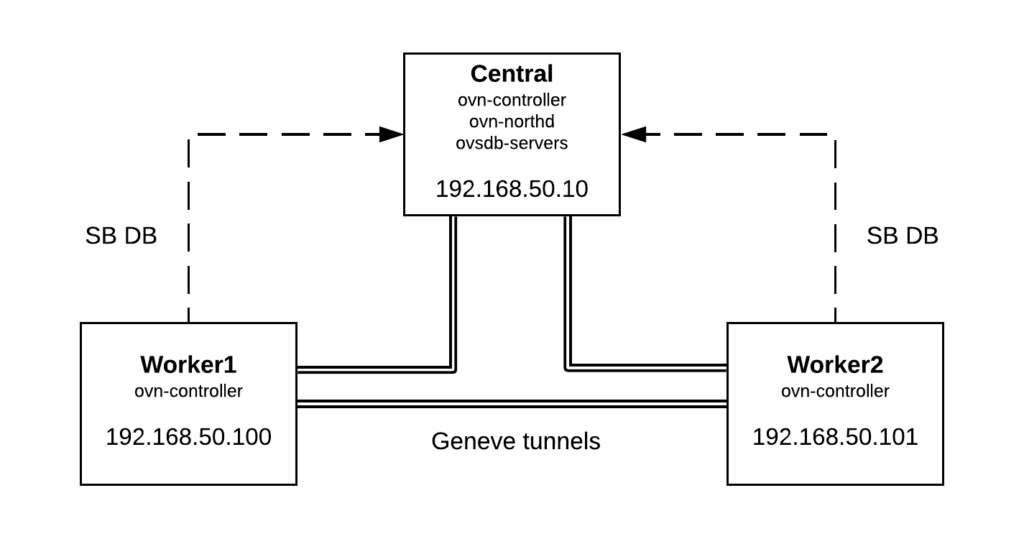
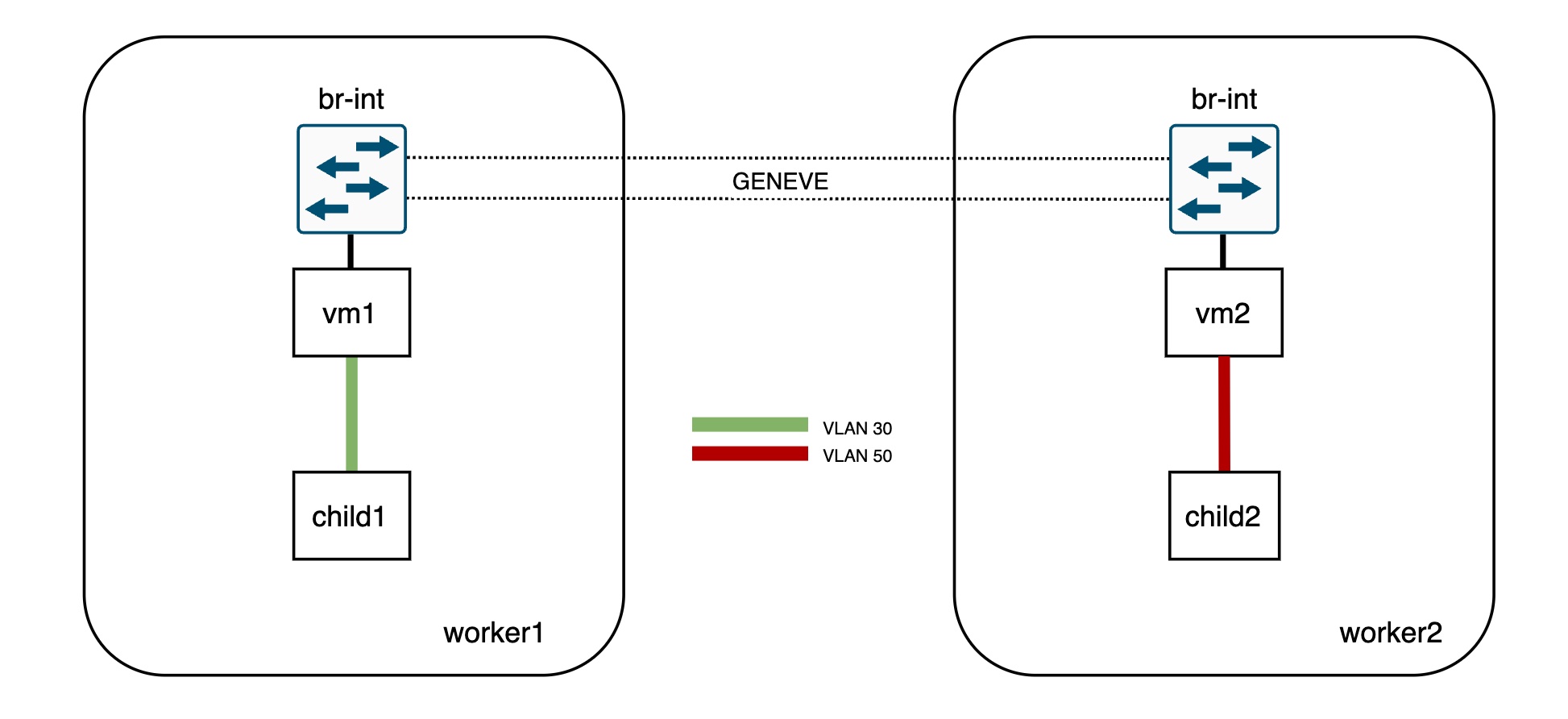
Let’s take a very simple topology for our deep dive. You can also deploy it in your machine using this vagrant setup and replay the commands as we go 🙂

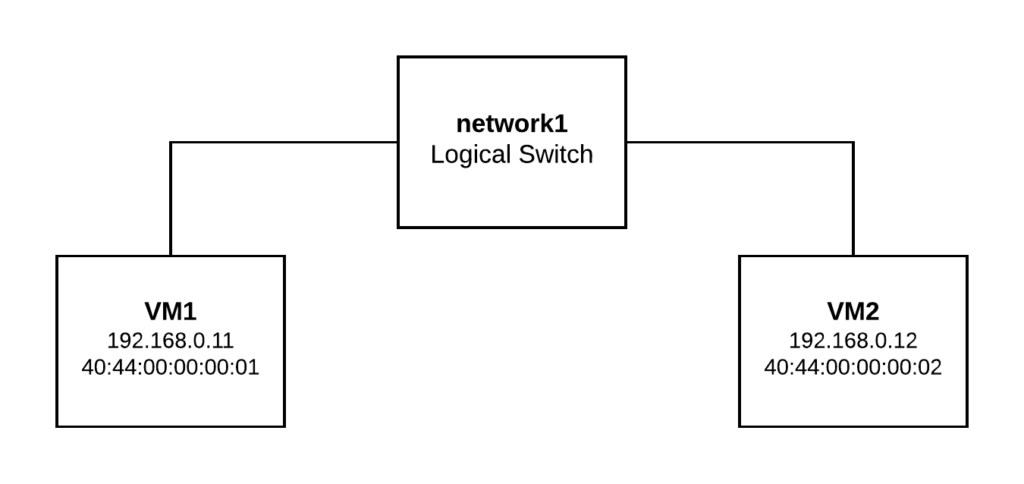
This sample setup has two Logical Switches and two ports on each of them. The physical layout is as follows:

  • vm1 bound to worker1
  • vm2 bound to worker2
  • child1 (VLAN 30) inside vm1
  • child2 (VLAN 50) inside vm2

Let’s quickly check the OVN databases info:

[root@central vagrant]# ovn-nbctl show
switch db4e7781-370c-4439-becd-35803c0e3f12 (network1)
    port vm1
        addresses: ["40:44:00:00:00:01 192.168.0.11"]
    port vm2
        addresses: ["40:44:00:00:00:02 192.168.0.12"]
switch 40ac144b-a32a-4202-bce2-3329f8f3e98f (network2)
    port child1
        parent: vm1
        tag: 30
        addresses: ["40:44:00:00:00:03 192.168.1.13"]
    port child2
        parent: vm2
        tag: 50
        addresses: ["40:44:00:00:00:04 192.168.1.14"]


[root@central vagrant]# ovn-sbctl show
Chassis worker2
    hostname: worker2
    Encap geneve
        ip: "192.168.50.101"
[root@central vagrant]# ovn-sbctl show
Chassis worker2
    hostname: worker2
    Encap geneve
        ip: "192.168.50.101"
        options: {csum="true"}
    Port_Binding child2
    Port_Binding vm2
Chassis worker1
    hostname: worker1
    Encap geneve
        ip: "192.168.50.100"
        options: {csum="true"}
    Port_Binding child1
    Port_Binding vm1

Instead of booting actual VMs and containers, I simulated it with network namespaces and VLAN devices inside them:

[root@worker1 vagrant]# ip netns exec vm1 ip -d link show
1: lo: <LOOPBACK> mtu 65536 qdisc noop state DOWN mode DEFAULT group default qlen 1000
    link/loopback 00:00:00:00:00:00 brd 00:00:00:00:00:00 promiscuity 0 addrgenmode eui64 numtxqueues 1 numrxqueues 1 gso_max_size 65536 gso_max_segs 65535
2: child1@vm1: <BROADCAST,MULTICAST,UP,LOWER_UP> mtu 1500 qdisc noqueue state UP mode DEFAULT group default qlen 1000
    link/ether 40:44:00:00:00:03 brd ff:ff:ff:ff:ff:ff promiscuity 0
    vlan protocol 802.1Q id 30 <REORDER_HDR> addrgenmode eui64 numtxqueues 1 numrxqueues 1 gso_max_size 65536 gso_max_segs 65535
24: vm1: <BROADCAST,MULTICAST,UP,LOWER_UP> mtu 1500 qdisc noqueue state UNKNOWN mode DEFAULT group default qlen 1000
    link/ether 40:44:00:00:00:01 brd ff:ff:ff:ff:ff:ff promiscuity 2
    openvswitch addrgenmode eui64 numtxqueues 1 numrxqueues 1 gso_max_size 65536 gso_max_segs 65535


[root@worker2 vagrant]# ip netns exec vm2 ip -d link show
1: lo: <LOOPBACK> mtu 65536 qdisc noop state DOWN mode DEFAULT group default qlen 1000
    link/loopback 00:00:00:00:00:00 brd 00:00:00:00:00:00 promiscuity 0 addrgenmode eui64 numtxqueues 1 numrxqueues 1 gso_max_size 65536 gso_max_segs 65535
2: child2@vm2: <BROADCAST,MULTICAST,UP,LOWER_UP> mtu 1500 qdisc noqueue state UP mode DEFAULT group default qlen 1000
    link/ether 40:44:00:00:00:04 brd ff:ff:ff:ff:ff:ff promiscuity 0
    vlan protocol 802.1Q id 50 <REORDER_HDR> addrgenmode eui64 numtxqueues 1 numrxqueues 1 gso_max_size 65536 gso_max_segs 65535
15: vm2: <BROADCAST,MULTICAST,UP,LOWER_UP> mtu 1500 qdisc noqueue state UNKNOWN mode DEFAULT group default qlen 1000
    link/ether 40:44:00:00:00:02 brd ff:ff:ff:ff:ff:ff promiscuity 2
    openvswitch addrgenmode eui64 numtxqueues 1 numrxqueues 1 gso_max_size 65536 gso_max_segs 65535

Now, as you can see, none of the subports (child1 and child2) are connected directly to the integration bridge so both vm1 and vm2 ports act as trunk ports for VLAN IDs 30 and 50. OVN will install flows to tag/untag the traffic directed to/from these ports.


Traffic and OpenFlow analysis

To illustrate this, let’s ping from child1 (worker1) to child 2 (worker2):

[root@worker1 vagrant]# ip netns exec vm1 ping 192.168.1.14
PING 192.168.1.14 (192.168.1.14) 56(84) bytes of data.
64 bytes from 192.168.1.14: icmp_seq=21 ttl=64 time=0.824 ms
64 bytes from 192.168.1.14: icmp_seq=22 ttl=64 time=0.211 ms

The traffic will arrive tagged to the vm1 interface and will be sent out untagged to worker2 (where vm2 is bound) via the Geneve tunnel:

[root@worker1 ~]# ip netns exec vm1 tcpdump -vvnee -i vm1 icmp -c1

tcpdump: listening on vm1, link-type EN10MB (Ethernet), capture size 262144 bytes
13:18:16.980650 40:44:00:00:00:03 > 40:44:00:00:00:04, ethertype 802.1Q (0x8100), length 102: vlan 30, p 0, ethertype IPv4, (tos 0x0, ttl 64, id 55255, offset 0, flags [DF], proto ICMP (1), length 84)
    192.168.1.13 > 192.168.1.14: ICMP echo request, id 9833, seq 176, length 64


[root@worker1 ~]# tcpdump -vvneei genev_sys_6081 icmp -c1

tcpdump: listening on genev_sys_6081, link-type EN10MB (Ethernet), capture size 262144 bytes
13:19:11.980671 40:44:00:00:00:03 > 40:44:00:00:00:04, ethertype IPv4 (0x0800), length 98: (tos 0x0, ttl 64, id 16226, offset 0, flags [DF], proto ICMP (1), length 84)
    192.168.1.13 > 192.168.1.14: ICMP echo request, id 9833, seq 231, length 64

On worker1, let’s inspect the OVS flows that determine the source network/port based on the VLAN ID:

[root@worker1 ~]# ovs-ofctl dump-flows br-int table=0 |grep vlan

 cookie=0x4b8d6fa5, duration=337116.380s, table=0, n_packets=270983, n_bytes=27165634, idle_age=0, hard_age=65534, priority=150,in_port=12,dl_vlan=30 actions=load:0x1->NXM_NX_REG10[5],strip_vlan,load:0x5->NXM_NX_REG13[],load:0x1->NXM_NX_REG11[],load:0x2->NXM_NX_REG12[],load:0x2->OXM_OF_METADATA[],load:0x1->NXM_NX_REG14[],resubmit(,8)

The flow above in table 0 matches on the VLAN tag (dl_vlan=30). Also, note that there’s no matching flow for VLAN 50 as vm2 is not bound to worker1.

As each parent should have subports with unique VLAN IDs, this ID will determine the source port (nested VM or container) that is sending the traffic. In our example, this will be child1 as it is the subport tagged with VLAN 30. In the actions section of the table 0 flow, the packet will be untagged (strip_vlan action), and the relevant registers will be populated to identify both the subport network and the logical input port:

  • The packet is coming from OF port 12 (in_port=12) which corresponds to vm1
[root@worker1 ~]# ovs-ofctl show br-int | grep vm1
 12(vm1): addr:40:44:00:00:00:01
  • The network identifier (metadata) is populated with the value 2 (load:0x2->OXM_OF_METADATA[]) which corresponds to the network of the subport (network2)
[root@central ~]# ovn-sbctl find datapath_binding tunnel_key=2
_uuid               : 2d762d73-5ab9-4f43-a303-65a6046e41e7
external_ids        : {logical-switch="40ac144b-a32a-4202-bce2-3329f8f3e98f", name=network2}
load_balancers      : []
tunnel_key          : 2
  • The logical input port (register 14) will be populated with the tunnel key of the child1 subport (load:0x1->NXM_NX_REG14[])
[root@central vagrant]# ovn-sbctl get port_binding child1 tunnel_key
1
  • Now the pipeline execution with the untagged packet gets resumed from table 8 (resubmit(,8)). Eventually it gets sent through the tunnel to worker2, where the parent (vm2) of the destination port (child2) is bound to.


Let’s inspect the traffic and flows on worker2, the destination hypervisor:

The traffic arrives untagged to br-int from the Geneve interface and later gets delivered to the vm2 interface tagged with the child2 VLAN ID (50).

[root@worker2 vagrant]# tcpdump -vvnee -i genev_sys_6081 icmp -c1
tcpdump: listening on genev_sys_6081, link-type EN10MB (Ethernet), capture size 262144 bytes
13:57:25.000587 40:44:00:00:00:03 > 40:44:00:00:00:04, ethertype IPv4 (0x0800), length 98: (tos 0x0, ttl 64, id 56431, offset 0, flags [DF], proto ICMP (1), length 84)
    192.168.1.13 > 192.168.1.14: ICMP echo request, id 10218, seq 31, length 64


[root@worker2 vagrant]# ip netns exec vm2 tcpdump -vvneei vm2 icmp -c1
tcpdump: listening on vm2, link-type EN10MB (Ethernet), capture size 262144 bytes
13:57:39.000617 40:44:00:00:00:03 > 40:44:00:00:00:04, ethertype 802.1Q (0x8100), length 102: vlan 50, p 0, ethertype IPv4, (tos 0x0, ttl 64, id 59701, offset 0, flags [DF], proto ICMP (1), length 84)
    192.168.1.13 > 192.168.1.14: ICMP echo request, id 10218, seq 45, length 64

The packet processing takes place as with any regular VIF but in the output stage, the traffic will be tagged before it is sent out to the vm2 interface:

[root@worker2 vagrant]# ovs-ofctl dump-flows br-int |grep mod_vlan_vid:50
 cookie=0x969b8a9d, duration=338995.147s, table=65, n_packets=263914, n_bytes=25814112, idle_age=0, hard_age=65534, priority=100,reg15=0x2,metadata=0x2 actions=mod_vlan_vid:50,output:4,strip_vlan

[root@worker2 vagrant]# ovs-ofctl show br-int | grep vm2
 4(vm2): addr:00:00:00:00:00:00


As you can see, the way that OVN implements this feature is very simple and only adds a couple of extra flows. Hope that this article helps understanding the details of trunk ports and how it’s leveraged by projects like Kuryr to run Kubernetes on top of OpenStack.

OVN: Where is my packet?

Working with rather complex OpenFlow pipelines as in the case of OVN can be tricky when it comes to debugging. Being able to tell where a packet gets dropped may not be the easiest task ever but fortunately, this is getting a bit more friendly thanks to the available tools around OVS and OVN these days.

In this post, I’ll show a recent troubleshooting process that I did where the symptom was that an ICMP Neighbor Advertisement packet sent out by a guest VM was not arriving at its destination. It turned out to be a bug in ovn-controller that has already been fixed so it will hopefully illustrate some of the available tools and techniques to debug OVN through a real world example.

Let’s start by showing a failing ping to an OVN destination and we’ll build up from here:

# ping 2001:db8::f816:3eff:fe1e:5a0f -c2
PING 2001:db8::f816:3eff:fe1e:5a0f(2001:db8::f816:3eff:fe1e:5a0f) 56 data bytes
From f00d:f00d:f00d:f00d:f00d:f00d:f00d:9: icmp_seq=1 Destination unreachable: Address unreachable
From f00d:f00d:f00d:f00d:f00d:f00d:f00d:9: icmp_seq=2 Destination unreachable: Address unreachable

--- 2001:db8::f816:3eff:fe1e:5a0f ping statistics ---
2 packets transmitted, 0 received, +2 errors, 100% packet loss, time 61ms

In the destination hypervisor we can see the Neighbor Solicitation packets but no answer to them:

$ tcpdump -i br-ex -ne "icmp6" -c2

13:11:18.350789 b6:c9:b9:6e:50:48 > 33:33:ff:1e:5a:0f, ethertype IPv6 (0x86dd), length 86: fe80::b4c9:b9ff:fe6e:5048 > ff02::1:ff1e:5a0f: ICMP6, neighbor solicitation, who has 2001:db8::f816:3eff:fe1e:5a0f, length 32

13:11:19.378648 b6:c9:b9:6e:50:48 > 33:33:ff:1e:5a:0f, ethertype IPv6 (0x86dd), length 86: fe80::b4c9:b9ff:fe6e:5048 > ff02::1:ff1e:5a0f: ICMP6, neighbor solicitation, who has 2001:db8::f816:3eff:fe1e:5a0f, length 32

The first step is to determine whether the actual VM is responding with Neighbor Advertisement packets by examining the traffic on the tap interface:

$ tcpdump -veni tapdf8a80f8-0c icmp6 -c2

15:10:26.862344 b6:c9:b9:6e:50:48 > 33:33:ff:1e:5a:0f, ethertype IPv6 (0x86dd), length 86: (hlim 255, next-header ICMPv6 (58) payload length: 32) fe80::b4c9:b9ff:fe6e:5048 > ff02::1:ff1e:5a0f: [icmp6 sum ok] ICMP6, neighbor solicitation, length 32, who has 2001:db8::f816:3eff:fe1e:5a0f
          source link-address option (1), length 8 (1): b6:c9:b9:6e:50:48

15:10:26.865489 fa:16:3e:1e:5a:0f > b6:c9:b9:6e:50:48, ethertype IPv6 (0x86dd), length 86: (hlim 255, next-header ICMPv6 (58) payload length: 32) 2001:db8::f816:3eff:fe1e:5a0f > fe80::b4c9:b9ff:fe6e:5048: [icmp6 sum ok] ICMP6, neighbor advertisement, length 32, tgt is 2001:db8::f816:3eff:fe1e:5a0f, Flags [solicited, override]
          destination link-address option (2), length 8 (1): fa:16:3e:1e:5a:0f

At this point we know that the Neighbor Advertisement (NA) packets are sent by the VM but dropped somewhere in the OVN integration bridge, which makes this task about inspecting Logical and Physical flows to find out what’s causing this.

Let’s begin by checking the Logical flows to see if, from the OVN database standpoint, all is correctly configured. For this, we need to collect all the info that we are going to pass to the ovn-trace tool to simulate the NA packet originated from the VM such as:

  • datapath: OVN Logical Switch name or ID
  • inport: OVN port name corresponding to the VM
  • eth.src & eth.dst: source and destination MAC addresses (we can copy them from the tcpdump output above)
  • ip6.src: the IPv6 address of the VM
  • nd_target: The IPv6 address that is advertised
# ovn-nbctl show
[...]
switch 0309ffff-7c89-427e-a68e-cd87b0658005 (neutron-aab27d39-a3c0-4666-81a0-aa4be26ec873) (aka provider-flat)
    port provnet-64e303a9-af62-4833-b713-6b361cdd6ecd
        type: localnet
        addresses: ["unknown"]
    port 916eb7ea-4d64-4d9c-be28-b693af2e7ed3
        type: localport
        addresses: ["fa:16:3e:65:76:bd 172.24.100.2 2001:db8::f816:3eff:fe65:76bd"]
    port df8a80f8-0cbf-48af-8b32-78377f034797 (aka vm-provider-flat-port)
        addresses: ["fa:16:3e:1e:5a:0f 2001:db8::f816:3eff:fe1e:5a0f"]
    port f1d49ca3-0e9c-4387-8d5d-c833fc3b7943
        type: router
        router-port: lrp-f1d49ca3-0e9c-4387-8d5d-c833fc3b7943

With all this info we are ready to run ovn-trace:

$ ovn-trace --summary neutron-aab27d39-a3c0-4666-81a0-aa4be26ec873 'inport == "df8a80f8-0cbf-48af-8b32-78377f034797" && eth.src == fa:16:3e:1e:5a:0f && eth.dst == b6:c9:b9:6e:50:48 && ip6.src == 2001:db8::f816:3eff:fe1e:5a0f  && nd.target == 2001:db8::f816:3eff:fe1e:5a0f && nd_na && nd.tll == fa:16:3e:1e:5a:0f'
# icmp6,reg14=0x4,vlan_tci=0x0000,dl_src=fa:16:3e:1e:5a:0f,dl_dst=b6:c9:b9:6e:50:48,ipv6_src=2001:db8::f816:3eff:fe1e:5a0f,ipv6_dst=::,ipv6_label=0x00000,nw_tos=0,nw_ecn=0,nw_ttl=255,icmp_type=136,icmp_code=0,nd_target=2001:db8::f816:3eff:fe1e:5a0f,nd_sll=00:00:00:00:00:00,nd_tll=fa:16:3e:1e:5a:0f
ingress(dp="provider-flat", inport="vm-provider-flat-port") {
    next;
    next;
    next;
    next;
    next;
    reg0[8] = 1;
    reg0[9] = 1;
    next;
    next;
    outport = "_MC_unknown";
    output;
    multicast(dp="provider-flat", mcgroup="_MC_unknown") {
        egress(dp="provider-flat", inport="vm-provider-flat-port", outport="provnet-64e303") {
            next;
            next;
            reg0[8] = 1;
            reg0[9] = 1;
            next;
            next;
            output;
            /* output to "provnet-64e303", type "localnet" */;
        };
    };
};

As we can see from the ovn-trace output above, the packet should be delivered to the localnet port as per the OVN DB contents, meaning that we should have been able to see it with tcpdump. Since we know that the packet was not present in the bridge, the next step is to figure out where it is being dropped in the OpenFlow pipeline by inspecting the Physical flows.

First, let’s capture a live packet (filter by ICMP6 and Neighbor Advertisement):

$ flow=$(tcpdump -nXXi tapdf8a80f8-0c "icmp6 && ip6[40] = 136 && host 2001:db8::f816:3eff:fe1e:5a0f"  -c1 | ovs-tcpundump)

1 packet captured
1 packet received by filter
0 packets dropped by kernel

$ echo $flow
b6c9b96e5048fa163e1e5a0f86dd6000000000203aff20010db800000000f8163efffe1e5a0ffe80000000000000b4c9b9fffe6e504888004d626000000020010db800000000f8163efffe1e5a0f0201fa163e1e5a0f

Now, let’s feed this packet into ovs-appctl to see the execution of the OVS pipeline:

$ ovs-appctl ofproto/trace br-int in_port=`ovs-vsctl get Interface tapdf8a80f8-0c ofport` $flow

Flow: icmp6,in_port=9,vlan_tci=0x0000,dl_src=fa:16:3e:1e:5a:0f,dl_dst=b6:c9:b9:6e:50:48,ipv6_src=2001:db8::f816:3eff:fe1e:5a0f,ipv6_dst=fe80::b4c9:b9ff:fe6e:5048,ipv6_label=0x00000,nw_tos=0,nw_ecn=0,nw_ttl=255,icmp_type=136,icmp_code=0,nd_target=2001:db8::f816:3eff:fe1e:5a0f,nd_sll=00:00:00:00:00:00,nd_tll=fa:16:3e:1e:5a:0f

bridge("br-int")
----------------
 0. in_port=9, priority 100, cookie 0x146e7f9c
    set_field:0x1->reg13
    set_field:0x3->reg11
    set_field:0x2->reg12
    set_field:0x7->metadata
    set_field:0x4->reg14
    resubmit(,8)
 8. reg14=0x4,metadata=0x7,dl_src=fa:16:3e:1e:5a:0f, priority 50, cookie 0x195ddd1b
    resubmit(,9)
 9. ipv6,reg14=0x4,metadata=0x7,dl_src=fa:16:3e:1e:5a:0f,ipv6_src=2001:db8::f816:3eff:fe1e:5a0f, priority 90, cookie 0x1c05660e
    resubmit(,10)
10. icmp6,reg14=0x4,metadata=0x7,nw_ttl=255,icmp_type=136,icmp_code=0, priority 80, cookie 0xd3c58704
    drop

Final flow: icmp6,reg11=0x3,reg12=0x2,reg13=0x1,reg14=0x4,metadata=0x7,in_port=9,vlan_tci=0x0000,dl_src=fa:16:3e:1e:5a:0f,dl_dst=b6:c9:b9:6e:50:48,ipv6_src=2001:db8::f816:3eff:fe1e:5a0f,ipv6_dst=fe80::b4c9:b9ff:fe6e:5048,ipv6_label=0x00000,nw_tos=0,nw_ecn=0,nw_ttl=255,icmp_type=136,icmp_code=0,nd_target=2001:db8::f816:3eff:fe1e:5a0f,nd_sll=00:00:00:00:00:00,nd_tll=fa:16:3e:1e:5a:0f
Megaflow: recirc_id=0,eth,icmp6,in_port=9,dl_src=fa:16:3e:1e:5a:0f,ipv6_src=2001:db8::f816:3eff:fe1e:5a0f,ipv6_dst=fe80::/16,nw_ttl=255,nw_frag=no,icmp_type=0x88/0xff,icmp_code=0x0/0xff,nd_target=2001:db8::f816:3eff:fe1e:5a0f,nd_sll=00:00:00:00:00:00,nd_tll=fa:16:3e:1e:5a:0f

We see that the packet is dropped in the table 10. Also, we can feed this output into ovn-detrace for a more friendly output which allows us to match each OpenFlow rule to OVN logical flows and tables:

$ ovs-appctl ofproto/trace br-int in_port=9 $flow | ovn-detrace --ovnsb="tcp:99.88.88.88:6642" --ovnnb="tcp:99.88.88.88:6641"

Flow: icmp6,in_port=9,vlan_tci=0x0000,dl_src=fa:16:3e:1e:5a:0f,dl_dst=b6:c9:b9:6e:50:48,ipv6_src=2001:db8::f816:3eff:fe1e:5a0f,ipv6_dst=fe80::b4c9:b9ff:fe6e:5048,ipv6_label=0x00000,nw_tos=0,nw_ecn=0,nw_ttl=255,icmp_type=136,icmp_code=0,nd_target=2001:db8::f816:3eff:fe1e:5a0f,nd_sll=00:00:00:00:00:00,nd_tll=fa:16:3e:1e:5a:0f

bridge("br-int")
----------------
0. in_port=9, priority 100, cookie 0x146e7f9c
set_field:0x1->reg13
set_field:0x3->reg11
set_field:0x2->reg12
set_field:0x7->metadata
set_field:0x4->reg14
resubmit(,8)
  *  Logical datapath: "neutron-aab27d39-a3c0-4666-81a0-aa4be26ec873" (67b33068-8baa-4e45-9447-61352f8d5204)
  *  Port Binding: logical_port "df8a80f8-0cbf-48af-8b32-78377f034797", tunnel_key 4, chassis-name "4bcf0b65-8d0c-4dde-9783-7ccb23fe3627", chassis-str "cmp-3-1.bgp.ftw"
8. reg14=0x4,metadata=0x7,dl_src=fa:16:3e:1e:5a:0f, priority 50, cookie 0x195ddd1b
resubmit(,9)
  *  Logical datapaths:
  *      "neutron-aab27d39-a3c0-4666-81a0-aa4be26ec873" (67b33068-8baa-4e45-9447-61352f8d5204) [ingress]
  *  Logical flow: table=0 (ls_in_port_sec_l2), priority=50, match=(inport == "df8a80f8-0cbf-48af-8b32-78377f034797" && eth.src == {fa:16:3e:1e:5a:0f}), actions=(next;)
   *  Logical Switch Port: df8a80f8-0cbf-48af-8b32-78377f034797 type  (addresses ['fa:16:3e:1e:5a:0f 172.24.100.163 2001:db8::f816:3eff:fe1e:5a0f'], dynamic addresses [], security ['fa:16:3e:1e:5a:0f 172.24.100.163 2001:db8::f816:3eff:fe1e:5a0f']
9. ipv6,reg14=0x4,metadata=0x7,dl_src=fa:16:3e:1e:5a:0f,ipv6_src=2001:db8::f816:3eff:fe1e:5a0f, priority 90, cookie 0x1c05660e
resubmit(,10)
  *  Logical datapaths:
  *      "neutron-aab27d39-a3c0-4666-81a0-aa4be26ec873" (67b33068-8baa-4e45-9447-61352f8d5204) [ingress]
  *  Logical flow: table=1 (ls_in_port_sec_ip), priority=90, match=(inport == "df8a80f8-0cbf-48af-8b32-78377f034797" && eth.src == fa:16:3e:1e:5a:0f && ip6.src == {fe80::f816:3eff:fe1e:5a0f, 2001:db8::f816:3eff:fe1e:5a0f}), actions=(next;)
   *  Logical Switch Port: df8a80f8-0cbf-48af-8b32-78377f034797 type  (addresses ['fa:16:3e:1e:5a:0f 172.24.100.163 2001:db8::f816:3eff:fe1e:5a0f'], dynamic addresses [], security ['fa:16:3e:1e:5a:0f 172.24.100.163 2001:db8::f816:3eff:fe1e:5a0f']
10. icmp6,reg14=0x4,metadata=0x7,nw_ttl=255,icmp_type=136,icmp_code=0, priority 80, cookie 0xd3c58704
drop
  *  Logical datapaths:
  *      "neutron-aab27d39-a3c0-4666-81a0-aa4be26ec873" (67b33068-8baa-4e45-9447-61352f8d5204) [ingress]
  *  Logical flow: table=2 (ls_in_port_sec_nd), priority=80, match=(inport == "df8a80f8-0cbf-48af-8b32-78377f034797" && (arp || nd)), actions=(drop;)
   *  Logical Switch Port: df8a80f8-0cbf-48af-8b32-78377f034797 type  (addresses ['fa:16:3e:1e:5a:0f 172.24.100.163 2001:db8::f816:3eff:fe1e:5a0f'], dynamic addresses [], security ['fa:16:3e:1e:5a:0f 172.24.100.163 2001:db8::f816:3eff:fe1e:5a0f']

Final flow: icmp6,reg11=0x3,reg12=0x2,reg13=0x1,reg14=0x4,metadata=0x7,in_port=9,vlan_tci=0x0000,dl_src=fa:16:3e:1e:5a:0f,dl_dst=b6:c9:b9:6e:50:48,ipv6_src=2001:db8::f816:3eff:fe1e:5a0f,ipv6_dst=fe80::b4c9:b9ff:fe6e:5048,ipv6_label=0x00000,nw_tos=0,nw_ecn=0,nw_ttl=255,icmp_type=136,icmp_code=0,nd_target=2001:db8::f816:3eff:fe1e:5a0f,nd_sll=00:00:00:00:00:00,nd_tll=fa:16:3e:1e:5a:0f
Megaflow: recirc_id=0,eth,icmp6,in_port=9,dl_src=fa:16:3e:1e:5a:0f,ipv6_src=2001:db8::f816:3eff:fe1e:5a0f,ipv6_dst=fe80::/16,nw_ttl=255,nw_frag=no,icmp_type=0x88/0xff,icmp_code=0x0/0xff,nd_target=2001:db8::f816:3eff:fe1e:5a0f,nd_sll=00:00:00:00:00:00,nd_tll=fa:16:3e:1e:5a:0f
Datapath actions: drop

The packet is explicitly dropped in table 10 (OVN Logical Switch table 2 (ls_in_port_sec_nd) because no other higher priority flow in that table was matched previously. Let’s inspect the relevant OVN Logical flows in such table:

_uuid               : e58f66b6-07f0-4f31-bd6b-97ea609ac3fb
actions             : "next;"
external_ids        : {source="ovn-northd.c:4455", stage-hint=bc1dbbdf, stage-name=ls_in_port_sec_nd}
logical_datapath    : 67b33068-8baa-4e45-9447-61352f8d5204
logical_dp_group    : []
match               : "inport == \"df8a80f8-0cbf-48af-8b32-78377f034797\" && eth.src == fa:16:3e:1e:5a:0f && ip6 && nd && ((nd.sll == 00:00:00:00:00:00 || nd.sll == fa:16:3e:1e:5a:0f) || ((nd.tll == 00:00:00:00:00:00 || nd.tll == fa:16:3e:1e:5a:0f) && (nd.target == fe80::f816:3eff:fe1e:5a0f || nd.target == 2001:db8::f816:3eff:fe1e:5a0f)))"
pipeline            : ingress
priority            : 90
table_id            : 2


_uuid               : d3c58704-c6be-4876-b023-2ec7ae870bde
actions             : "drop;"
external_ids        : {source="ovn-northd.c:4462", stage-hint=bc1dbbdf, stage-name=ls_in_port_sec_nd}
logical_datapath    : 67b33068-8baa-4e45-9447-61352f8d5204
logical_dp_group    : []
match               : "inport == \"df8a80f8-0cbf-48af-8b32-78377f034797\" && (arp || nd)"
pipeline            : ingress
priority            : 80
table_id            : 2

The first flow above should have matched, it has higher priority than the drop and all the fields seem correct. Let’s take a look at the actual OpenFlow rules installed by ovn-controller matching on some fields of the logical flow such as the uuid/cookie or the nd_target: 

$ ovs-ofctl dump-flows br-int |grep cookie=0xe58f66b6 | grep icmp_type=136
 cookie=0xe58f66b6, duration=20946.048s, table=10, n_packets=0, n_bytes=0, idle_age=20946, priority=90,conj_id=19,icmp6,reg14=0x4,metadata=0x7,dl_src=fa:16:3e:1e:5a:0f,nw_ttl=255,icmp_type=136,icmp_code=0 actions=resubmit(,11)

$ ovs-ofctl dump-flows br-int table=10 | grep priority=90 | grep nd_target=2001:db8::f816:3eff:fe1e:5a0f
 cookie=0x0, duration=21035.890s, table=10, n_packets=0, n_bytes=0, idle_age=21035, priority=90,icmp6,reg14=0x4,metadata=0x7,dl_src=fa:16:3e:1e:5a:0f,nw_ttl=255,icmp_type=136,icmp_code=0,nd_target=2001:db8::f816:3eff:fe1e:5a0f actions=conjunction(3,1/2)

At first glance, the fact that the packet counter is 0 when all the fields seem correct (src/dest IP addresses, ICMP6 type, …) looks suspicious. The conjunctive flows are key here. On one hand, the first flow is referencing conj_id=19 while the second flow is referencing conj_id=3 (the notation for conjunction(3,1/2) means that the action to be executed is the first out of 2 clauses for the conjunction id 3). However, there’s no such conjunction and hence, the packet will not hit these flows:

$ ovs-ofctl dump-flows br-int | grep conj_id=3 -c
0

If our assumptions are correct, we could rewrite the first flow so that the conjunction id matches the expected value (3). For this, we’ll stop first ovn-controller, delete the flow and add the new one:

$ ovs-ofctl del-flows --strict br-int table=10,priority=90,conj_id=19,icmp6,reg14=0x4,metadata=0x7,dl_src=fa:16:3e:1e:5a:0f,nw_ttl=255,icmp_type=136,icmp_code=0

$ ovs-ofctl add-flow br-int "cookie=0xe58f66b6,table=10,priority=90,conj_id=3,icmp6,reg14=0x4,metadata=0x7,dl_src=fa:16:3e:1e:5a:0f,nw_ttl=255,icmp_type=136,icmp_code=0,actions=resubmit(,11)"

At this point we can test the ping and see if it works and the new flow gets hit:

$ tcpdump -ni tapdf8a80f8-0c

11:00:24.975037 IP6 fe80::b4c9:b9ff:fe6e:5048 > 2001:db8::f816:3eff:fe1e:5a0f: ICMP6, neighbor solicitation, who has 2001:db8::f816:3eff:fe1e:5a0f, length 32

11:00:24.975544 IP6 2001:db8::f816:3eff:fe1e:5a0f > fe80::b4c9:b9ff:fe6e:5048: ICMP6, neighbor advertisement, tgt is 2001:db8::f816:3eff:fe1e:5a0f, length 24

11:00:25.831695 IP6 f00d:f00d:f00d:4::1 > 2001:db8::f816:3eff:fe1e:5a0f: ICMP6, echo request, seq 55, length 64

11:00:25.832182 IP6 2001:db8::f816:3eff:fe1e:5a0f > f00d:f00d:f00d:4::1: ICMP6, echo reply, seq 55, length 64

$ sudo ovs-ofctl dump-flows br-int| grep cookie=0xe58f66b6  | grep conj_id

 cookie=0xe58f66b6, duration=5.278s, table=10, n_packets=2, n_bytes=172, idle_age=4, priority=90,conj_id=3,icmp6,reg14=0x4,metadata=0x7,dl_src=fa:16:3e:1e:5a:0f,nw_ttl=255,icmp_type=136,icmp_code=0 actions=resubmit(,11)

As I mentioned earlier, this issue is now solved upstream and you can check the fix here. With this patch, the conjunction ids will be properly generated and we’ll no longer hit this bug. 

Most of the issues that we’ll face in OVN will be likely related to misconfigurations (missing ACLs, port security, …) and the use of tools like ovn-trace will help us spot them. However, when tackling legitimate bugs in the core OVN side, there’s no easy and defined way to find them but luckily we have some tools at hand that, at the very least, will help us providing a good bug report that will be promptly picked and solved by the very active OVN community. 

OVN external ports

Some time back a new type of virtual port was introduced in OVN: external ports. The initial motivation was to support two main use cases in OpenStack:

  1. SR-IOV:  For this type of workloads, the VM will bypass the hypervisor by accessing the physical NIC directly on the host. This means that the traffic sent out by the VM which requires a controller action (such as DHCP requests or IGMP traffic) will not hit the local OVN bridge and will be missed. You can read more about SR-IOV in this excellent blog post.
  2. Baremetal provisioning: Similarly, when provisioning a baremetal server, DHCP requests for PXE booting will be missed as those ports are not bound in OVN so even they’re sent in broadcast, all the ovn-controller instances in the cluster will ignore them.

For both cases we needed to have a way in OVN to process those requests coming from ports that are not bound to the local hypervisor and the solution was to implement the OVN external ports.

Testing scenario

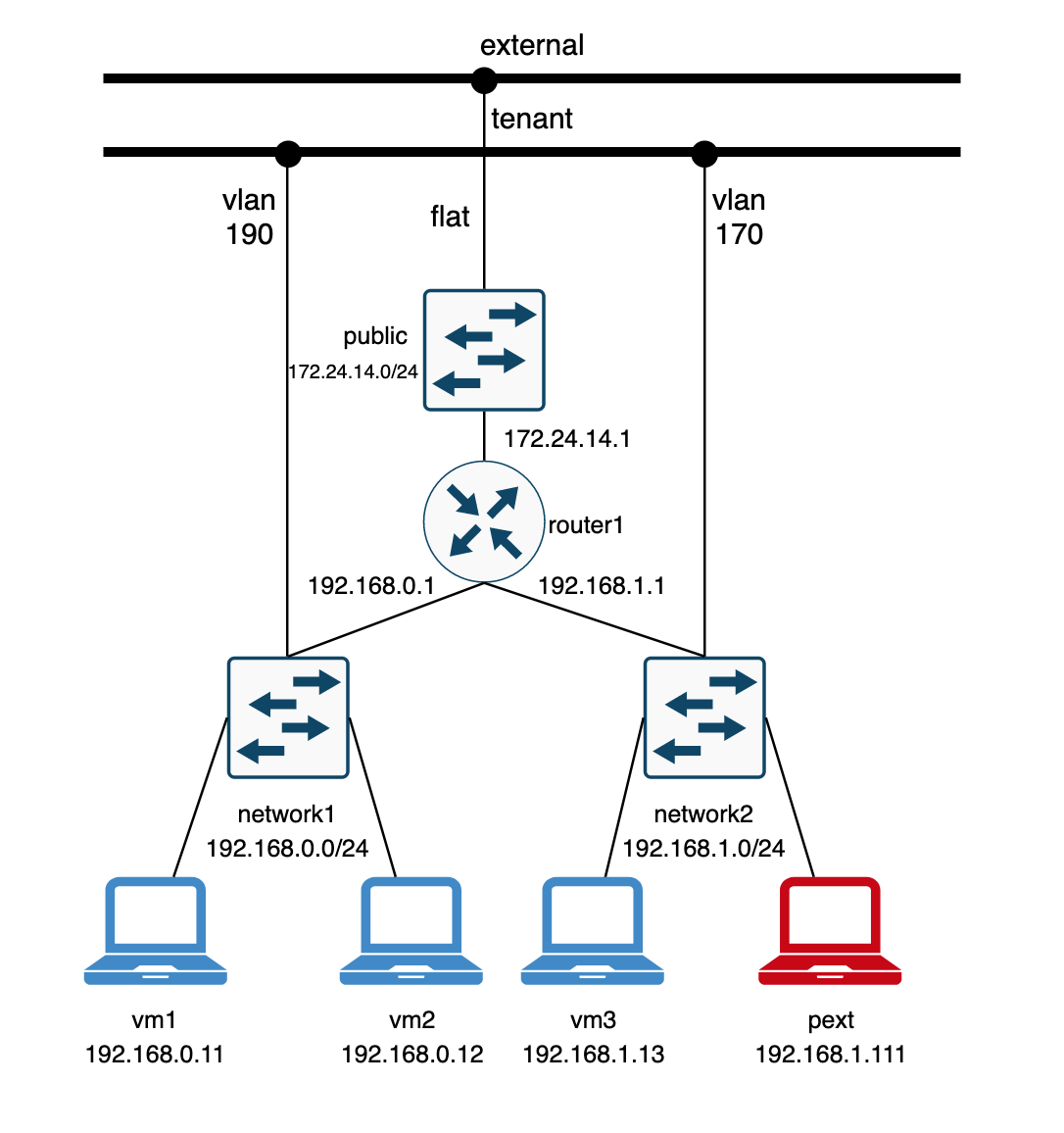
From a pure OVN perspective, I created the following setup that will hopefully help understand the details and how to troubleshoot this type of ports.

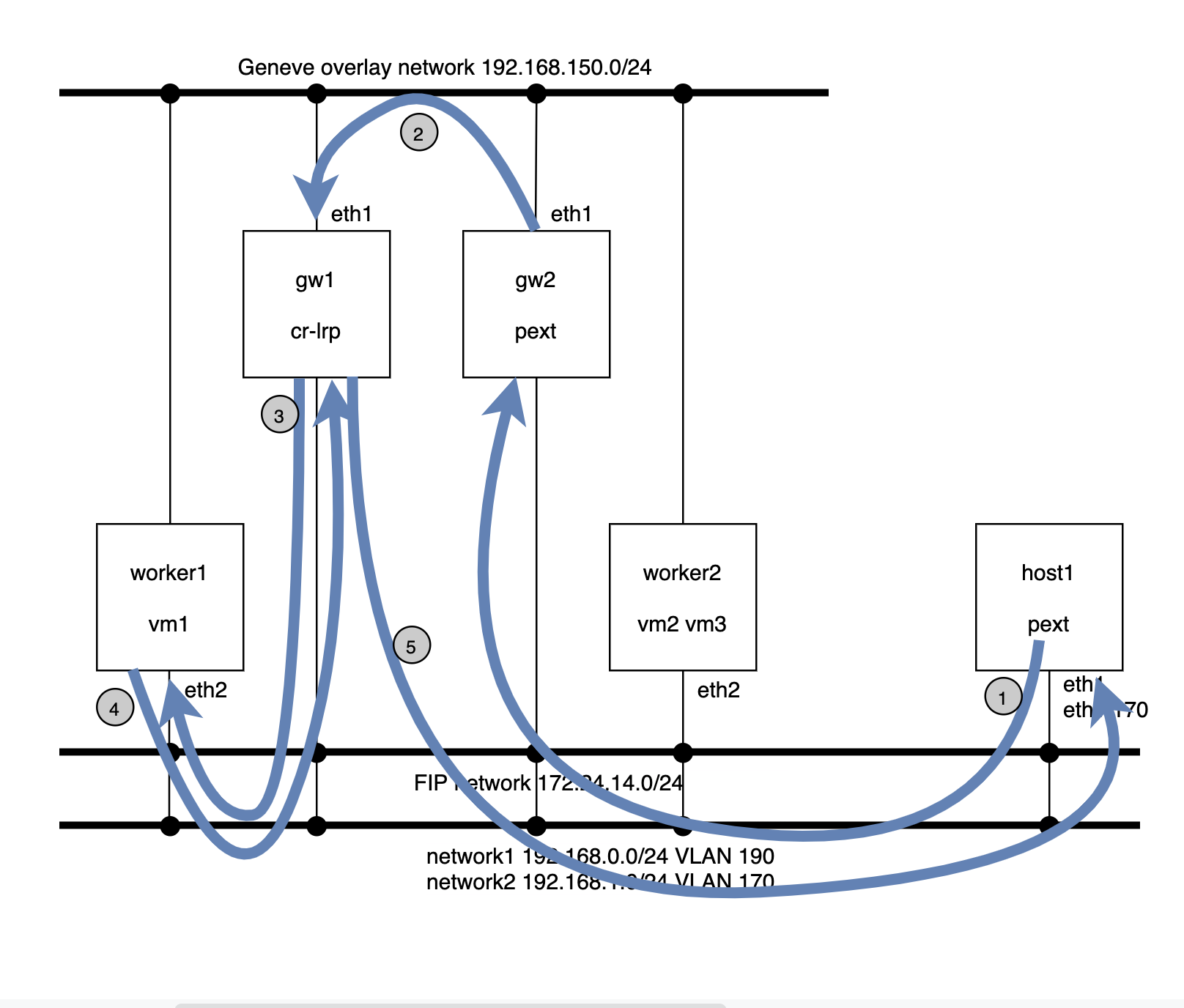
  • Two private networks:
    • network1: 192.168.0.0/24 of type VLAN and ID 190
    • network2: 192.168.1.0/24 of type VLAN and ID 170
  • Two provider networks:
    • external: 172.24.14.0/24 used for Floating IP traffic
    • tenant: used by network1 and network2 VLAN networks
  • One Logical router that connects both private networks and the Floating IP network
    • router1-net1: “40:44:00:00:00:03” “192.168.0.1/24”
    • router1-net2: “40:44:33:00:00:05” “192.168.1.1/24”
    • router1-public: “40:44:00:00:00:04” “172.24.14.1/24”
  • 4 Virtual Machines (simulated with network namespaces), 2 on each network
    • vm1: addresses: [“40:44:00:00:00:01 192.168.0.11”]
    • vm2: addresses: [“40:44:00:00:00:02 192.168.0.12”]
    • vm3: addresses: [“40:44:33:00:00:03 192.168.1.13”]
    • pext: addresses: [“40:44:44:00:00:10 192.168.1.111”]

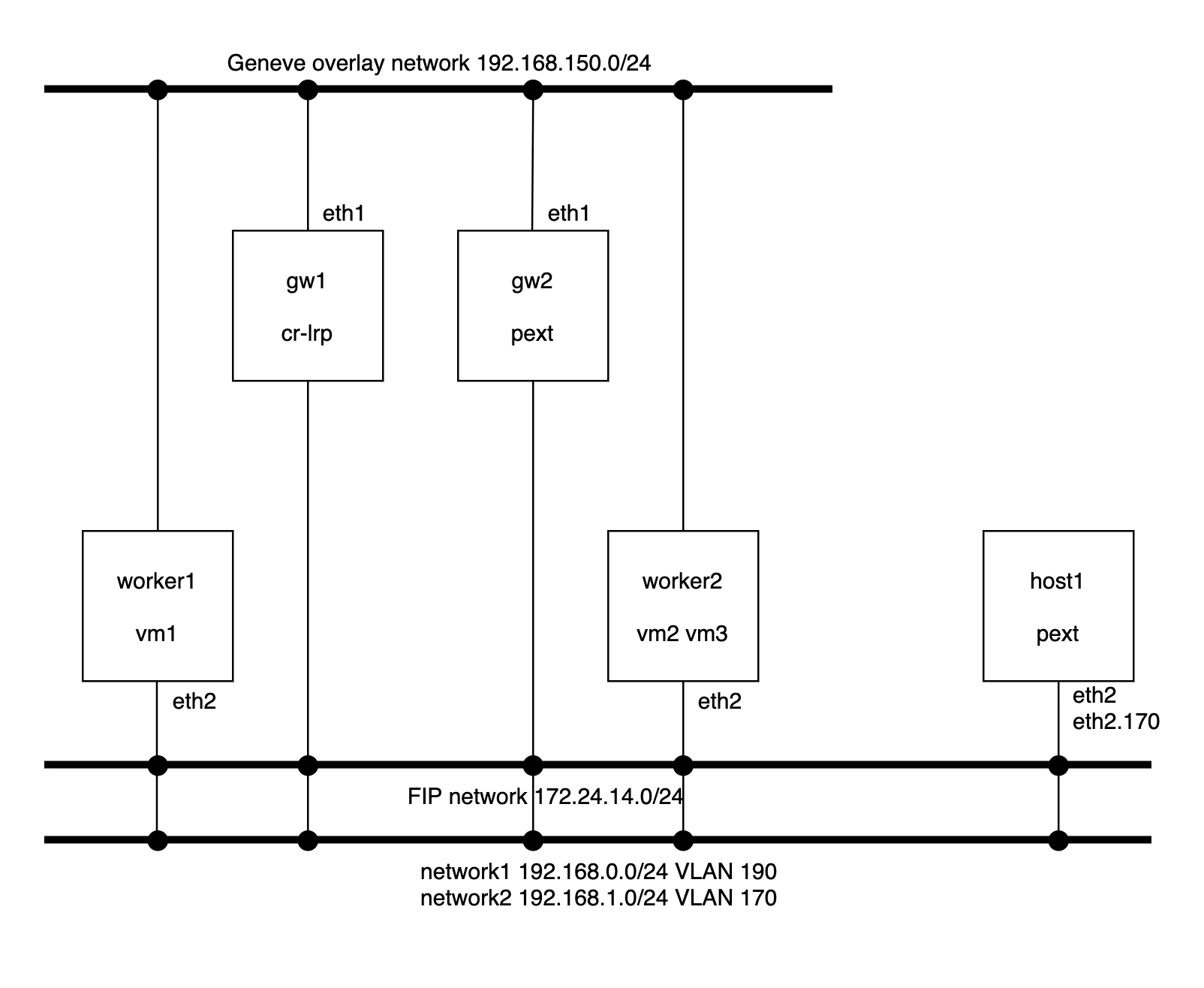
The physical layout involves the following nodes:

  • Worker nodes:
    • They have one NIC connected to the Geneve overlay network and another NIC on the provider network using the same OVS bridge (br-ex) for the flat external network and for both VLAN tenant networks.
  • Gateway nodes:
    • Same network configuration as the worker nodes 
    • gw1: which hosts the router gateway port for the Logical Router
    • gw2: which hosts the external port (pext)
  • Host
    • This server is just another machine which has access to the provider networks and no OVN/OVS components are running on it.
    • To illustrate different scenarios, during the provisioning phase, it’ll be configured with a network namespace connected to an OVS bridge and a VLAN device on the network2 (VLAN 170) with the MAC address of the external port.

A full vagrant setup can be found here that will deploy and configure the above setup for you in less than 10 minutes 🙂

The configuration of the external port in the OVN NorthBound database can be found here:


# Create the external port
ovn-nbctl lsp-add network2 pext
ovn-nbctl lsp-set-addresses pext \
          "40:44:44:00:00:10 192.168.1.111"
ovn-nbctl lsp-set-type pext external

# Schedule the external port in gw2
ovn-nbctl --id=@ha_chassis  create HA_Chassis \
          chassis_name=gw2 priority=1 -- \
          --id=@ha_chassis_group create \
          HA_Chassis_Group name=default2 \
          ha_chassis=[@ha_chassis] -- \
          set Logical_Switch_Port pext \
          ha_chassis_group=@ha_chassis_group

DHCP

When using a regular OVN port, the DHCP request from the VM hits the integration bridge and, via a controller action, is served by the local ovn-controller instance. Also, the DHCP request never leaves the hypervisor.

However, when it comes to external ports, the broadcast request will be processed by the chassis where the port is scheduled and the ovn-controller instance running there will be responsible of serving DHCP for it.

Let’s get to our setup and issue the request from host1:

[root@host1 vagrant] ip netns exec pext dhclient -v -i pext.170 --no-pid
Listening on LPF/pext.170/40:44:44:00:00:10
Sending on   LPF/pext.170/40:44:44:00:00:10
Sending on   Socket/fallback
DHCPREQUEST on pext.170 to 255.255.255.255 port 67 (xid=0x5149c1a3)
DHCPACK from 192.168.1.1 (xid=0x56bf40c1)
bound to 192.168.1.111 -- renewal in 1667 seconds.

Since we scheduled the external port on the gw2, we’d expect the request being handled there which we can check by inspecting the relevant logs:

[root@gw2 ~] tail -f /usr/var/log/ovn/ovn-controller.log
2020-09-08T09:01:52.547Z|00007|pinctrl(ovn_pinctrl0)
|INFO|DHCPACK 40:44:44:00:00:10 192.168.1.111

Below you can see the flows installed to handle DHCP in the gw2 node:

table=22, priority=100, udp, reg14=0x2, metadata=0x3, dl_src=40:44:44:00:00:10, nw_src=192.168.1.111, nw_dst=255.255.255.255, tp_src=68, tp_dst=67 actions=controller(…

table=22, priority=100, udp, reg14=0x2, metadata=0x3, dl_src=40:44:44:00:00:10, nw_src=0.0.0.0, nw_dst=255.255.255.255, tp_src=68, tp_dst=67 actions=controller(…

table=22, priority=100, udp, reg14=0x2, metadata=0x3, dl_src=40:44:44:00:00:10, nw_src=192.168.1.111, nw_dst=192.168.1.1, tp_src=68, tp_dst=67 actions=controller(…

Regular L2 traffic path

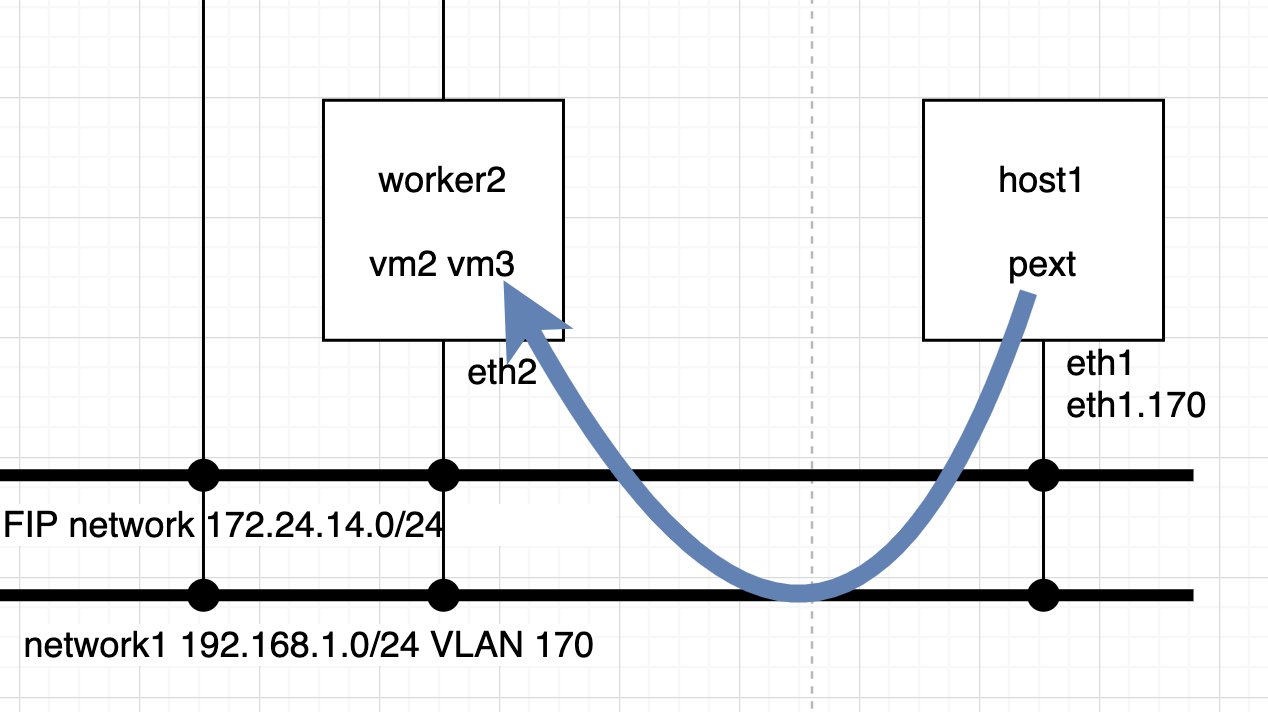
This is the easy path. As the external port MAC/IP addresses are known to OVN, whenever the packet arrives to the destination chassis via a localnet port they’ll be processed normally and delivered to the output port. No extra hops are observed:

Let’s ping from the external port pext to vm3 which are in the same network. The expected path is for the ICMP packets to exit host1 from eth1 tagged with VLAN 170 and reach worker2 on eth2:

[root@host1 vagrant]# ip netns exec pext ping 192.168.1.13 -c2
PING 192.168.1.13 (192.168.1.13) 56(84) bytes of data.
64 bytes from 192.168.1.13: icmp_seq=1 ttl=64 time=0.331 ms
64 bytes from 192.168.1.13: icmp_seq=2 ttl=64 time=0.299 ms

— 192.168.1.13 ping statistics —
2 packets transmitted, 2 received, 0% packet loss, time 1000ms
rtt min/avg/max/mdev = 0.299/0.315/0.331/0.016 ms

Traffic from host1 arrives directly with the destination MAC address of the vm3 port and the reply is received from that same MAC:

[root@host1 ~]# tcpdump -i eth1 -vvnee
tcpdump: listening on eth1, link-type EN10MB (Ethernet), capture size 262144 bytes
14:45:22.919136 40:44:44:00:00:10 > 40:44:33:00:00:03, ethertype 802.1Q (0x8100), length 102: vlan 170, p 0, ethertype IPv4, (tos 0x0, ttl 64, id 14603, offset 0, flags [DF], proto ICMP (1), length 84)
192.168.1.111 > 192.168.1.13: ICMP echo request, id 19425, seq 469, length 64


14:45:22.919460 40:44:33:00:00:03 > 40:44:44:00:00:10, ethertype 802.1Q (0x8100), length 102: vlan 170, p 0, ethertype IPv4, (tos 0x0, ttl 64, id 13721, offset 0, flags [none], proto ICMP (1), length 84)
192.168.1.13 > 192.168.1.111: ICMP echo reply, id 19425, seq 469, length 64

At worker2, we see the traffic coming in from the eth2 NIC on the network2 VLAN 170:

[root@worker2 ~]# tcpdump -i eth2 -vvne
tcpdump: listening on eth2, link-type EN10MB (Ethernet), capture size 262144 bytes
14:43:33.009370 40:44:44:00:00:10 > 40:44:33:00:00:03, ethertype 802.1Q (0x8100), length 102: vlan 170, p 0, ethertype IPv4, (tos 0x0, ttl 64, id 22650, offset 0, flags [DF], proto ICMP (1), length 84)


192.168.1.111 > 192.168.1.13: ICMP echo request, id 19425, seq 360, length 64
14:43:33.009472 40:44:33:00:00:03 > 40:44:44:00:00:10, ethertype 802.1Q (0x8100), length 102: vlan 170, p 0, ethertype IPv4, (tos 0x0, ttl 64, id 23154, offset 0, flags [none], proto ICMP (1), length 84)
192.168.1.13 > 192.168.1.111: ICMP echo reply, id 19425, seq 360, length 64

Routed traffic path

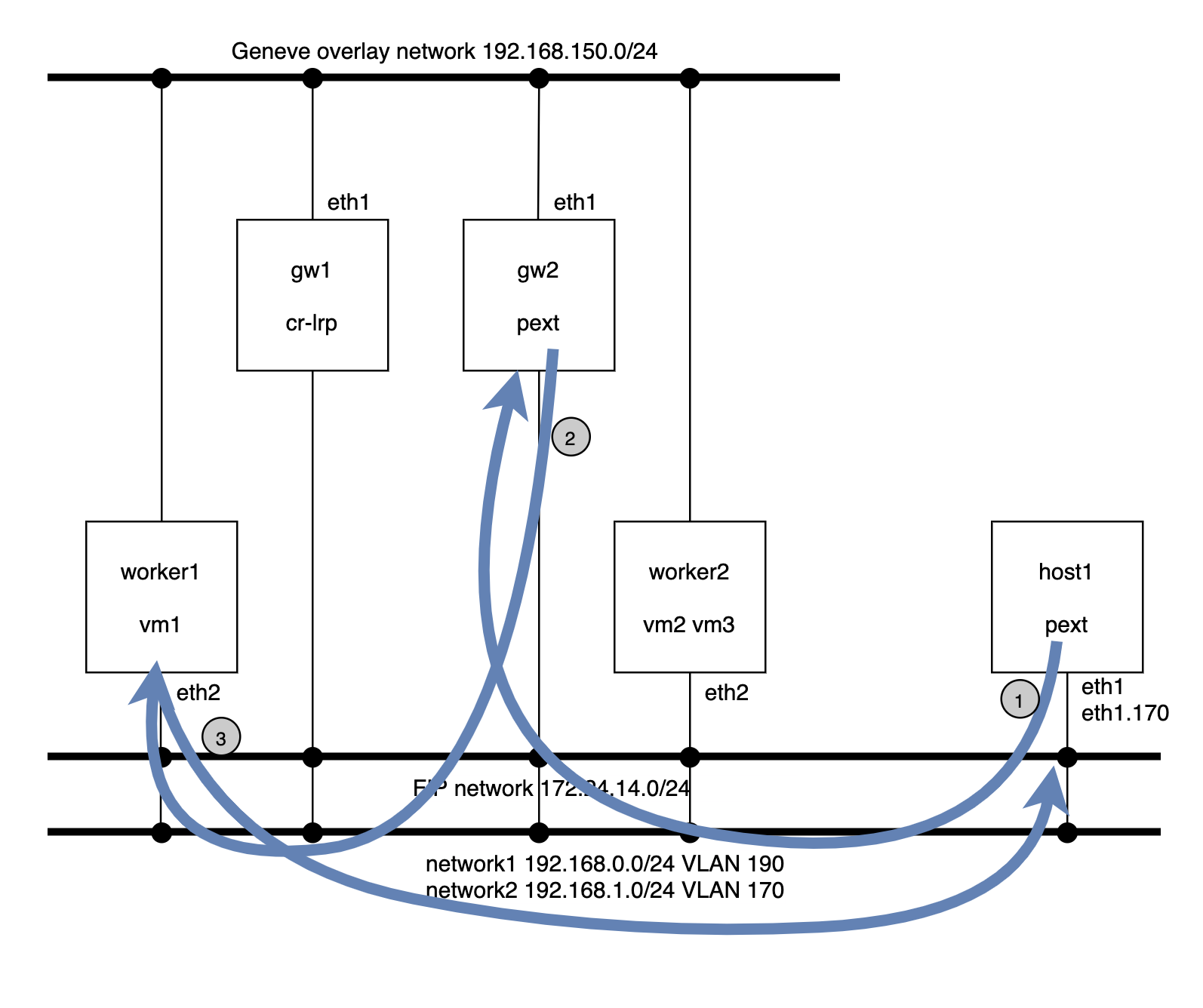
In this example, we’re going to ping from the external port pext to vm1 (192.168.0.11) located in worker1. Now, the packet will exit the host1 with the destination MAC address of the router port (192.168.1.1). Since the traffic is originated by pext and it is bound to the gateway gw2, the routing will happen there.


The router pipeline, and network1 and 2 pipelines will run in the gw2 and, from here, the packet goes out already to the network2 (VLAN 190) to worker1.


  • Ping from external port pext to vm1

[root@host1 ~]# ip netns exec pext ping 192.168.0.11 -c2
PING 192.168.0.11 (192.168.0.11) 56(84) bytes of data.
64 bytes from 192.168.0.11: icmp_seq=1 ttl=63 time=2.67 ms
64 bytes from 192.168.0.11: icmp_seq=2 ttl=63 time=0.429 ms

— 192.168.0.11 ping statistics —
2 packets transmitted, 2 received, 0% packet loss, time 1001ms
rtt min/avg/max/mdev = 0.429/1.553/2.678/1.125 ms

[root@host1 ~]# ip net e pext ip neigh
192.168.1.1 dev pext.170 lladdr 40:44:33:00:00:05 REACHABLE

[root@host1 ~]# tcpdump -i eth1 -vvnee
tcpdump: listening on eth1, link-type EN10MB (Ethernet), capture size 262144 bytes
16:18:52.285722 40:44:44:00:00:10 > 40:44:33:00:00:05, ethertype 802.1Q (0x8100), length 102: vlan 170, p 0, ethertype IPv4, (tos 0x0, ttl 64, id 15048, offset 0, flags [DF], proto ICMP (1), length 84)
192.168.1.111 > 192.168.0.11: ICMP echo request, id 1257, seq 6, length 64

  • Packet arrives to gw2 for routing:

[root@gw2 ~]# tcpdump -i eth2 -vvne icmp
tcpdump: listening on eth2, link-type EN10MB (Ethernet), capture size 262144 bytes
16:19:40.901874 40:44:44:00:00:10 > 40:44:33:00:00:05, ethertype 802.1Q (0x8100), length 102: vlan 170, p 0, ethertype IPv4, (tos 0x0, ttl 64, id 41726, offset 0, flags [DF], proto ICMP (1), length 84)
192.168.1.111 > 192.168.0.11: ICMP echo request, id 1257, seq 56, length 64

  • And from gw2, the packet is sent to the destination vm vm1 on the VLAN 190 network:

12:31:13.737551 40:44:44:00:00:10 > 40:44:33:00:00:05, ethertype 802.1Q (0x8100), length 102: vlan 170, p 0, ethertype IPv4, (tos 0x0, ttl 64, id 35405, offset 0, flags [DF], proto ICMP (1), length 84)
192.168.1.111 > 192.168.0.11: ICMP echo request, id 6103, seq 5455, length 64
12:31:13.737583 1e:02:ad:bb:aa:cc > 40:44:00:00:00:01, ethertype 802.1Q (0x8100), length 102: vlan 190, p 0, ethertype IPv4, (tos 0x0, ttl 63, id 35405, offset 0, flags [DF], proto ICMP (1), length 84)
192.168.1.111 > 192.168.0.11: ICMP echo request, id 6103, seq 5455, length 64

  • At worker1, the packet is delivered to the tap port of vm1 and this will reply to the ping

[root@worker1 ~]# ip netns exec vm1 tcpdump -i vm1 -vvne icmp
tcpdump: listening on vm1, link-type EN10MB (Ethernet), capture size 262144 bytes
16:21:38.561881 40:44:00:00:00:03 > 40:44:00:00:00:01, ethertype IPv4 (0x0800), length 98: (tos 0x0, ttl 63, id 32180, offset 0, flags [DF], proto ICMP (1), length 84)
192.168.1.111 > 192.168.0.11: ICMP echo request, id 1278, seq 18, length 64
16:21:38.561925 40:44:00:00:00:01 > 40:44:00:00:00:03, ethertype IPv4 (0x0800), length 98: (tos 0x0, ttl 64, id 25498, offset 0, flags [none], proto ICMP (1), length 84)
192.168.0.11 > 192.168.1.111: ICMP echo reply, id 1278, seq 18, length 64

  • The ICMP echo reply packet will be sent directly to pext through the localnet port to the physical network tagged with VLAN 170:

[root@host1 ~]# tcpdump -vvnne -i eth1 icmp
tcpdump: listening on eth1, link-type EN10MB (Ethernet), capture size 262144 bytes
12:35:00.322735 1e:02:ad:bb:aa:77 > 40:44:44:00:00:10, ethertype 802.1Q (0x8100), length 102: vlan 170, p 0, ethertype IPv4, (tos 0x0, ttl 63, id 18741, offset 0, flags [none], proto ICMP (1), length 84)
192.168.0.11 > 192.168.1.111: ICMP echo reply, id 6103, seq 5681, length 644

You might have noticed that the source MAC address (1e:02:ad:bb:aa:77) in the last step doesn’t correspond to any OVN logical port. This is because, in order for the routing to be distributed, OVN rewrites this MAC address to that of external_ids:ovn-chassis-mac-mappings. In our case, this tell us as well that the traffic is coming directly from worker1 saving the extra hop that we see for the pext -> vm1 path via gw2.

[root@worker1 ~]# ovs-vsctl get open . external_ids:ovn-chassis-mac-mappings
“tenant:1e:02:ad:bb:aa:77”

Floating IP traffic path

The FIP traffic path (for non Distributed Virtual RoutingDVR –  case) is similar to the case that we just described except for the fact that since we require to traverse the distributed gateway port, our traffic will take an extra hop.

Example of ping from pext to the Floating IP of vm1 (172.24.14.100):

  1. The packet goes from host1 to gw2 via the VLAN 170 network with the destination MAC address of the network2 router port.
  2. From gw2, the traffic will be steered to the gw1 node which is hosting the distributed gateway port. This traffic is sent out via the Geneve overlay tunnel.
  3. gw1 will perform the routing and send the traffic to the FIP of vm1 via the public flat network (172.24.14.0/24) and src IP that of the SNAT (172.24.14.1).
  4. The request arrives to worker1 where ovn-controller un-NATs the packet to the vm1 (192.168.0.11) and delivers it to the tap interface. The reply from the vm1 is NATed to the FIP (172.14.14.100) and sent back to the router at gw1 via the flat network.
  5. gw1 will perform the routing to the network2 and push the reply packet directly onto the network2 with VLAN 190 which will be received at host1.

OpenStack

For use cases like SR-IOV workloads, OpenStack is responsible for creating an OVN port of type ‘external‘ in the NorthBound database and also its location, ie., which chassis are going to claim the port and install the relevant flows to, for example, serve DHCP.

This is done through a HA Chassis Group where the OVN Neutron plugin adds all the external ports to and, usually, the controller nodes belong to it. This way if one node goes down, all the external ports will be served from the next highest priority chassis in the group.

Information about how OpenStack handles this can be found here.

Future uses of OVN external ports include baremetal provisioning but as of this writing we lack some features like PXE chaining in OVN.


Debugging scaling issues on OVN

One of the great things of OVN is that North/South routing can happen locally in the hypervisor when a ‘dnat_and_snat‘ rule is used (aka Floating IP) without having to go through a central or network node.

The way it works is that when outgoing traffic reaches the OVN bridge, the source IP address is changed by the Floating IP (snat) and pushed out to the external network. Similarly, when the packet comes in, the Floating IP address is changed (dnat) by that of the virtual machine in the private network.

In the OpenStack world, this is called DVR (“Distributed Virtual Routing”) as the routing doesn’t need to traverse any central node and happens on compute nodes meaning no extra hops, no overlay traffic and distributed routing processing.

The main advantage is that if all your workloads have a Floating IP and a lot of N/S traffic, the cloud can be well dimensioned and it’s very scalable (no need to scale any network/gateway nodes as you scale out the number of computes and less dependency on the control plane). The drawback is that you’ll need to consume IP addresses from the FIP pool. Yeah, it couldn’t be all good news :p

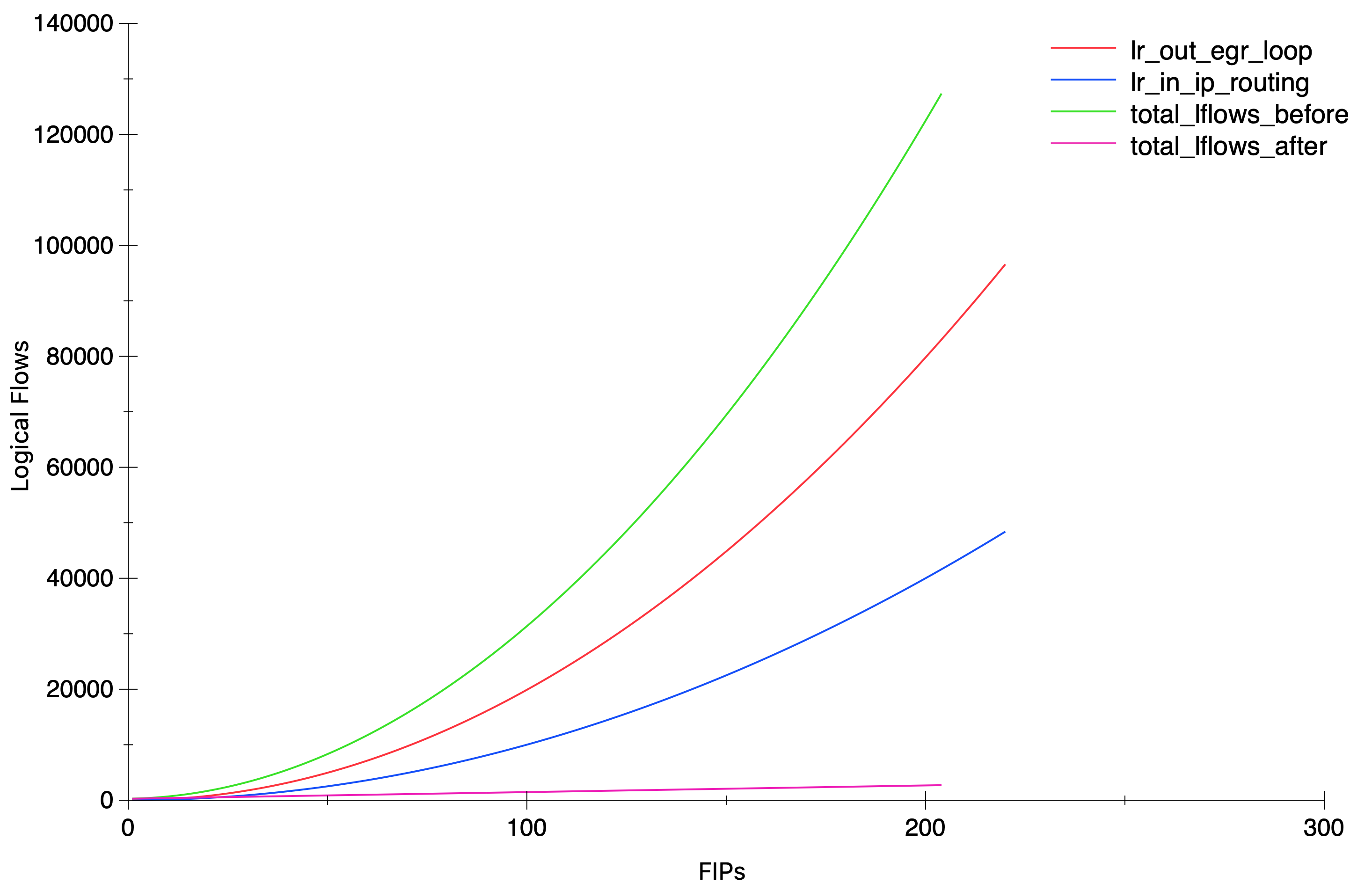
All this introduction to say that during some testing on an OVN cluster with lots of Floating IPs, we noticed that the amount of Logical Flows was *huge* and that led to numerous problems related to a very high CPU and memory consumption on both server (ovsdb-server) and client (ovn-controller) sides.

I wanted to understand how the flows were distributed and what was the main contributor(s) to this explosion. What I did is simply count the number of flows on every stage and sorting them. This showed that 93% of all the Logical Flows were in two stages:

$ head -n 6 logical_flows_distribution_sorted.txt
lr_out_egr_loop: 423414  62.24%
lr_in_ip_routing: 212199  31.19%
lr_in_ip_input: 10831  1.59%
ls_out_acl: 4831  0.71%
ls_in_port_sec_ip: 3471  0.51%
ls_in_l2_lkup: 2360  0.34%

Here’s the simple commands that I used to figure out the flow distribution:

# ovn-sbctl list Logical_Flow > logical_flows.txt

# Retrieve all the stages in the current pipeline
$ grep ^external_ids logical_flows.txt | sed 's/.*stage-name=//' | tr -d '}' | sort | uniq

# Count how many flows on each stage
$ while read stage; do echo $stage: $(grep $stage logical_flows.txt -c); done < stage_names.txt  > logical_flows_distribution.txt

$ sort  -k 2 -g -r logical_flows_distribution.txt  > logical_flows_distribution_sorted.txt

Next step would be to understand what’s in those two tables (lr_out_egr_loop & lr_in_ip_routing):

_uuid               : e1cc600a-fb9c-4968-a124-b0f78ed8139f
actions             : "next;"
external_ids        : {source="ovn-northd.c:8958", stage-name=lr_out_egr_loop}
logical_datapath    : 9cd315f4-1033-4f71-a26e-045a379aebe8
match               : "ip4.src == 172.24.4.10 && ip4.dst == 172.24.4.209"
pipeline            : egress
priority            : 200
table_id            : 2
hash                : 0

_uuid               : c8d8400a-590e-4b7e-b433-7a1491d31488
actions             : "inport = outport; outport = \"\"; flags = 0; flags.loopback = 1; reg9[1] = 1; next(pipeline=ingress, table=0); "
external_ids        : {source="ovn-northd.c:8950", stage-name=lr_out_egr_loop}
logical_datapath    : 9cd315f4-1033-4f71-a26e-045a379aebe8
match               : "is_chassis_resident(\"vm1\") && ip4.src == 172.24.4.218 && ip4.dst == 172.24.4.220"
pipeline            : egress
priority            : 300
table_id            : 2
hash                : 0
_uuid               : 0777b005-0ff0-40cb-8532-f7e2261dae06
actions             : "outport = \"router1-public\"; eth.src = 40:44:00:00:00:06; eth.dst = 40:44:00:00:00:07; reg0 = ip4.dst; reg1 = 172.24.4.218; reg9[2] = 1; reg9[0] = 0; ne
xt;"
external_ids        : {source="ovn-northd.c:6945", stage-name=lr_in_ip_routing}
logical_datapath    : 9cd315f4-1033-4f71-a26e-045a379aebe8
match               : "inport == \"router1-net1\" && ip4.src == 192.168.0.11 && ip4.dst == 172.24.4.226"
pipeline            : ingress
priority            : 400
table_id            : 9
hash                : 0

Turns out that those flows are intended to handle inter-FIP communication. Basically, there are flows for every possible FIP pair so that the traffic doesn’t flow through a Geneve tunnel.

While FIP-to-FIP traffic between two OVN ports is not perhaps the most common use case, those flows are there to handle it that way that the traffic would be distributed and never sent through the overlay network.

A git blame on the code that generates those flows will show the commits [1][2] and some background on the actual issue.

With the results above, one would expect a quadratic growth but still, it’s always nice to pull some graphs 🙂


And again, the simple script that I used to get the numbers in the graph:

ovn-nbctl clear logical_router router1 nat
for i in {1..200}; do
  ovn-nbctl lr-nat-add router1 dnat_and_snat 172.24.4.$i 192.168.0.11 vm1 40:44:00:00:00:07
  # Allow some time to northd to generate the new lflows.
  ovn-sbctl list logical_flow > /dev/null
  ovn-sbctl list logical_flow > /tmp/lflows.txt
  S1=$(grep lr_out_egr_loop -c /tmp/lflows.txt )
  S2=$(grep lr_in_ip_routing -c /tmp/lflows.txt )
  echo $S1 $S2
done

Soon after I reported this scaling issue with the above findings, my colleague Numan did an amazing job fixing it with this patch. The results are amazing and for the same test scenario with 200 FIPs, the total amount of lflows dropped from ~127K to ~2.7K and most importantly, from an exponential to a linear growth.


Since the Logical Flows are represented in ASCII, they are also quite expensive in processing due to the string parsing, and not very cheap to transmit in the OVSDB protocol. This has been a great leap when it comes to scaling scaling environments with a heavy N/S traffic and lots of Floating IPs.

OVN Cluster Interconnection

A new feature has been recently introduced in OVN that allows multiple clusters to be interconnected at L3 level (here’s a link to the series of patches). This can be useful for scenarios with multiple availability zones (or physical regions) or simply to allow better scaling by having independent control planes yet allowing connectivity between workloads in separate zones.

Simplifying things, logical routers on each cluster can be connected via transit overlay networks. The interconnection layer is responsible for creating the transit switches in the IC database that will become visible to the connected clusters. Each cluster can then connect their logical routers to the transit switches. More information can be found in the ovn-architecture manpage.

I created a vagrant setup to test it out and become a bit familiar with it. All you need to do to recreate it is cloning and running ‘vagrant up‘ inside the ovn-interconnection folder:

https://github.com/danalsan/vagrants/tree/master/ovn-interconnection

This will deploy 7 CentOS machines (300MB of RAM each) with two separate OVN clusters (west & east) and the interconnection services. The layout is described in the image below:

Once the services are up and running, a few resources will be created on each cluster and the interconnection services will be configured with a transit switch between them:

Let’s see, for example, the logical topology of the east availability zone, where the transit switch ts1 is listed along with the port in the west remote zone:

[root@central-east ~]# ovn-nbctl show
switch c850599c-263c-431b-b67f-13f4eab7a2d1 (ts1)
    port lsp-ts1-router_west
        type: remote
        addresses: ["aa:aa:aa:aa:aa:02 169.254.100.2/24"]
    port lsp-ts1-router_east
        type: router
        router-port: lrp-router_east-ts1
switch 8361d0e1-b23e-40a6-bd78-ea79b5717d7b (net_east)
    port net_east-router_east
        type: router
        router-port: router_east-net_east
    port vm1
        addresses: ["40:44:00:00:00:01 192.168.1.11"]
router b27d180d-669c-4ca8-ac95-82a822da2730 (router_east)
    port lrp-router_east-ts1
        mac: "aa:aa:aa:aa:aa:01"
        networks: ["169.254.100.1/24"]
        gateway chassis: [gw_east]
    port router_east-net_east
        mac: "40:44:00:00:00:04"
        networks: ["192.168.1.1/24"]

As for the Southbound database, we can see the gateway port for each router. In this setup I only have one gateway node but, as any other distributed gateway port in OVN, it could be scheduled in multiple nodes providing HA

[root@central-east ~]# ovn-sbctl show
Chassis worker_east
    hostname: worker-east
    Encap geneve
        ip: "192.168.50.100"
        options: {csum="true"}
    Port_Binding vm1
Chassis gw_east
    hostname: gw-east
    Encap geneve
        ip: "192.168.50.102"
        options: {csum="true"}
    Port_Binding cr-lrp-router_east-ts1
Chassis gw_west
    hostname: gw-west
    Encap geneve
        ip: "192.168.50.103"
        options: {csum="true"}
    Port_Binding lsp-ts1-router_west

If we query the interconnection databases, we will see the transit switch in the NB and the gateway ports in each zone:

[root@central-ic ~]# ovn-ic-nbctl show
Transit_Switch ts1

[root@central-ic ~]# ovn-ic-sbctl show
availability-zone east
    gateway gw_east
        hostname: gw-east
        type: geneve
            ip: 192.168.50.102
        port lsp-ts1-router_east
            transit switch: ts1
            address: ["aa:aa:aa:aa:aa:01 169.254.100.1/24"]
availability-zone west
    gateway gw_west
        hostname: gw-west
        type: geneve
            ip: 192.168.50.103
        port lsp-ts1-router_west
            transit switch: ts1
            address: ["aa:aa:aa:aa:aa:02 169.254.100.2/24"]

With this topology, traffic flowing from vm1 to vm2 shall flow from gw-east to gw-west through a Geneve tunnel. If we list the ports in each gateway we should be able to see the tunnel ports. Needless to say, gateways have to be mutually reachable so that the transit overlay network can be established:

[root@gw-west ~]# ovs-vsctl show
6386b867-a3c2-4888-8709-dacd6e2a7ea5
    Bridge br-int
        fail_mode: secure
        Port ovn-gw_eas-0
            Interface ovn-gw_eas-0
                type: geneve
                options: {csum="true", key=flow, remote_ip="192.168.50.102"}

Now, when vm1 pings vm2, the traffic flow should be like:

(vm1) worker_east ==== gw_east ==== gw_west ==== worker_west (vm2).

Let’s see it via ovn-trace tool:

[root@central-east vagrant]# ovn-trace  --ovs --friendly-names --ct=new net_east  'inport == "vm1" && eth.src == 40:44:00:00:00:01 && eth.dst == 40:44:00:00:00:04 && ip4.src == 192.168.1.11 && ip4.dst == 192.168.2.12 && ip.ttl == 64 && icmp4.type == 8'


ingress(dp="net_east", inport="vm1")
...
egress(dp="net_east", inport="vm1", outport="net_east-router_east")
...
ingress(dp="router_east", inport="router_east-net_east")
...
egress(dp="router_east", inport="router_east-net_east", outport="lrp-router_east-ts1")
...
ingress(dp="ts1", inport="lsp-ts1-router_east")
...
egress(dp="ts1", inport="lsp-ts1-router_east", outport="lsp-ts1-router_west")
 9. ls_out_port_sec_l2 (ovn-northd.c:4543): outport == "lsp-ts1-router_west", priority 50, uuid c354da11
    output;
    /* output to "lsp-ts1-router_west", type "remote" */

Now let’s capture Geneve traffic on both gateways while a ping between both VMs is running:

[root@gw-east ~]# tcpdump -i genev_sys_6081 -vvnee icmp
tcpdump: listening on genev_sys_6081, link-type EN10MB (Ethernet), capture size 262144 bytes
10:43:35.355772 aa:aa:aa:aa:aa:01 > aa:aa:aa:aa:aa:02, ethertype IPv4 (0x0800), length 98: (tos 0x0, ttl 63, id 11379, offset 0, flags [DF], proto ICMP (1), length 84)
    192.168.1.11 > 192.168.2.12: ICMP echo request, id 5494, seq 40, length 64
10:43:35.356077 aa:aa:aa:aa:aa:01 > aa:aa:aa:aa:aa:02, ethertype IPv4 (0x0800), length 98: (tos 0x0, ttl 63, id 11379, offset 0, flags [DF], proto ICMP (1), length 84)
    192.168.1.11 > 192.168.2.12: ICMP echo request, id 5494, seq 40, length 64
10:43:35.356442 aa:aa:aa:aa:aa:02 > aa:aa:aa:aa:aa:01, ethertype IPv4 (0x0800), length 98: (tos 0x0, ttl 63, id 42610, offset 0, flags [none], proto ICMP (1), length 84)
    192.168.2.12 > 192.168.1.11: ICMP echo reply, id 5494, seq 40, length 64
10:43:35.356734 40:44:00:00:00:04 > 40:44:00:00:00:01, ethertype IPv4 (0x0800), length 98: (tos 0x0, ttl 62, id 42610, offset 0, flags [none], proto ICMP (1), length 84)
    192.168.2.12 > 192.168.1.11: ICMP echo reply, id 5494, seq 40, length 64


[root@gw-west ~]# tcpdump -i genev_sys_6081 -vvnee icmp
tcpdump: listening on genev_sys_6081, link-type EN10MB (Ethernet), capture size 262144 bytes
10:43:29.169532 aa:aa:aa:aa:aa:01 > aa:aa:aa:aa:aa:02, ethertype IPv4 (0x0800), length 98: (tos 0x0, ttl 63, id 8875, offset 0, flags [DF], proto ICMP (1), length 84)
    192.168.1.11 > 192.168.2.12: ICMP echo request, id 5494, seq 34, length 64
10:43:29.170058 40:44:00:00:00:10 > 40:44:00:00:00:02, ethertype IPv4 (0x0800), length 98: (tos 0x0, ttl 62, id 8875, offset 0, flags [DF], proto ICMP (1), length 84)
    192.168.1.11 > 192.168.2.12: ICMP echo request, id 5494, seq 34, length 64
10:43:29.170308 aa:aa:aa:aa:aa:02 > aa:aa:aa:aa:aa:01, ethertype IPv4 (0x0800), length 98: (tos 0x0, ttl 63, id 38667, offset 0, flags [none], proto ICMP (1), length 84)
    192.168.2.12 > 192.168.1.11: ICMP echo reply, id 5494, seq 34, length 64
10:43:29.170476 aa:aa:aa:aa:aa:02 > aa:aa:aa:aa:aa:01, ethertype IPv4 (0x0800), length 98: (tos 0x0, ttl 63, id 38667, offset 0, flags [none], proto ICMP (1), length 84)
    192.168.2.12 > 192.168.1.11: ICMP echo reply, id 5494, seq 34, length 64

You can observe that the ICMP traffic flows between the transit switch ports (aa:aa:aa:aa:aa:02 <> aa:aa:aa:aa:aa:01) traversing both zones.

Also, as the packet has gone through two routers (router_east and router_west), the TTL at the destination has been decremented twice (from 64 to 62):

[root@worker-west ~]# ip net e vm2 tcpdump -i any icmp -vvne
tcpdump: listening on any, link-type LINUX_SLL (Linux cooked), capture size 262144 bytes
10:49:32.491674  In 40:44:00:00:00:10 ethertype IPv4 (0x0800), length 100: (tos 0x0, ttl 62, id 57504, offset 0, flags [DF], proto ICMP (1), length 84)

This is a really great feature that opens a lot of possibilities for cluster interconnection and scaling. However, it has to be taken into account that it requires another layer of management that handles isolation (multitenancy) and avoids IP overlapping across the connected availability zones.

OVN Routing and ovn-trace

In the last post we covered how OVN distributes the pipeline execution across the different hypervisors thanks to the encapsulation used. Using the same system as a base, let’s create a Logical Router and a second Logical Switch where we can see how routing works between different nodes.


ovn-nbctl ls-add network1
ovn-nbctl ls-add network2
ovn-nbctl lsp-add network1 vm1
ovn-nbctl lsp-add network2 vm2
ovn-nbctl lsp-set-addresses vm1 "40:44:00:00:00:01 192.168.0.11"
ovn-nbctl lsp-set-addresses vm2 "40:44:00:00:00:02 192.168.1.11"

ovn-nbctl lr-add router1
ovn-nbctl lrp-add router1 router1-net1 40:44:00:00:00:03 192.168.0.1/24
ovn-nbctl lsp-add network1 net1-router1
ovn-nbctl lsp-set-addresses net1-router1 40:44:00:00:00:03
ovn-nbctl lsp-set-type net1-router1 router
ovn-nbctl lsp-set-options net1-router1 router-port=router1-net1

ovn-nbctl lrp-add router1 router1-net2 40:44:00:00:00:04 192.168.1.1/24
ovn-nbctl lsp-add network2 net2-router1
ovn-nbctl lsp-set-addresses net2-router1 40:44:00:00:00:04
ovn-nbctl lsp-set-type net2-router1 router
ovn-nbctl lsp-set-options net2-router1 router-port=router1-net2

And then on Worker1 and Worker2 respectively, let’s bind VM1 and VM2 ports inside network namespaces:

# Worker1
ovs-vsctl add-port br-int vm1 -- set Interface vm1 type=internal -- set Interface vm1 external_ids:iface-id=vm1
ip netns add vm1
ip link set vm1 netns vm1
ip netns exec vm1 ip link set vm1 address 40:44:00:00:00:01
ip netns exec vm1 ip addr add 192.168.0.11/24 dev vm1
ip netns exec vm1 ip link set vm1 up
ip netns exec vm1 ip route add default via 192.168.0.1

# Worker2
ovs-vsctl add-port br-int vm2 -- set Interface vm2 type=internal -- set Interface vm2 external_ids:iface-id=vm2
ip netns add vm2
ip link set vm2 netns vm2
ip netns exec vm2 ip link set vm2 address 40:44:00:00:00:02
ip netns exec vm2 ip addr add 192.168.1.11/24 dev vm2
ip netns exec vm2 ip link set vm2 up
ip netns exec vm2 ip route add default via 192.168.1.1

First, let’s check connectivity between two VMs through the Logical Router:

[root@worker1 ~]# ip netns exec vm1 ping 192.168.1.11 -c2
PING 192.168.1.11 (192.168.1.11) 56(84) bytes of data.
64 bytes from 192.168.1.11: icmp_seq=1 ttl=63 time=0.371 ms
64 bytes from 192.168.1.11: icmp_seq=2 ttl=63 time=0.398 ms

--- 192.168.1.11 ping statistics ---
2 packets transmitted, 2 received, 0% packet loss, time 1000ms
rtt min/avg/max/mdev = 0.371/0.384/0.398/0.023 ms

ovn-trace

Let’s now check with ovn-trace how the flow of a packet from VM1 to VM2 looks like and then we’ll verify how this gets realized in our physical deployment with 3 hypervisors: 

[root@central ~]# ovn-trace --summary network1 'inport == "vm1" && eth.src == 40:44:00:00:00:01 && eth.dst == 40:44:00:00:00:03 && ip4.src == 192.168.0.11 && ip4.dst == 192.168.1.11 && ip.ttl == 64'
# ip,reg14=0x1,vlan_tci=0x0000,dl_src=40:44:00:00:00:01,dl_dst=40:44:00:00:00:03,nw_src=192.168.0.11,nw_dst=192.168.1.11,nw_proto=0,nw_tos=0,nw_ecn=0,nw_ttl=64
ingress(dp="network1", inport="vm1") {
    next;
    outport = "net1-router1";
    output;
    egress(dp="network1", inport="vm1", outport="net1-router1") {
        output;
        /* output to "net1-router1", type "patch" */;
        ingress(dp="router1", inport="router1-net1") {
            next;
            ip.ttl--;
            reg0 = ip4.dst;
            reg1 = 192.168.1.1;
            eth.src = 40:44:00:00:00:04;
            outport = "router1-net2";
            flags.loopback = 1;
            next;
            eth.dst = 40:44:00:00:00:02;
            next;
            output;
            egress(dp="router1", inport="router1-net1", outport="router1-net2") {
                output;
                /* output to "router1-net2", type "patch" */;
                ingress(dp="network2", inport="net2-router1") {
                    next;
                    outport = "vm2";
                    output;
                    egress(dp="network2", inport="net2-router1", outport="vm2") {
                        output;
                        /* output to "vm2", type "" */;
                    };
                };
            };
        };
    };
};

As you can see, the packet goes through 3 OVN datapaths: network1, router1 and network2. As VM1 is on Worker1 and VM2 is on Worker2, the packet will traverse the tunnel between both hypervisors and thanks to the Geneve encapsulation, the execution pipeline will be distributed:

  • Worker1 will execute both ingress and egress pipelines of network1
  • Worker1 will also perform the routing (lines 10 to 28 above) and the ingress pipeline for network2. Then the packet will be pushed to Worker2 via the tunnel.
  • Worker2 will execute the egress pipeline for network2 delivering the packet to VM2.

Let’s launch a ping from VM1 and check the Geneve traffic on Worker2: 

52:54:00:13:e0:a2 > 52:54:00:ac:67:5b, ethertype IPv4 (0x0800), length 156: (tos 0x0, ttl 64, id 46587, offset 0, flags [DF], proto UDP (17), length 142)
    192.168.50.100.55145 > 192.168.50.101.6081: [bad udp cksum 0xe6a5 -> 0xb087!] Geneve, Flags [C],
vni 0x8,
proto TEB (0x6558),
options [class Open Virtual Networking (OVN) (0x102)
type 0x80(C) len 8
data 00020001]

From what we learnt in the previous post, when the packet arrives to Worker2, the egress pipeline of Datapath 8 (VNI) will be executed being ingress port = 2 and egress port = 1. Let’s see if it matches what ovn-trace gave us earlier:

egress(dp=”network2″, inport=”net2-router1″, outport=”vm2″) 

[root@central ~]# ovn-sbctl get Datapath_Binding network2 tunnel_key
8
[root@central ~]# ovn-sbctl get Port_Binding net2-router1 tunnel-key
2
[root@central ~]# ovn-sbctl get Port_Binding vm2 tunnel-key
1

What about the reply from VM2 to VM1? If we check the tunnel traffic on Worker2 we’ll see the ICMP echo reply packets with different datapath and ingress/egress ports:

22:19:03.896340 52:54:00:ac:67:5b > 52:54:00:13:e0:a2, ethertype IPv4 (0x0800), length 156: (tos 0x0, ttl 64, id 30538, offset 0, flags [DF], proto UDP (17), length 142)
    192.168.50.101.13530 > 192.168.50.100.6081: [bad udp cksum 0xe6a5 -> 0x5419!] Geneve, Flags [C],
vni 0x7,
proto TEB (0x6558),
options [class Open Virtual Networking (OVN) (0x102)
type 0x80(C) len 8
data 00020001]


[root@central ~]# ovn-sbctl get Datapath_Binding network1 tunnel_key
7
[root@central ~]# ovn-sbctl get Port_Binding net1-router1 tunnel-key
2
[root@central ~]# ovn-sbctl get Port_Binding vm1 tunnel-key
1

As we can see, the routing happens locally in the source node; there’s no need to send the packet to any central/network node as the East/West routing is always distributed with OVN. In the case of North/South traffic, where SNAT is required, traffic will go to the gateway node but we’ll cover this in coming posts.

OpenFlow analysis

Until now, we just focused on the Logical elements but ovn-controller will ultimately translate the Logical Flows into physical flows on the OVN bridge.  Let’s inspect the ports that our bridge has on Worker2:

[root@worker2 ~]# ovs-ofctl show br-int
OFPT_FEATURES_REPLY (xid=0x2): dpid:0000404400000002
n_tables:254, n_buffers:0
capabilities: FLOW_STATS TABLE_STATS PORT_STATS QUEUE_STATS ARP_MATCH_IP
actions: output enqueue set_vlan_vid set_vlan_pcp strip_vlan mod_dl_src mod_dl_dst mod_nw_src mod_nw_dst mod_nw_tos mod_tp_src mod_tp_dst
 1(ovn-centra-0): addr:ea:64:c2:a9:86:fe
     config:     0
     state:      0
     speed: 0 Mbps now, 0 Mbps max
 2(ovn-worker-0): addr:de:96:64:2b:21:4a
     config:     0
     state:      0
     speed: 0 Mbps now, 0 Mbps max
 8(vm2): addr:40:44:00:00:00:02
     config:     0
     state:      0
     speed: 0 Mbps now, 0 Mbps max
 LOCAL(br-int): addr:40:44:00:00:00:02
     config:     PORT_DOWN
     state:      LINK_DOWN
     speed: 0 Mbps now, 0 Mbps max
OFPT_GET_CONFIG_REPLY (xid=0x4): frags=normal miss_send_len=0

We have 3 ports in the OVN bridge:

  1. ovn-centra-0: Tunnel port with Central node
  2. ovn-worker-0: Tunnel port with Worker1
  3. vm2: Our fake virtual machine that we bound to Worker2

When ICMP echo request packets are coming from VM1, we expect them to be arriving via port 2 and being delivered to VM2 on port 8. We can check this by inspecting the flows at table 0 (input) and table 65 (output) for br-int. For a more detailed information of the OpenFlow tables, see ovn-architecture(7) document, section “Architectural Physical Life Cycle of a Packet”.

[root@worker2 ~]# ovs-ofctl dump-flows br-int table=0 | grep idle_age='[0-1],'
cookie=0x0, duration=3845.572s, table=0, n_packets=2979, n_bytes=291942, idle_age=0, priority=100,in_port=2 actions=move:NXM_NX_TUN_ID[0..23]->OXM_OF_METADATA[0..23],move:NXM_NX_TUN_METADATA0[16..30]->NXM_NX_REG14[0..14],move:NXM_NX_TUN_METADATA0[0..15]->NXM_NX_REG15[0..15],resubmit(,33)


[root@worker2 ~]# ovs-ofctl dump-flows br-int table=65 | grep idle_age='[0-1],'
 cookie=0x0, duration=3887.336s, table=65, n_packets=3062, n_bytes=297780, idle_age=0, priority=100,reg15=0x1,metadata=0x8 actions=output:8

I was filtering the dump-flows output to display only those flows with an idle_age of just 0 or 1 seconds. This means that they’ve been recently hit so if we’re inspecting tables with lots of flows, we would filter away unwanted flows to focus just on the ones that we’re really interested. Please, note that for this particular example, I’ve set the VM2 link down to see only incoming ICMP packets from VM1 and hide the replies.

Let’s inspect the input flow on table 0 where the following actions happen:

actions=
move:NXM_NX_TUN_ID[0..23]->OXM_OF_METADATA[0..23],
move:NXM_NX_TUN_METADATA0[16..30]->NXM_NX_REG14[0..14],
move:NXM_NX_TUN_METADATA0[0..15]->NXM_NX_REG15[0..15],
resubmit(,33)

These actions will:

  • Copy the 24 bits of the VNI (Tunnel ID / Logical Datapath) to the OpenFlow metadata.
  • Copy bits 16-30 of the tunnel data (Ingress port) to the OpenvSwitch register 14
  • Copy bits 0-15 of the tunnel data (Egress port) to the OpenvSwitch register 15.

From the ovn-architecture document, we can read:

logical datapath field
A field that denotes the logical datapath through which a
packet is being processed. OVN uses the field that Open‐
Flow 1.1+ simply (and confusingly) calls “metadata” to
store the logical datapath. (This field is passed across
tunnels as part of the tunnel key.)

logical input port field
A field that denotes the logical port from which the
packet entered the logical datapath. OVN stores this in
Open vSwitch extension register number 14.

Geneve and STT tunnels pass this field as part of the
tunnel key. Although VXLAN tunnels do not explicitly
carry a logical input port, OVN only uses VXLAN to commu‐
nicate with gateways that from OVN’s perspective consist
of only a single logical port, so that OVN can set the
logical input port field to this one on ingress to the
OVN logical pipeline.

logical output port field
A field that denotes the logical port from which the
packet will leave the logical datapath. This is initial‐
ized to 0 at the beginning of the logical ingress pipe‐
line. OVN stores this in Open vSwitch extension register
number 15.

Geneve and STT tunnels pass this field as part of the
tunnel key. VXLAN tunnels do not transmit the logical
output port field. Since VXLAN tunnels do not carry a
logical output port field in the tunnel key, when a
packet is received from VXLAN tunnel by an OVN hypervi‐
sor, the packet is resubmitted to table 8 to determine
the output port(s); when the packet reaches table 32,
these packets are resubmitted to table 33 for local de‐
livery by checking a MLF_RCV_FROM_VXLAN flag, which is
set when the packet arrives from a VXLAN tunnel. 

Similarly, we can see that in the output action from table 65, the OpenFlow rule is matching on “reg15=0x1,metadata=0x8” when it outputs the packet to the OpenFlow port number 8 (VM2). As we saw earlier, metadata 8 corresponds to network2 Logical Switch and the output port (reg15) 1 corresponds to the VM2 logical port (tunnel_key 1).


Due to its distributed nature and everything being OpenFlow based, it may be a little bit tricky to trace packets when implementing Software Defined Networking with OVN compared to traditional solutions (iptables, network namespaces, …). Knowing the above concepts and getting familiar with the tools is key to debug OVN systems in an effective way.

OVN – Geneve Encapsulation

In the last post we created a Logical Switch with two ports residing on different hypervisors. Communication between those two ports took place over the tunnel interface using Geneve encapsulation. Let’s now take a closer look at this overlay traffic.

Without diving too much into the packet processing in OVN, we need to know that each Logical Datapath (Logical Switch / Logical Router) has an ingress and an egress pipeline. Whenever a packet comes in, the ingress pipeline is executed and after the output action, the egress pipeline will run to deliver the packet to its destination. More info here: http://docs.openvswitch.org/en/latest/faq/ovn/#ovn

In our scenario, when we ping from VM1 to VM2, the ingress pipeline of each ICMP packet runs on Worker1 (where VM1 is bound to) and the packet is pushed to the tunnel interface to Worker2 (where VM2 resides). When Worker2 receives the packet on its physical interface, the egress pipeline of the Logical Switch (network1) is executed to deliver the packet to VM2. But … How does OVN know where the packet comes from and which Logical Datapath should process it? This is where the metadata in the Geneve headers comes in.

Let’s get back to our setup and ping from VM1 to VM2 and capture traffic on the physical interface (eth1) of Worker2:

[root@worker2 ~]# sudo tcpdump -i eth1 -vvvnnexx

17:02:13.403229 52:54:00:13:e0:a2 > 52:54:00:ac:67:5b, ethertype IPv4 (0x0800), length 156: (tos 0x0, ttl 64, id 63920, offset 0, flags [DF], proto UDP (17), length 142)
    192.168.50.100.7549 > 192.168.50.101.6081: [bad udp cksum 0xe6a5 -> 0x7177!] Geneve, Flags [C], vni 0x1, proto TEB (0x6558), options [class Open Virtual Networking (OVN) (0x102) type 0x80(C) len 8 data 00010002]
        40:44:00:00:00:01 > 40:44:00:00:00:02, ethertype IPv4 (0x0800), length 98: (tos 0x0, ttl 64, id 41968, offset 0, flags [DF], proto ICMP (1), length 84)
    192.168.0.11 > 192.168.0.12: ICMP echo request, id 1251, seq 6897, length 64
        0x0000:  5254 00ac 675b 5254 0013 e0a2 0800 4500
        0x0010:  008e f9b0 4000 4011 5a94 c0a8 3264 c0a8
        0x0020:  3265 1d7d 17c1 007a e6a5 0240 6558 0000
        0x0030:  0100 0102 8001 0001 0002 4044 0000 0002
        0x0040:  4044 0000 0001 0800 4500 0054 a3f0 4000
        0x0050:  4001 1551 c0a8 000b c0a8 000c 0800 c67b
        0x0060:  04e3 1af1 94d9 6e5c 0000 0000 41a7 0e00
        0x0070:  0000 0000 1011 1213 1415 1617 1819 1a1b
        0x0080:  1c1d 1e1f 2021 2223 2425 2627 2829 2a2b
        0x0090:  2c2d 2e2f 3031 3233 3435 3637

17:02:13.403268 52:54:00:ac:67:5b > 52:54:00:13:e0:a2, ethertype IPv4 (0x0800), length 156: (tos 0x0, ttl 64, id 46181, offset 0, flags [DF], proto UDP (17), length 142)
    192.168.50.101.9683 > 192.168.50.100.6081: [bad udp cksum 0xe6a5 -> 0x6921!] Geneve, Flags [C], vni 0x1, proto TEB (0x6558), options [class Open Virtual Networking (OVN) (0x102) type 0x80(C) len 8 data 00020001]
        40:44:00:00:00:02 > 40:44:00:00:00:01, ethertype IPv4 (0x0800), length 98: (tos 0x0, ttl 64, id 16422, offset 0, flags [none], proto ICMP (1), length 84)
    192.168.0.12 > 192.168.0.11: ICMP echo reply, id 1251, seq 6897, length 64
        0x0000:  5254 0013 e0a2 5254 00ac 675b 0800 4500
        0x0010:  008e b465 4000 4011 9fdf c0a8 3265 c0a8
        0x0020:  3264 25d3 17c1 007a e6a5 0240 6558 0000
        0x0030:  0100 0102 8001 0002 0001 4044 0000 0001
        0x0040:  4044 0000 0002 0800 4500 0054 4026 0000
        0x0050:  4001 b91b c0a8 000c c0a8 000b 0000 ce7b
        0x0060:  04e3 1af1 94d9 6e5c 0000 0000 41a7 0e00
        0x0070:  0000 0000 1011 1213 1415 1617 1819 1a1b
        0x0080:  1c1d 1e1f 2021 2223 2425 2627 2829 2a2b
        0x0090:  2c2d 2e2f 3031 3233 3435 3637

Let’s now decode the ICMP request packet (I’m using this tool):

ICMP request inside the Geneve tunnel

Metadata


In the ovn-architecture(7) document, you can check how the Metadata is used in OVN in the Tunnel Encapsulations section. In short, OVN encodes the following information in the Geneve packets:

  • Logical Datapath (switch/router) identifier (24 bits) – Geneve VNI
  • Ingress and Egress port identifiers – Option with class 0x0102 and type 0x80 with 32 bits of data:
         1       15          16
       +---+------------+-----------+
       |rsv|ingress port|egress port|
       +---+------------+-----------+
         0

Back to our example: VNI = 0x000001 and Option Data = 00010002, so from the above:

Logical Datapath = 1   Ingress Port = 1   Egress Port = 2

Let’s take a look at SB database contents to see if they match what we expect:

[root@central ~]# ovn-sbctl get Datapath_Binding network1 tunnel-key
1

[root@central ~]# ovn-sbctl get Port_Binding vm1 tunnel-key
1

[root@central ~]# ovn-sbctl get Port_Binding vm2 tunnel-key
2

We can see that the Logical Datapath belongs to network1, that the ingress port is vm1 and that the output port is vm2 which makes sense as we’re analyzing the ICMP request from VM1 to VM2. 

By the time this packet hits Worker2 hypervisor, OVN has all the information to process the packet on the right pipeline and deliver the port to VM2 without having to run the ingress pipeline again.

What if we don’t use any encapsulation?

This is technically possible in OVN and there’s such scenarios like in the case where we’re managing a physical network directly and won’t use any kind of overlay technology. In this case, our ICMP request packet would’ve been pushed directly to the network and when Worker2 receives the packet, OVN needs to figure out (based on the IP/MAC addresses) which ingress pipeline to execute (twice, as it was also executed by Worker1) before it can go to the egress pipeline and deliver the packet to VM2.

Multinode OVN setup

As a follow up from the last post, we are now going to deploy a 3 nodes OVN setup to demonstrate basic L2 communication across different hypervisors. This is the physical topology and how services are distributed:

  • Central node: ovn-northd and ovsdb-servers (North and Southbound databases) as well as ovn-controller
  • Worker1 / Worker2: ovn-controller connected to Central node Southbound ovsdb-server (TCP port 6642)

In order to deploy the 3 machines, I’m using Vagrant + libvirt and you can checkout the Vagrant files and scripts used from this link. After running ‘vagrant up’, we’ll have 3 nodes with OVS/OVN installed from sources and we should be able to log in to the central node and verify that OVN is up and running and Geneve tunnels have been established to both workers:


[vagrant@central ~]$ sudo ovs-vsctl show
f38658f5-4438-4917-8b51-3bb30146877a
    Bridge br-int
        fail_mode: secure
        Port br-int
            Interface br-int
                type: internal
        Port "ovn-worker-1"
            Interface "ovn-worker-1"
                type: geneve
                options: {csum="true", key=flow, remote_ip="192.168.50.101"}
        Port "ovn-worker-0"
            Interface "ovn-worker-0"
                type: geneve
                options: {csum="true", key=flow, remote_ip="192.168.50.100"}
    ovs_version: "2.11.90"


For demonstration purposes, we’re going to create a Logical Switch (network1) and two Logical Ports (vm1 and vm2). Then we’re going to bind VM1 to Worker1 and VM2 to Worker2. If everything works as expected, we would be able to communicate both Logical Ports through the overlay network formed between both workers nodes.

We can run the following commands on any node to create the logical topology (please, note that if we run them on Worker1 or Worker2, we need to specify the NB database location by running ovn-nbctl with “–db=tcp:192.168.50.10:6641” as 6641 is the default port for NB database):

ovn-nbctl ls-add network1
ovn-nbctl lsp-add network1 vm1
ovn-nbctl lsp-add network1 vm2
ovn-nbctl lsp-set-addresses vm1 "40:44:00:00:00:01 192.168.0.11"
ovn-nbctl lsp-set-addresses vm2 "40:44:00:00:00:02 192.168.0.12"

And now let’s check the Northbound and Southbound databases contents. As we didn’t bind any port to the workers yet, “ovn-sbctl show” command should only list the chassis (or hosts in OVN jargon):

[root@central ~]# ovn-nbctl show
switch a51334e8-f77d-4d85-b01a-e547220eb3ff (network1)
    port vm2
        addresses: ["40:44:00:00:00:02 192.168.0.12"]
    port vm1
        addresses: ["40:44:00:00:00:01 192.168.0.11"]

[root@central ~]# ovn-sbctl show
Chassis "worker2"
    hostname: "worker2"
    Encap geneve
        ip: "192.168.50.101"
        options: {csum="true"}
Chassis central
    hostname: central
    Encap geneve
        ip: "127.0.0.1"
        options: {csum="true"}
Chassis "worker1"
    hostname: "worker1"
    Encap geneve
        ip: "192.168.50.100"
        options: {csum="true"}

Now we’re going to bind VM1 to Worker1:

ovs-vsctl add-port br-int vm1 -- set Interface vm1 type=internal -- set Interface vm1 external_ids:iface-id=vm1
ip netns add vm1
ip link set vm1 netns vm1
ip netns exec vm1 ip link set vm1 address 40:44:00:00:00:01
ip netns exec vm1 ip addr add 192.168.0.11/24 dev vm1
ip netns exec vm1 ip link set vm1 up

And VM2 to Worker2:

ovs-vsctl add-port br-int vm2 -- set Interface vm2 type=internal -- set Interface vm2 external_ids:iface-id=vm2
ip netns add vm2
ip link set vm2 netns vm2
ip netns exec vm2 ip link set vm2 address 40:44:00:00:00:02
ip netns exec vm2 ip addr add 192.168.0.12/24 dev vm2
ip netns exec vm2 ip link set vm2 up

Checking again the Southbound database, we should see the port binding status:

[root@central ~]# ovn-sbctl show
Chassis "worker2"
    hostname: "worker2"
    Encap geneve
        ip: "192.168.50.101"
        options: {csum="true"}
    Port_Binding "vm2"
Chassis central
    hostname: central
    Encap geneve
        ip: "127.0.0.1"
        options: {csum="true"}
Chassis "worker1"
    hostname: "worker1"
    Encap geneve
        ip: "192.168.50.100"
        options: {csum="true"}
    Port_Binding "vm1"

Now let’s check connectivity between VM1 (Worker1) and VM2 (Worker2):

[root@worker1 ~]# ip netns exec vm1 ping 192.168.0.12 -c2
PING 192.168.0.12 (192.168.0.12) 56(84) bytes of data.
64 bytes from 192.168.0.12: icmp_seq=1 ttl=64 time=0.416 ms
64 bytes from 192.168.0.12: icmp_seq=2 ttl=64 time=0.307 ms

--- 192.168.0.12 ping statistics ---
2 packets transmitted, 2 received, 0% packet loss, time 1000ms
rtt min/avg/max/mdev = 0.307/0.361/0.416/0.057 ms


[root@worker2 ~]# ip netns exec vm2 ping 192.168.0.11 -c2
PING 192.168.0.11 (192.168.0.11) 56(84) bytes of data.
64 bytes from 192.168.0.11: icmp_seq=1 ttl=64 time=0.825 ms
64 bytes from 192.168.0.11: icmp_seq=2 ttl=64 time=0.275 ms

--- 192.168.0.11 ping statistics ---
2 packets transmitted, 2 received, 0% packet loss, time 1000ms
rtt min/avg/max/mdev = 0.275/0.550/0.825/0.275 ms

As both ports are located in different hypervisors, OVN is pushing the traffic via the overlay Geneve tunnel from Worker1 to Worker2. In the next post, we’ll analyze the Geneve encapsulation and how OVN uses its metadata internally.

For now, let’s ping from VM1 to VM2 and just capture traffic on the geneve interface on Worker2 to verify that ICMP packets are coming through the tunnel:

[root@worker2 ~]# tcpdump -i genev_sys_6081 -vvnn icmp
tcpdump: listening on genev_sys_6081, link-type EN10MB (Ethernet), capture size 262144 bytes
15:07:42.395318 IP (tos 0x0, ttl 64, id 45147, offset 0, flags [DF], proto ICMP (1), length 84)
    192.168.0.11 > 192.168.0.12: ICMP echo request, id 1251, seq 26, length 64
15:07:42.395383 IP (tos 0x0, ttl 64, id 39282, offset 0, flags [none], proto ICMP (1), length 84)
    192.168.0.12 > 192.168.0.11: ICMP echo reply, id 1251, seq 26, length 64
15:07:43.395221 IP (tos 0x0, ttl 64, id 45612, offset 0, flags [DF], proto ICMP (1), length 84)
    192.168.0.11 > 192.168.0.12: ICMP echo request, id 1251, seq 27, length 64

In coming posts we’ll cover Geneve encapsulation as well as OVN pipelines and L3 connectivity.

Simple OVN setup in 5 minutes

Open Virtual Network (OVN) is an awesome open source project which adds virtual network abstractions to Open vSwitch such as L2 and L3 overlays as well as managing connectivity to physical networks.

OVN has been integrated with OpenStack through networking-ovn which implements a Neutron ML2 driver to realize network resources such as networks, subnets, ports or routers. However, if you don’t want to go through the process of deploying OpenStack, this post provides a quick tutorial to get you started with OVN. (If you feel like it, you can use Packstack to deploy OpenStack RDO which by default will use OVN as the networking backend).

#!/bin/bash

# Disable SELinux
sudo setenforce 0
sudo sed -i 's/^SELINUX=.*/SELINUX=permissive/g' /etc/selinux/config

# Install pre-requisites to compile Open vSwitch
sudo yum group install "Development Tools" -y
sudo yum install python-devel python-six -y

GIT_REPO=${GIT_REPO:-https://github.com/openvswitch/ovs}
GIT_BRANCH=${GIT_BRANCH:-master}

# Clone ovs repo
git clone $GIT_REPO
cd ovs

if [[ "z$GIT_BRANCH" != "z" ]]; then
 git checkout $GIT_BRANCH
fi

# Compile the sources and install OVS
./boot.sh
CFLAGS="-O0 -g" ./configure --prefix=/usr
make -j5 V=0 install
sudo make install

# Start both OVS and OVN services
sudo /usr/share/openvswitch/scripts/ovs-ctl start --system-id="ovn"
sudo /usr/share/openvswitch/scripts/ovn-ctl start_ovsdb --db-nb-create-insecure-remote=yes --db-sb-create-insecure-remote=yes
sudo /usr/share/openvswitch/scripts/ovn-ctl start_northd
sudo /usr/share/openvswitch/scripts/ovn-ctl start_controller

# Configure OVN in OVSDB
sudo ovs-vsctl set open . external-ids:ovn-bridge=br-int
sudo ovs-vsctl set open . external-ids:ovn-remote=unix:/usr/var/run/openvswitch/ovnsb_db.sock
sudo ovs-vsctl set open . external-ids:ovn-encap-ip=127.0.0.1
sudo ovs-vsctl set open . external-ids:ovn-encap-type=geneve

After this, we have a functional OVN system which we can interact with by using the ovn-nbctl tool.

As an example, let’s create a very simple topology consisting on one Logical Switch and attach two Logical Ports to it:

# ovn-nbctl ls-add network1
# ovn-nbctl lsp-add network1 vm1
# ovn-nbctl lsp-add network1 vm2
# ovn-nbctl lsp-set-addresses vm1 "40:44:00:00:00:01 192.168.50.21"
# ovn-nbctl lsp-set-addresses vm2 "40:44:00:00:00:02 192.168.50.22"
# ovn-nbctl show
switch 6f2921aa-e679-462a-ae2b-b581cd958b82 (network1)
port vm2
addresses: ["40:44:00:00:00:02 192.168.50.22"]
port vm1
addresses: ["40:44:00:00:00:01 192.168.50.21"]

What now? Can we communicate vm1 and vm2 somehow?
At this point, we just defined our topology from a logical point of view but those ports are not bound to any hypervisor (Chassis in OVN terminology).

# ovn-sbctl show
Chassis ovn
 hostname: ovnhost
 Encap geneve
 ip: "127.0.0.1"
 options: {csum="true"}

# ovn-nbctl lsp-get-up vm1
down
# ovn-nbctl lsp-get-up vm2
down

For simplicity, let’s bind both ports “vm1” and “vm2” to our chassis simulating that we’re booting two virtual machines. If we would use libvirt or virtualbox to spawn the VMs, their integration with OVS would add the VIF ID to the external_ids:iface-id on the OVN bridge. Check this out for more information.


[root@ovnhost vagrant]# ovs-vsctl add-port br-int vm1 -- set Interface vm1 type=internal -- set Interface vm1 external_ids:iface-id=vm1
[root@ovnhost vagrant]# ovs-vsctl add-port br-int vm2 -- set Interface vm2 type=internal -- set Interface vm2 external_ids:iface-id=vm2
[root@ovnhost vagrant]# ovn-sbctl show
Chassis ovn
hostname: ovnhost
Encap geneve
ip: "127.0.0.1"
options: {csum="true"}
Port_Binding "vm2"
Port_Binding "vm1"
[root@ovnhost vagrant]# ovn-nbctl lsp-get-up vm1
up
[root@ovnhost vagrant]# ovn-nbctl lsp-get-up vm2
up

At this point we have both vm1 and vm2 bound to our chassis. This means that OVN installed the necessary flows in the OVS bridge for them. In order to test this communication, let’s create a namespace for each port and configure a network interface with the assigned IP and MAC addresses:


ip netns add vm1
ip link set vm1 netns vm1
ip netns exec vm1 ip link set vm1 address 40:44:00:00:00:01
ip netns exec vm1 ip addr add 192.168.50.21/24 dev vm1
ip netns exec vm1 ip link set vm1 up

ip netns add vm2
ip link set vm2 netns vm2
ip netns exec vm2 ip link set vm2 address 40:44:00:00:00:02
ip netns exec vm2 ip addr add 192.168.50.22/24 dev vm2
ip netns exec vm2 ip link set vm2 up

After this, we should be able to communicate vm1 and vm2 via the OVN Logical Switch:


[root@ovnhost vagrant]# ip netns list
vm2 (id: 1)
vm1 (id: 0)

[root@ovnhost vagrant]# ip netns exec vm1 ip addr
1: lo: <LOOPBACK> mtu 65536 qdisc noop state DOWN group default qlen 1000
link/loopback 00:00:00:00:00:00 brd 00:00:00:00:00:00
16: vm1: <BROADCAST,MULTICAST,UP,LOWER_UP> mtu 1500 qdisc noqueue state UNKNOWN group default qlen 1000
link/ether 40:44:00:00:00:01 brd ff:ff:ff:ff:ff:ff
inet 192.168.50.21/24 scope global vm1
valid_lft forever preferred_lft forever
inet6 fe80::4244:ff:fe00:1/64 scope link
valid_lft forever preferred_lft forever

[root@ovnhost vagrant]# ip netns exec vm2 ip addr
1: lo: <LOOPBACK> mtu 65536 qdisc noop state DOWN group default qlen 1000
link/loopback 00:00:00:00:00:00 brd 00:00:00:00:00:00
17: vm2: <BROADCAST,MULTICAST,UP,LOWER_UP> mtu 1500 qdisc noqueue state UNKNOWN group default qlen 1000
link/ether 40:44:00:00:00:02 brd ff:ff:ff:ff:ff:ff
inet 192.168.50.22/24 scope global vm2
valid_lft forever preferred_lft forever
inet6 fe80::4244:ff:fe00:2/64 scope link
valid_lft forever preferred_lft forever

[root@ovnhost vagrant]# ip netns exec vm1 ping -c2 192.168.50.22
PING 192.168.50.22 (192.168.50.22) 56(84) bytes of data.
64 bytes from 192.168.50.22: icmp_seq=1 ttl=64 time=0.326 ms
64 bytes from 192.168.50.22: icmp_seq=2 ttl=64 time=0.022 ms

--- 192.168.50.22 ping statistics ---
2 packets transmitted, 2 received, 0% packet loss, time 1000ms
rtt min/avg/max/mdev = 0.022/0.174/0.326/0.152 ms

[root@ovnhost vagrant]# ip netns exec vm2 ping -c2 192.168.50.21
PING 192.168.50.21 (192.168.50.21) 56(84) bytes of data.
64 bytes from 192.168.50.21: icmp_seq=1 ttl=64 time=0.025 ms
64 bytes from 192.168.50.21: icmp_seq=2 ttl=64 time=0.021 ms

--- 192.168.50.21 ping statistics ---
2 packets transmitted, 2 received, 0% packet loss, time 1000ms
rtt min/avg/max/mdev = 0.021/0.023/0.025/0.002 ms

In essence, what this post is describing is the OVN sandbox that comes out of the box with the OVS source code and presented by Russell Bryant . However, the idea behind this tutorial is to serve as a base to setup a simple OVN system as a playground or debugging environment without the burden of deploying OpenStack or any other CMS. In coming articles, we’ll extend the deployment to have more than one node and do more advanced stuff.